
GuideApp tutorials
Class 23: the customer app login, explained
Class 23 of the Wasoolo course: give a customer their own login, hand it over by QR or WhatsApp, and decide exactly what their app is allowed to show.
What Class 23 covers, in order
- 1Make the loginOpen the customer's page, tap Login, tap Create app login. His phone number becomes the username.
- 2Hand it overLet him scan the QR from your screen, send it to his WhatsApp, or copy every detail in one tap.
- 3He opens his own khataBalance, what he bought, what he paid, the plan, and a statement he can download himself.
- 4Decide what everyone seesTen switches on one page — item names, settled khatas, entry history, the qist plan and more.
- 5Then decide it for one personA single customer can have his own answer, and it beats the shop-wide one.
- 6Choose his alertsSix switches decide which pushes reach his phone: new entries, changes, payments, reminders, messages.
- 7Reset it or take it backA forgotten password is a new one in two taps, and Remove login closes the door for this shop.
A customer login lets your customer open his own khata on his own phone. He sees his balance, what he bought, what he paid, and he can send you a payment. You decide what his app is allowed to show. It is free, there is no limit on how many you give, and it takes about two taps.
What a customer login actually is
It is a second, smaller Wasoolo: the same app, opened with the customer's own username and password, showing one thing, his khata with your shop.
Two facts decide everything else.
The username is his phone number. Not an email, not something he has to invent. Wasoolo makes the password itself and shows it to you once on screen.
The login belongs to your shop alone. If Akram buys from you and from the hardware shop next door, and both of you use Wasoolo, he gets a separate login from each of you. Your password does not open the other shop, and theirs does not open yours.
He never edits anything: he can read, report a payment, and tell you a line looks wrong. Every figure in your khata stays yours.
Making one takes two taps
Open the customer. On his page, under his name, sit three round buttons: Login, Remind, Message.
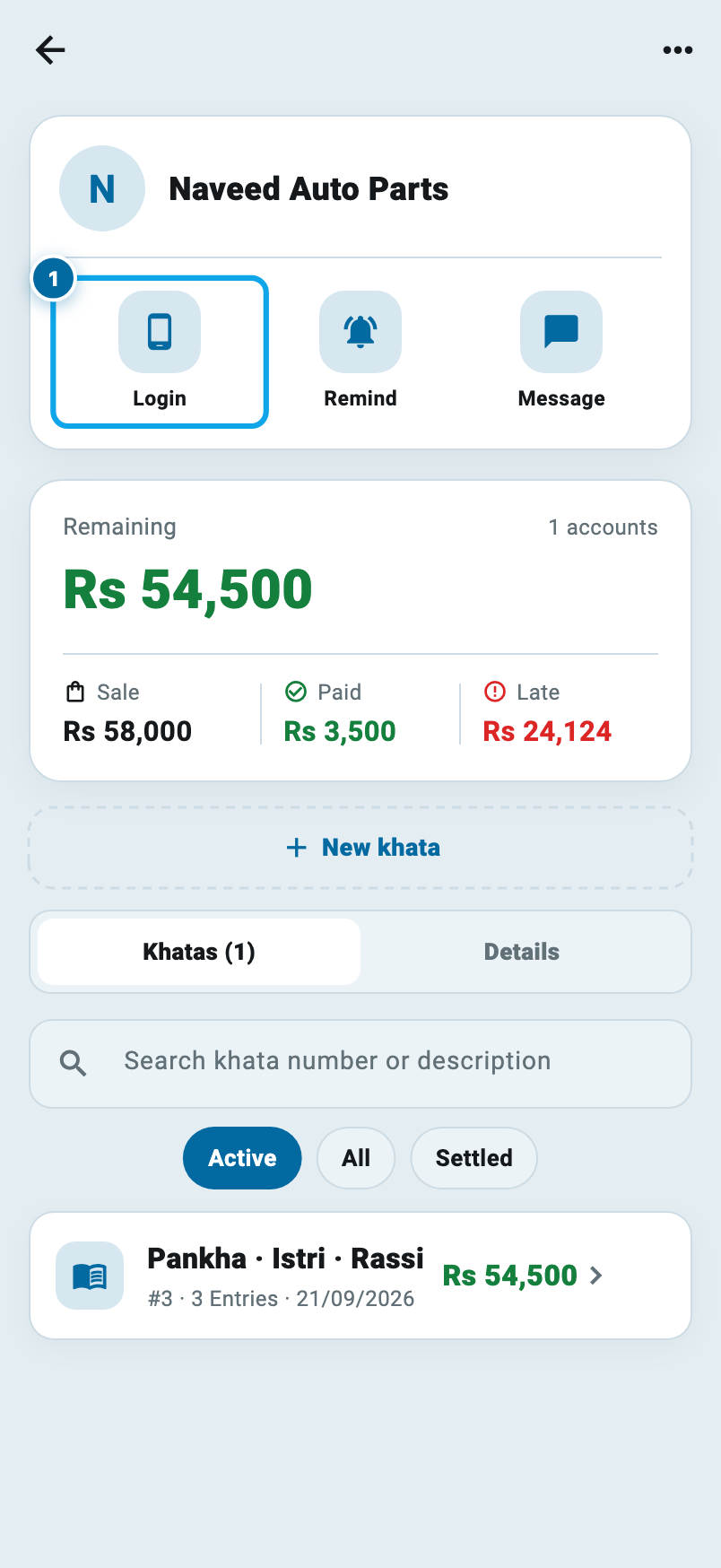
The only thing you need first is his phone number on file. If it is missing, Wasoolo says so instead of guessing, and Class 1 covers adding it.
Tap Login and a small sheet comes up.
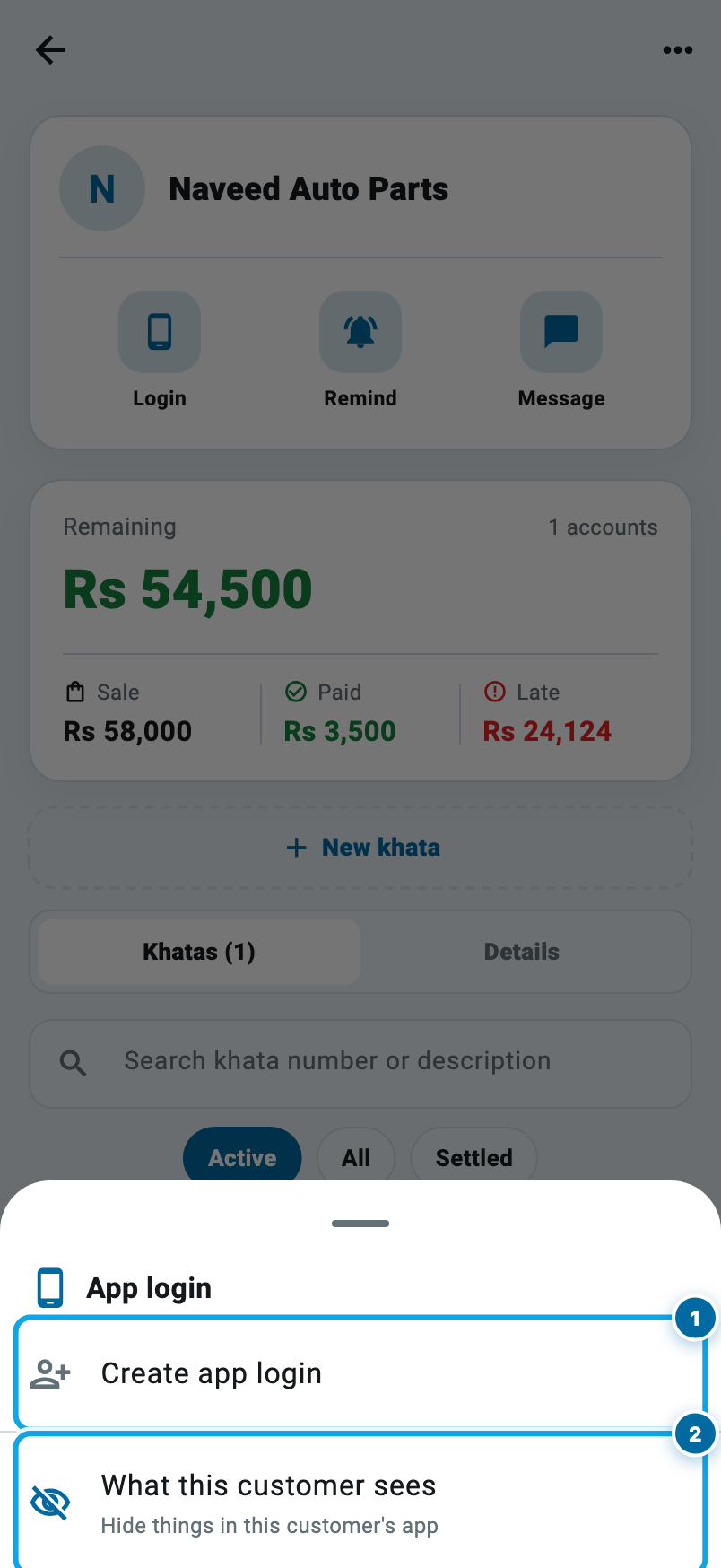
Tap Create app login. The username, the password and a QR code are on your screen a second later.
What Class 23 covers, in order
- 1Make the loginOpen the customer's page, tap Login, tap Create app login. His phone number becomes the username.
- 2Hand it overLet him scan the QR from your screen, send it to his WhatsApp, or copy every detail in one tap.
- 3He opens his own khataBalance, what he bought, what he paid, the plan, and a statement he can download himself.
- 4Decide what everyone seesTen switches on one page — item names, settled khatas, entry history, the qist plan and more.
- 5Then decide it for one personA single customer can have his own answer, and it beats the shop-wide one.
- 6Choose his alertsSix switches decide which pushes reach his phone: new entries, changes, payments, reminders, messages.
- 7Reset it or take it backA forgotten password is a new one in two taps, and Remove login closes the door for this shop.
Handing it over: scan it, send it, or read it out
This is the part shopkeepers get wrong, so Wasoolo gives you three ways.
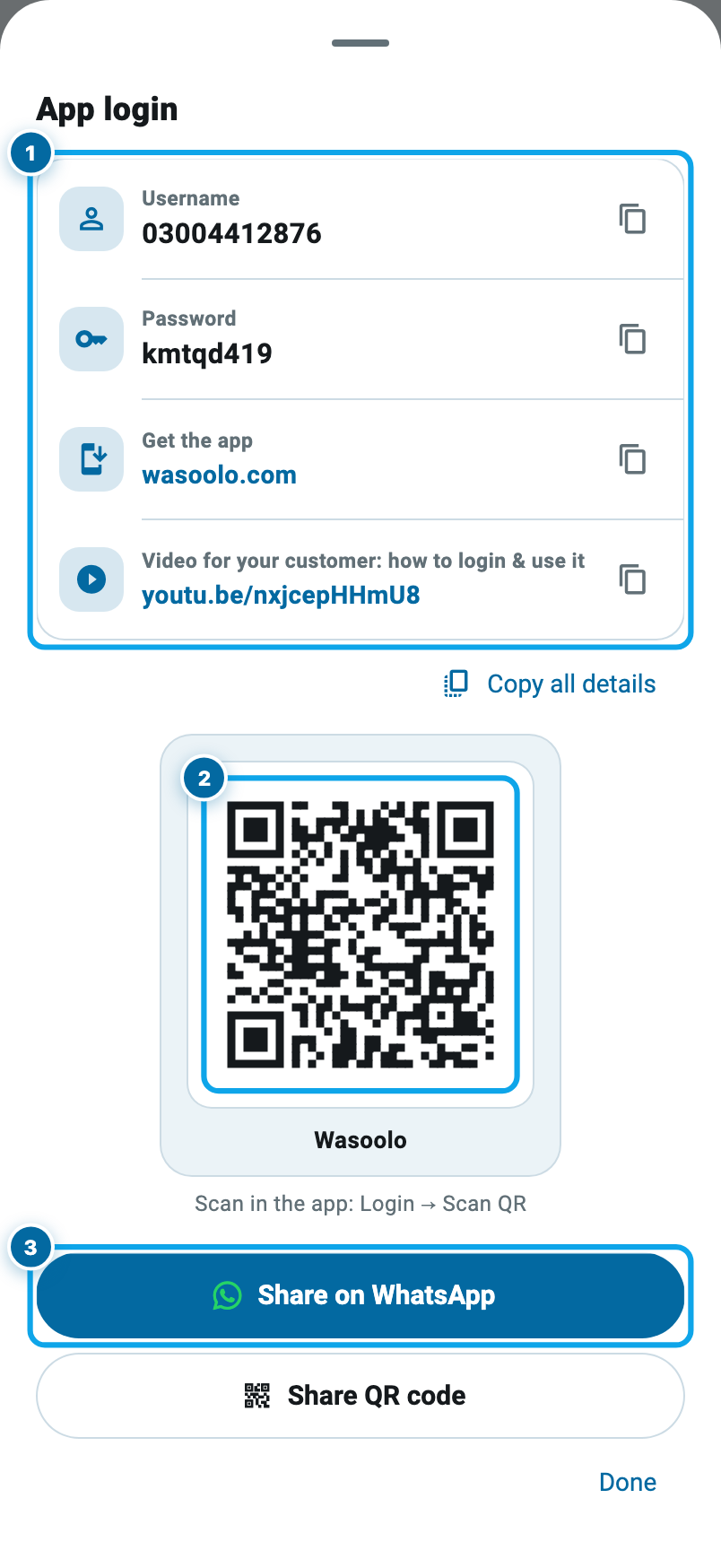
He is at your counter. Let him install Wasoolo, tap Login with QR, and point his camera at your screen. Nothing is typed, so nothing is mistyped.
He is not here. Share on WhatsApp opens a chat with his number, with the details already written. You still press send yourself. Wasoolo never sends a message on its own.
He is on the phone. Copy all details puts the app name, username, password and download link on your clipboard in one tap.
The sheet also carries a short video made for the customer. Send it with the password and you will answer far fewer questions.
What your customer opens
Here is his side. It is his khata, and only his.
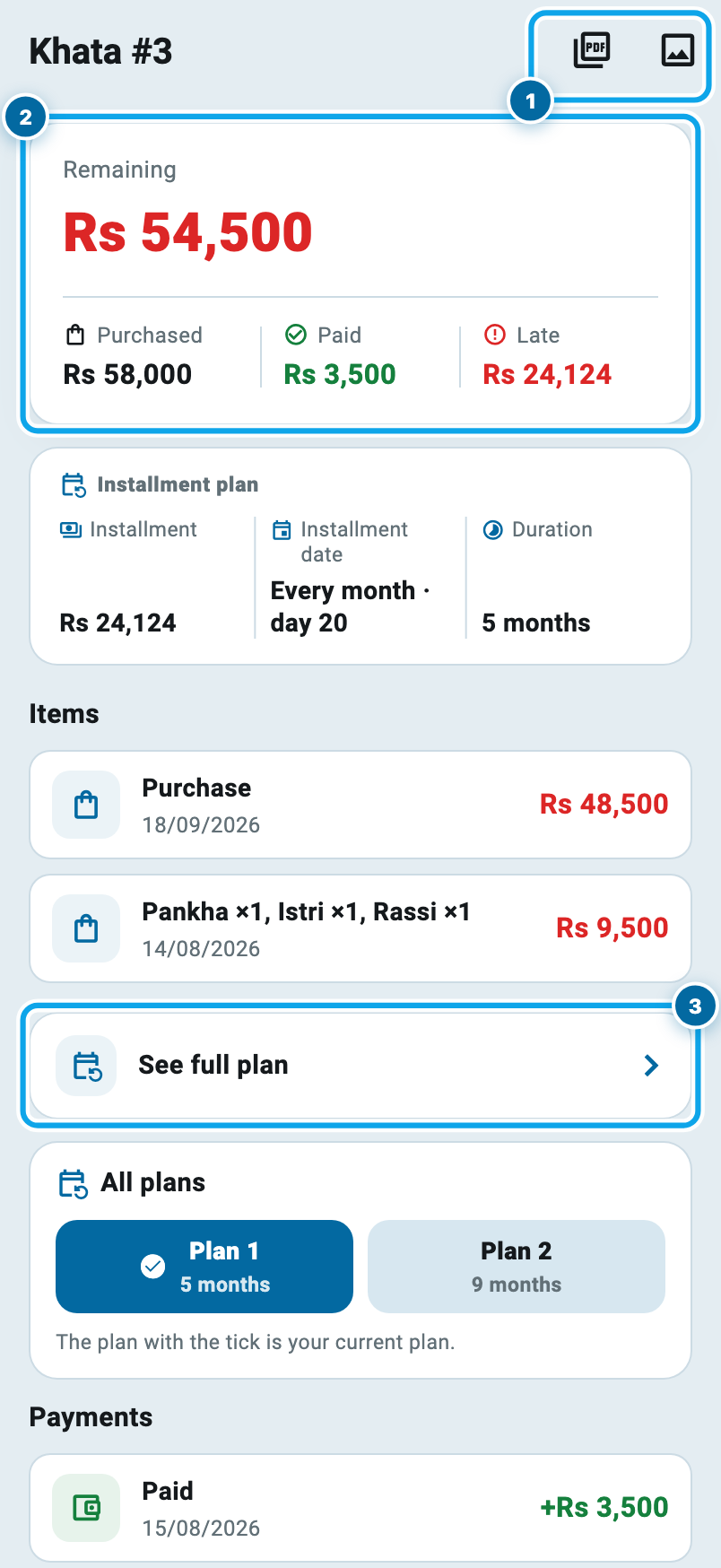
He gets the balance in big figures, what he bought and what he paid beside it, and the dated lines under that. On an installment (qist) plan, the kind Class 4 builds, he also sees the installment amount, the day it falls on, and the whole schedule behind See full plan.
The two small buttons at the top right save that khata as a PDF or a picture, to send on or to keep. That alone ends a lot of arguments, because now you are both reading the same page.
He can also pay from here: he enters the amount, picks how he paid, attaches a photo of the transfer and sends it. Nothing touches your ledger yet. It arrives as a request, and you decide. Confirm it and he gets a thank-you notification; reject it and he sees why. The money moves only when you say it moved.
Say: one week of "how much do I owe?" calls
Start your digital khata today
Free to start. Works offline. English, Roman Urdu & Hinglish. Your customers get their app free, forever.
Deciding what every customer may see
Now the half nobody expects: you are not forced to show him everything. Go to More, then Users & permissions, then Customers.
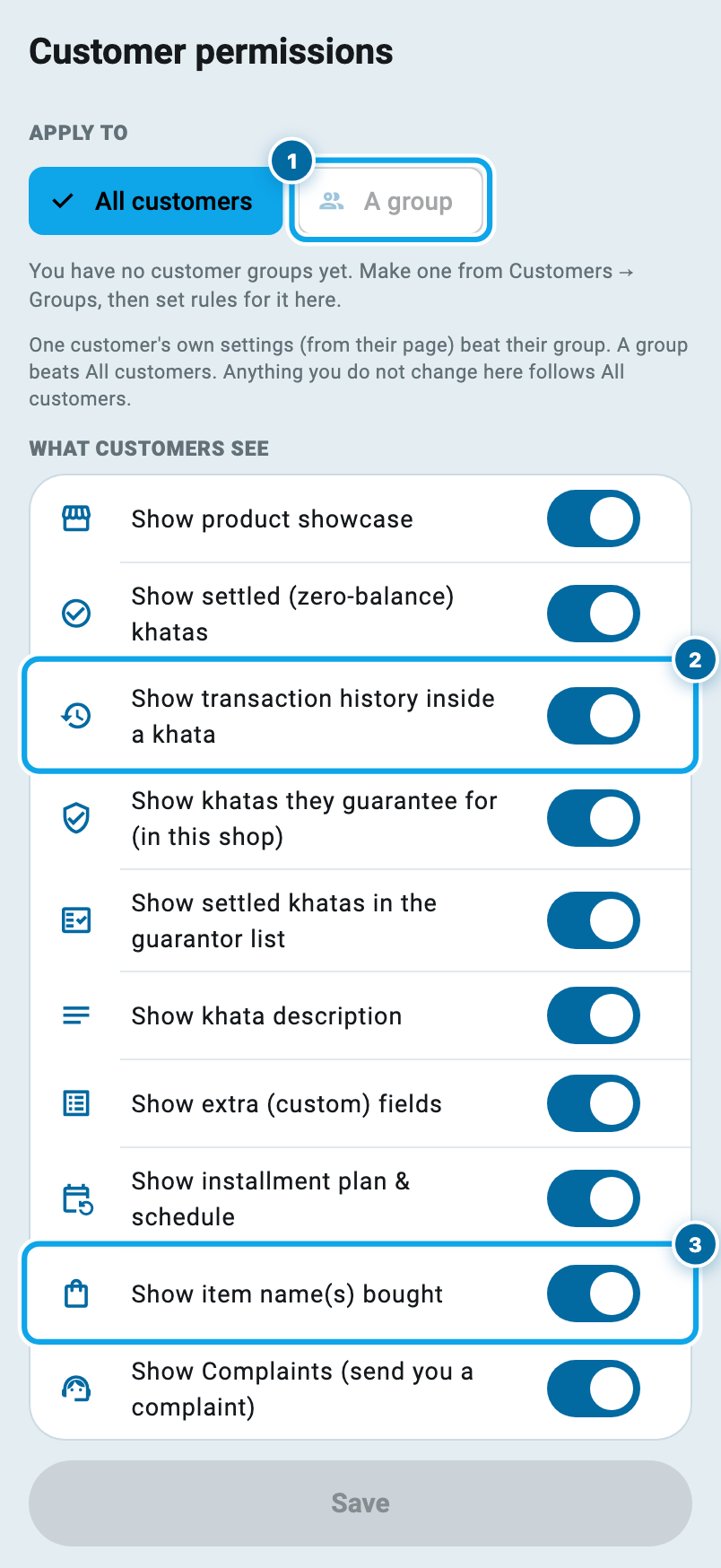
Ten switches, all on by default. Turn one off and that thing stops appearing in every customer's app:
- Item names. Off, and a khata stops being named after the goods in it and becomes "Khata #3". Useful when you write down what was bought but would rather it did not show on a screen at home.
- Transaction history inside a khata. Off, and he sees the balance but not the line-by-line list.
- Settled khatas, so his app only carries what is still open.
- Installment plan and schedule, khata description, extra fields, the khatas he guarantees for, the product showcase, and Complaints, the door he uses to send you one.
At the top, Apply to answers for everybody or for one group, the groups Class 7 makes. Wholesale buyers can be shown more than walk-in customers, without touching either by hand.
…and what one customer may see
One man can always have his own answer. Tap Login on his page again and take the last row, What this customer sees.
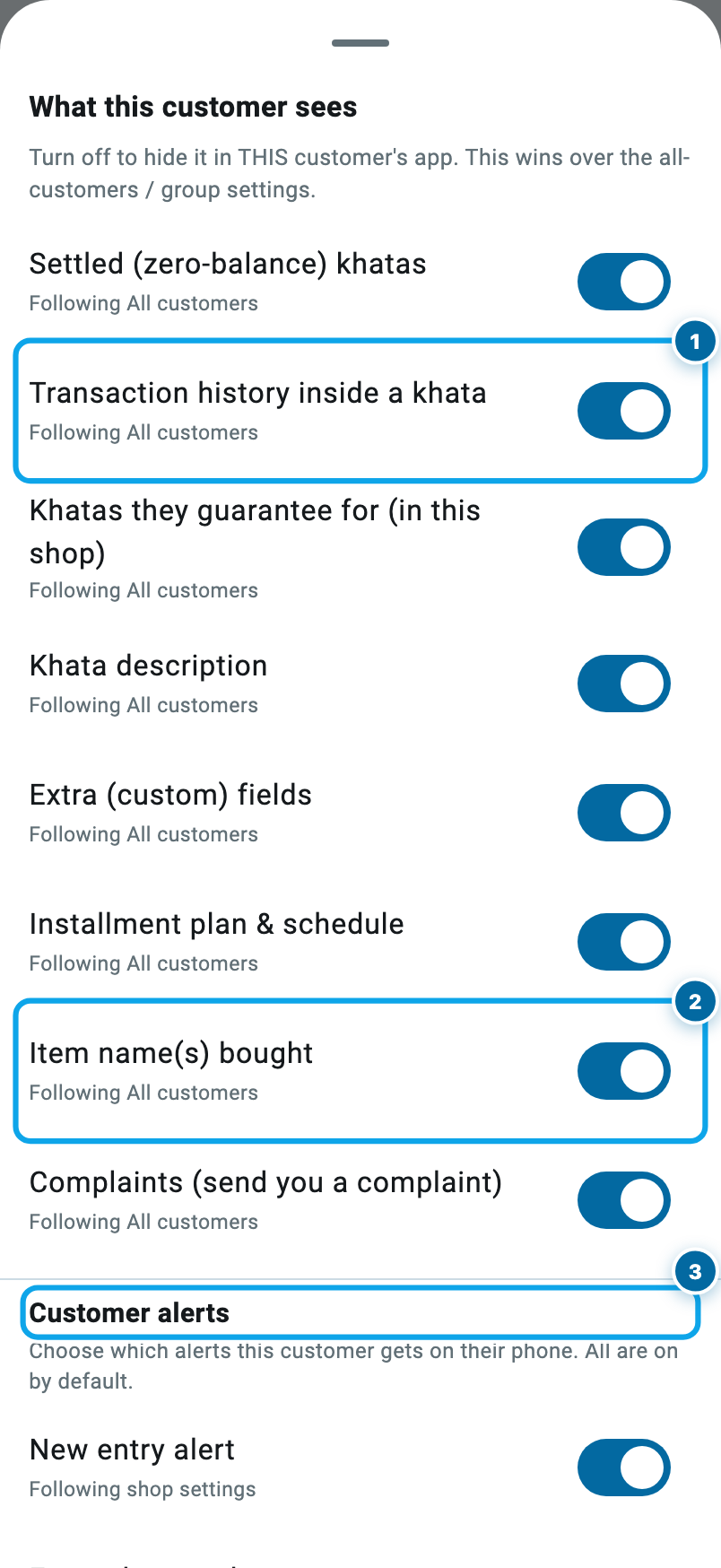
Each row says where its answer comes from: "Following All customers", or "Custom for this customer". Change one and it turns custom, and from then on it wins, so a later shop-wide change cannot drag him back. Follow shop settings puts him under the shop's answer again.
The shop-wide answer, and the one-customer answer
Scroll down in the same sheet and you reach Customer alerts, six switches for what actually reaches his phone. A new entry, a changed entry, a deleted entry, a confirmed payment, your reminders, and messages and offers. All on by default. A customer who says "your app keeps buzzing me" is a thirty-second fix, not a reason to remove his login.
Be straight with yourself about one thing: these switches decide what the app shows and what it sends. They are not a lock on a vault.
Changing the password, or taking it back
Tap Login on a customer who already has one and the sheet looks different.
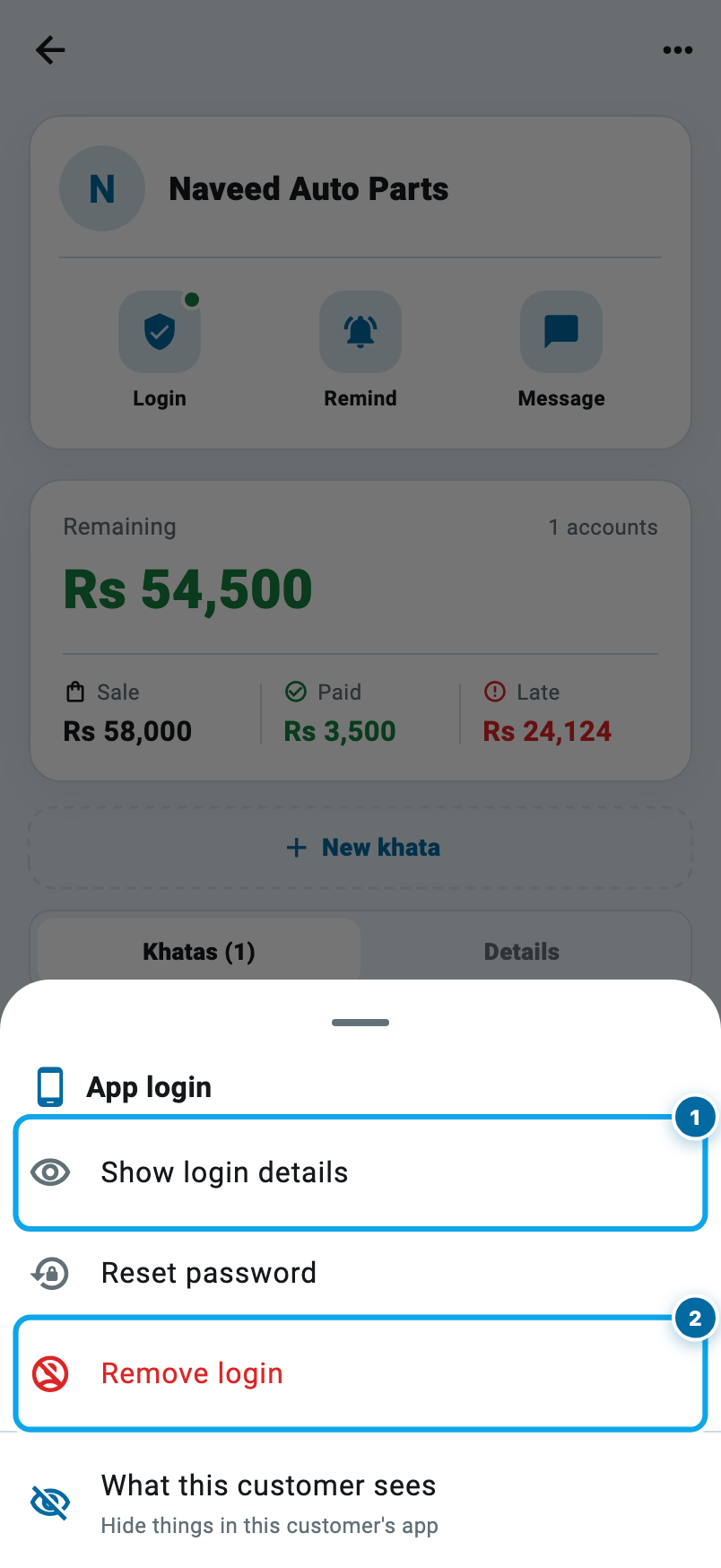
Show login details brings the same username and password back for a customer who lost the message. Reset password makes a new one; use it when he says someone else has seen it. Remove login closes his access to your shop, and Wasoolo asks before it does.
Removing a login does not touch a single rupee. His khata, entries and history stay where they were; he simply cannot open them on his phone. Make him a new login tomorrow and everything is waiting.
Start your digital khata today
Free to start. Works offline. English, Roman Urdu & Hinglish. Your customers get their app free, forever.
Give it to your five most regular customers first. They are the ones who call, and the ones who will notice. Then open your day book that evening and see how much quieter the counter was.
Common questions
Does a customer login cost anything?
No. It is free on every Wasoolo plan, with no limit on how many customers you give one to. You only need the customer's phone number on his page.
Can my customer change a figure in his khata?
No. A customer's app is read-only. He can send a payment for confirmation and report that a line looks wrong, but every amount stays yours to enter and to correct.
My customer buys from another shop that also uses Wasoolo. Will he see my khata there?
No. Each shop's login is its own and opens only that shop's khata. He can hold both in one app and switch between them, but the two never mix.
He paid me in the app. Is the money in my khata now?
Not yet. It arrives as a payment waiting for you, with his amount, his method and his screenshot. You check it and confirm it, and only then does the entry exist. If it is wrong, reject it with a reason, and he sees that too.
Can I hide what he bought but still show him the balance?
Yes. Turn off "Show item name(s) bought" and the khata is named "Khata #3" instead of the goods. The balance, the payments and the due date carry on showing.
He forgot his password. What do I do?
Open his page, tap Login, then Show login details to read it out again, or Reset password for a fresh one. Neither touches his khata.