
GuideApp tutorials
Class 4: how to make an installment (qist) khata in Wasoolo
Class 4 of the Wasoolo course: open an installment khata, set the total, the advance and a one-time profit, and let the app write every qist date for you.
What Class 4 covers, in order
- 1Open the khataPick the customer, then press the Installments card.
- 2Put the price inThe item lines set the total, and the total opens the plan.
- 3Name the moneyThe advance he pays today, and where that money landed.
- 4Add your profit onceA one-time percent you choose, added when the plan is made.
- 5Choose how many, how oftenFive or ten payments, weekly or monthly, and the due day.
- 6Save and collectThe khata shows the next due date and takes each payment.
An installment khata is one sale cut into fixed payments with dates on them. Class 4 builds a whole plan from zero: the total, the advance, your one-time profit, how many payments and how often. Wasoolo writes every due date itself, and nothing is ever added afterwards for a slow month.
Where an installment khata starts
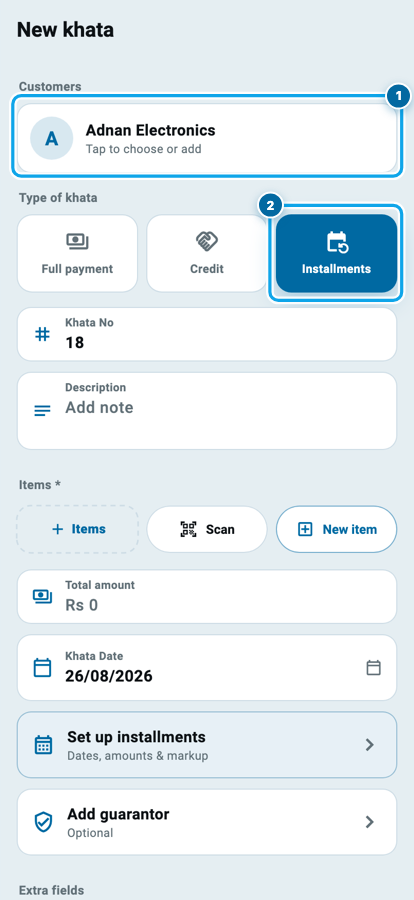
The form is the one from Class 3: the Khatas tab, the blue New khata button, and Select customer at the top. Answer that row first; nothing below it saves until a name sits there. Class 1 built those customer pages, and the picker searches them by name or phone.
Under the customer sit three cards: Full payment, Credit and Installments. Press Installments. That one tap is what turns a single sale into a row of dated payments instead of one open balance.
This khata type is for the sale too big to clear in one go: a washing machine, a fan, a sewing machine. For anything smaller, plain udhaar is lighter, and which to offer on a big item is worth deciding before you open the form.
Put the price in before you open the plan
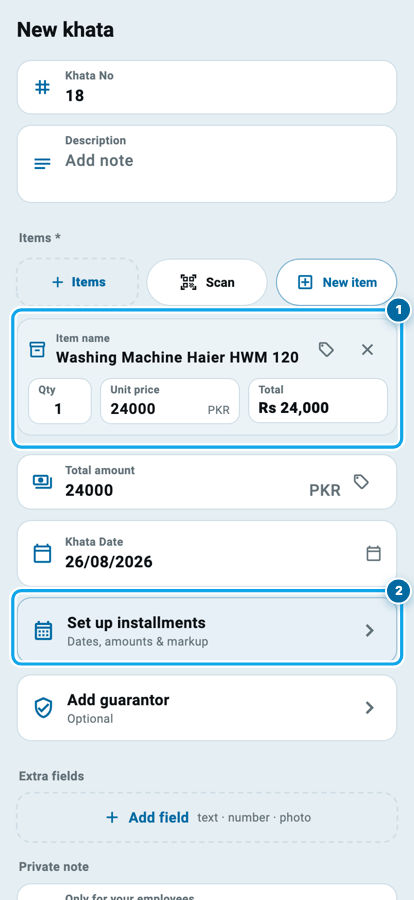
Below the customer sit Khata No, Description and Items. Add what he is taking: Items opens your product list, Scan reads a barcode, and New item writes a line by hand.
Say he is taking a washing machine at Rs 24,000. One line, and the Total amount box reads Rs 24,000 by itself.
Now the row only this khata type shows: Set up installments, with "Dates, amounts & markup" written under it. Press it while the total is still Rs 0 and the app answers "Pick a product or enter the amount first." The plan needs a figure to divide before it can do anything.
The money card: total, advance and your profit
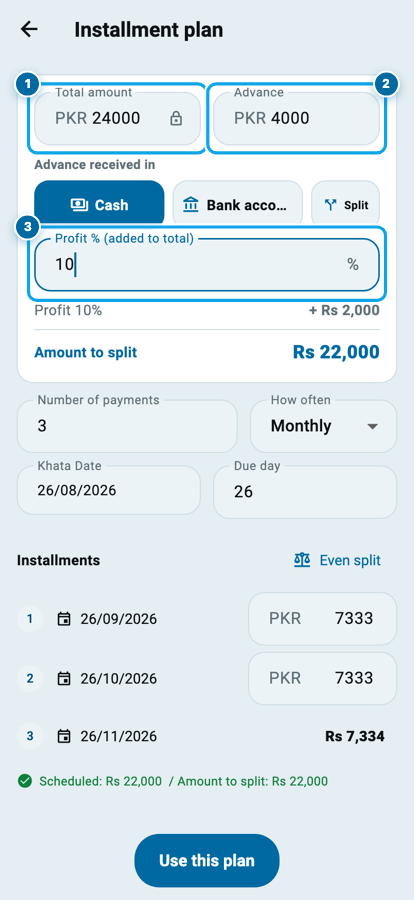
The Installment plan screen opens on one card that holds every rupee of the deal.
Total amount is filled already and carries a small lock, because the item lines set it. Advance beside it is what he hands over today. Type 4000.
The moment you do, Advance received in appears under it with Cash chosen. Tap Bank account if that Rs 4,000 came online. It is the same question Class 2 asked, and it keeps your closing count right at night.
Then Profit % (added to total). Type 10 and a line appears: Profit 10% + Rs 2,000. That is a one-time markup on the Rs 20,000 he still owes, chosen by you, added today, once. It never grows again. There is no late fee in this app and no charge for time, so a payment that arrives eleven days late costs him exactly the same as one that arrives on the day.
The card closes with Amount to split: Rs 22,000. That is the figure the schedule below will divide.
The plan built in this class, line by line
Rs 22,000 over 5 months is Rs 4,400 a month. Cash price Rs 24,000, installment price Rs 26,000, and you chose that difference yourself.
How many payments, and how often
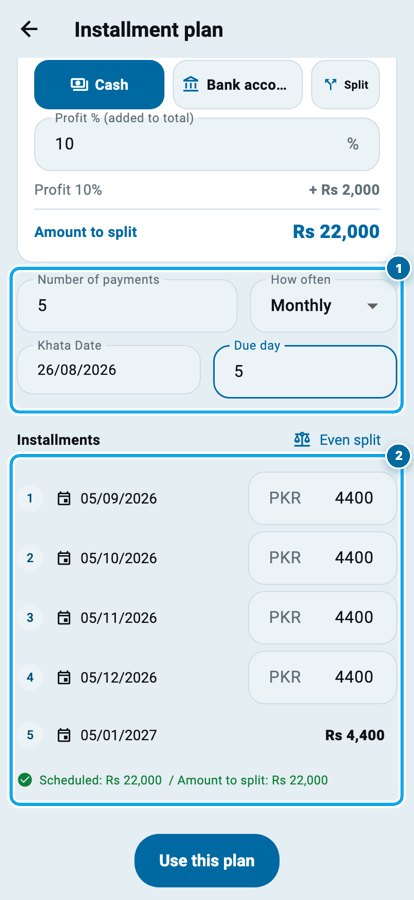
Two boxes sit under the card. Number of payments takes 5. How often offers Monthly or Weekly.
Beside them are Khata Date and Due day. Due day is the day of the month he pays on: type 5 and every payment lands on the 5th. The first one always falls the month after the khata date, so a khata opened on 26 August starts on 5 September.
Touch nothing else and the list below writes itself: five rows, Rs 4,400 each, 05/09/2026 through to 05/01/2027. A line at the bottom turns green when those five add up to Rs 22,000 exactly.
Weekly behaves the same way, seven days apart from the first date, and the Due day box disappears, because a week has no fifth.
Every row is still yours to change
The schedule is a suggestion, not an order. Each row carries a number, a date and an amount, and both the date and the amount are open.
Tap a date to move that one payment to the 20th. Tap an amount and type a bigger figure for the first month, because he has just been paid. The rows below take the difference, and the last row absorbs what is over, so the five never stop adding up to Rs 22,000. Even split puts everything back to equal amounts when you have spoilt it.
That green line at the bottom is your check. While it is green, the plan is sound. Press Use this plan, then Save khata on the form behind it. Building a plan he can actually keep is worth ten minutes before you press save.
What the saved khata shows you
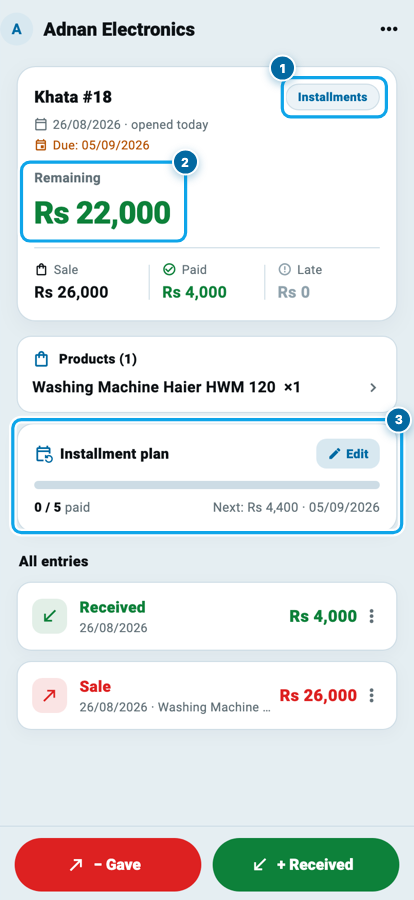
The khata page opens with an Installments badge and Remaining Rs 22,000, with Sale, Paid and Late in a row under it: Rs 26,000 sold, Rs 4,000 paid, Rs 0 late.
Below the products sits an Installment plan card: a bar, 0 / 5 paid, and Next: Rs 4,400 · 05/09/2026. Its Edit button reopens the plan, and anything not yet paid can still be changed.
Taking a qist payment later
Tap the plan card and the whole schedule opens as a list: every payment with its number, its amount, its date, and a badge that reads Pending, Overdue, Partial or Paid. Every unpaid row carries a small green pay button on the right.
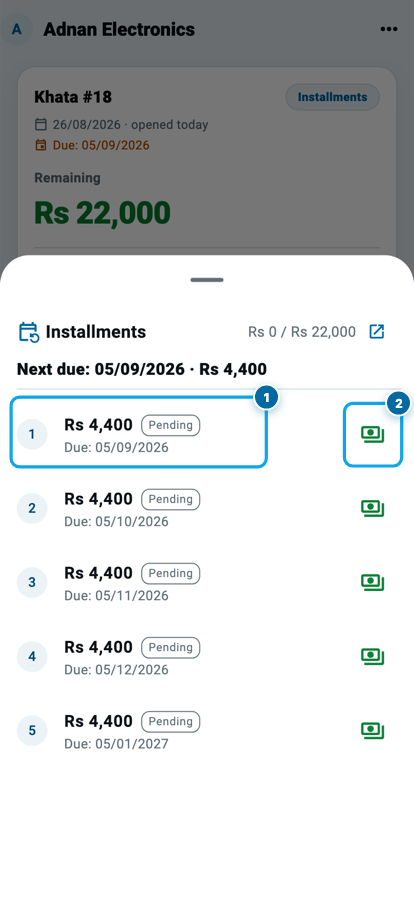
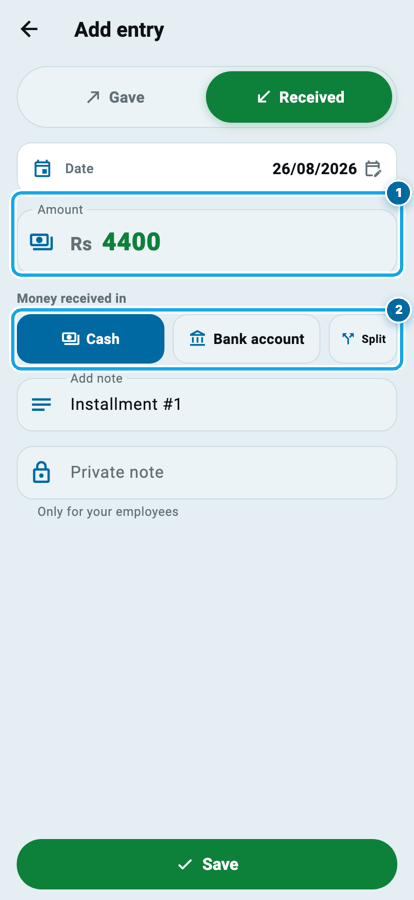
Press it on row 1 and an entry opens on Received with Rs 4,400 already in it, and the note already written. Change it if he brought less, name the account the money went into, and save. The plan moves forward by itself: the row turns Paid, the bar reads 1 / 5, and the khata's remaining figure drops to Rs 17,600.
If the money does not come at all, the amount does not move. The row turns Overdue on your own screen and waits, and what to do about a payment he has missed is an article of its own.
Start your digital khata today
Free to start. Works offline. English, Roman Urdu & Hinglish. Your customers get their app free, forever.
Common questions
Can I make an installment plan without any advance?
Yes. Leave the Advance box empty and the whole total is divided instead. The Advance received in row only appears once you type a figure, because there is no money to place until then.
Does the profit percent keep adding every month?
No. It is worked out once, when the plan is made, on what is left after the advance, and it is written into the plan as a fixed amount. It never grows again, and no late fee is ever added on top of it.
He wants to pay two installments together. What do I do?
Take the money as one payment for a larger amount. The plan fills the next row, then the one after it, and the bar moves by two. Nothing needs editing by hand.
Can I change a plan after some payments have come in?
The paid rows lock and show a small lock instead of their number, and everything still unpaid stays open. You can change the count, the amounts and the dates of the tail, which is where a real plan usually needs to bend.
Weekly or monthly, which should I choose?
Match it to how he earns. A daily-wage customer keeps a weekly plan better than a monthly one, and a salaried customer keeps a monthly one. The app takes either, and you can move any single date afterwards.
Does the customer see this plan?
If he has a login for your shop in the customer app, he sees his own khata with the dates and what is left. Otherwise the plan lives on your phone, and the statement you send him carries the same rows.
Wasoolo is 100% FREE to download on Android and iPhone. Class 3 opened the khata, and this class turned one of them into a plan with a date on every rupee.