
GuideApp tutorials
Class 21: the Roznamcha (Day Book), explained
Class 21 of the Wasoolo course: read your whole day on one page. Where the money started, what came in, what went out, and where it stands now.
What Class 21 covers, in order
- 1Open the Day BookOne page for one day, with today waiting for you the moment it opens.
- 2Read the boardDay start, what came in, what went out, and where your money stands right now.
- 3Open the accountsCash in hand and every bank account, each with its own start and its own day end.
- 4Take the two sides apartReceived shows every rupee that came in; Spent shows every rupee that left.
- 5Turn back to any daySwipe or pick a date, and that day opens with its own numbers, exactly as it was.
- 6Write into the dayMoney in and Money out open the same forms you already use, with the date filled in.
- 7Hand the day overSend the whole day as a PDF or a picture, in your own shop's design.
The Roznamcha, or Day Book, is your whole shop's money written as one page per day. It tells you what you had when you opened, what came in, what went out, and what you are holding right now. Class 21 reads that page with you, line by line.
Open the Day Book and see the whole day at once
Nine at night. The shutter is half down, the cash drawer is open, and you are trying to remember whether the Rs 18,000 Akram handed you went into the drawer or straight to the milk supplier. This is the page that answers it.
Go to More and tap Day Book. It opens on today, and today is already counted. Nothing to set up, no date to type, no total to add.
The blue board at the top is the day itself. Day start is what you were holding before the first customer came. Received and Spent are the two directions the money moved. Right now is what you are actually holding, this minute, cash and bank together.
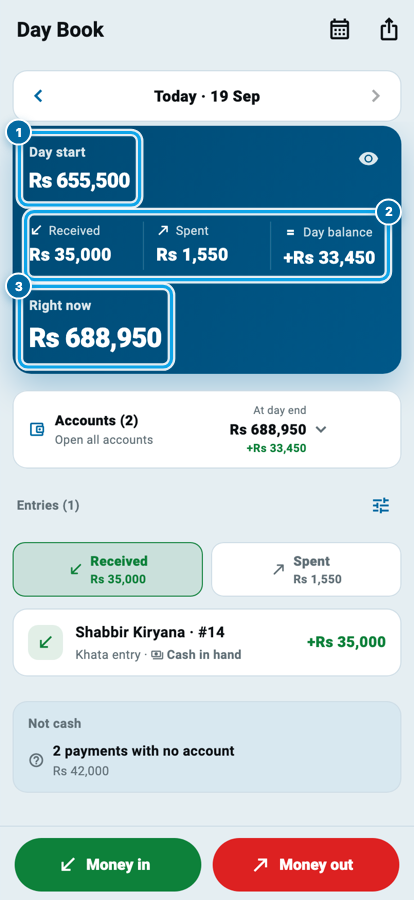
Day start, and where you stand right now
Those four figures are one sentence of arithmetic, and the Day Book does it for you every time the page opens.
Say: an ordinary Tuesday at your counter
The Day Book does this arithmetic for you every time you open it. You never add a column.
Notice the last line. Today's Right now becomes tomorrow's Day start. Every day begins exactly where the last one ended, so there is no gap for a rupee to fall through. That is the whole reason a paper roznamcha was invented, and the reason the daily cash count stops being a fight.
The small eye on the board hides every figure behind dots. Useful when a customer is leaning over the counter and the screen is facing him.
Start your digital khata today
Free to start. Works offline. English, Roman Urdu & Hinglish. Your customers get their app free, forever.
Every account keeps its own day
Your money is not in one place. Some is in the drawer, some in Meezan, some in an easypaisa account. A single total is honest but not enough: you need to know which box the day moved.
Tap Open all accounts and each one opens its own small day: its Day start, what it received, what it spent, and where it lands At day end. Open it once and it stays open the next time you come back, because you told the app that is how you like to read it.
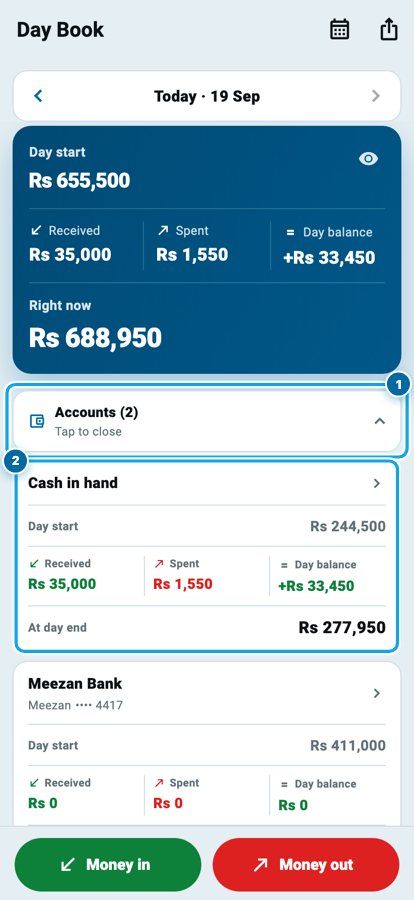
One thing that trips people up: moving Rs 10,000 from your drawer into your bank does not show up as Received or Spent on the big board. Not one rupee entered or left your shop, so the day's two big numbers ignore it. It still shows inside the accounts, where the drawer really went down and the bank really went up. If you want the whole story of those accounts, Class 2 on Cash & Bank is the one to read next.
The two sides: what came in, what went out
Under the board sit two buttons, Received and Spent, with the day's totals on them. One of the two is always lit, so you are always reading the day from one side.
Tap Spent and the list becomes every rupee that left today: the supplier you paid, the expense you wrote down, the salary advance you handed over. Each line says what it was and which account it came out of, and tapping it takes you to the screen that owns it.
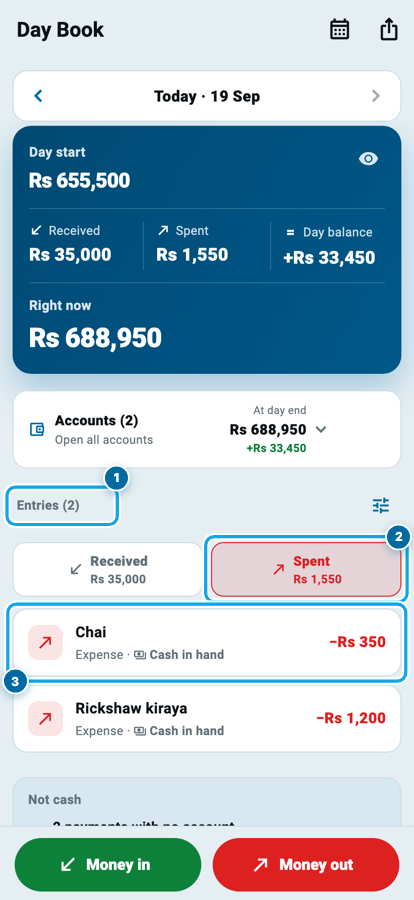
The funnel icon narrows the list further, and it only ever offers you something the day actually holds, so it can never leave you staring at an empty page wondering what you did wrong.
At the bottom sits a grey strip headed Not cash. Goods you handed over on udhaar are real business, but no money moved, so they are deliberately kept outside the day's totals instead of being quietly mixed in. The strip tells you they happened. The board stays true.
Any day you like, not just today
Swipe the page sideways and yesterday arrives. Swipe again for the day before. Or tap the calendar and jump to a date months back: last Eid, the day of that wedding order, the Tuesday your helper says he paid the electricity.
The day opens exactly as it was, with its own start, its own two sides and its own ending. A past day says At day end instead of Right now, because that day is finished. A Today pill appears to bring you back in one tap.
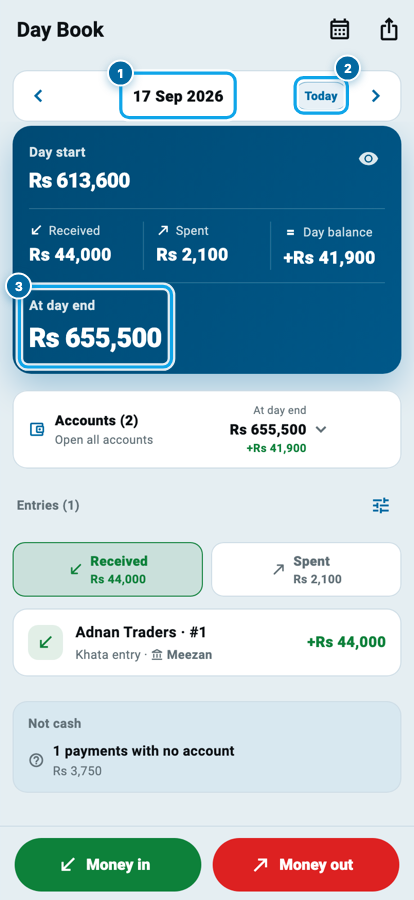
This is the part a paper register cannot do. Your old roznamcha is in a cupboard, and finding one Tuesday in it takes twenty minutes and good light.
Start your digital khata today
Free to start. Works offline. English, Roman Urdu & Hinglish. Your customers get their app free, forever.
Write into the day without leaving the page
You will often spot the hole while you are looking at it: a payment you took at noon and never wrote. The two buttons at the foot of the page fix it there and then.
Money in offers a payment from a customer, money back from a supplier, money you put in yourself, or a transfer between your own accounts. Money out offers the matching list. Whichever you pick, Wasoolo opens the same form you already know, and the date is already set to the day you were looking at, so a Tuesday entry can never land on Thursday by accident.
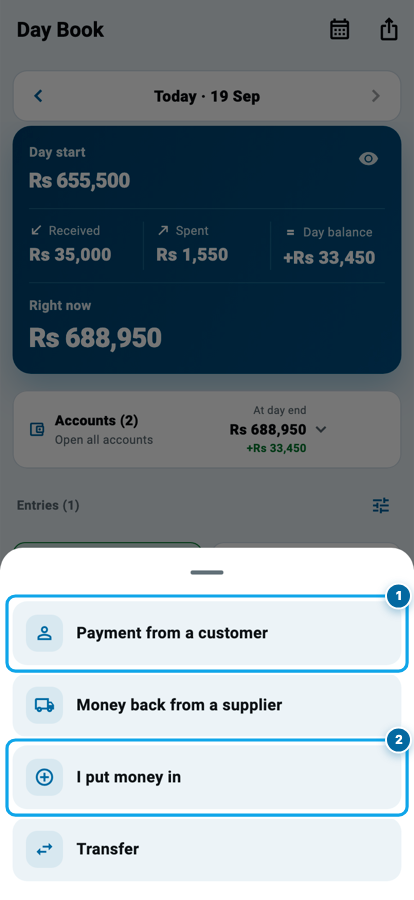
The Day Book itself writes nothing. It only reads, and it sends you to the screen that owns the money, which is why its numbers always agree with Cash & Bank instead of arguing with them.
Hand the whole day over as paper
Your partner asks what happened today. Your father wants the week. Your accountant wants last month's Tuesdays.
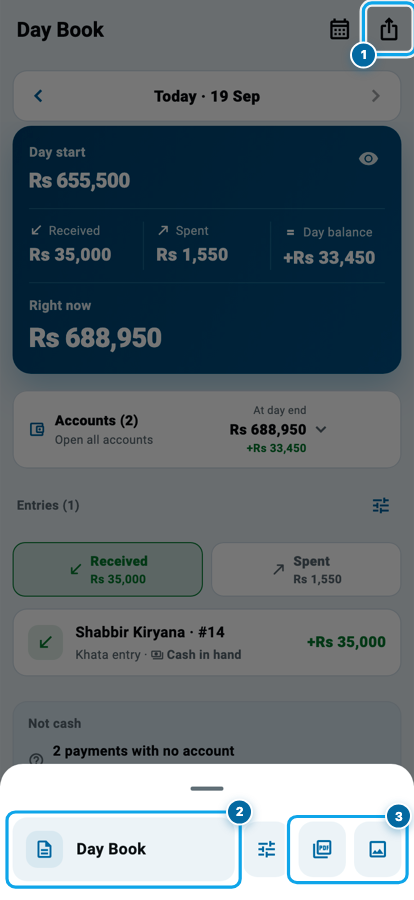
Tap the share icon at the top and the day becomes paper: a PDF or a picture, in your shop's own design, with your name and number on it. The sliders button lets you decide what that paper shows before you send it.
Common questions
What is the difference between the Day Book and Cash & Bank?
They read the same money. Cash & Bank is arranged by account: this drawer, that bank. The Day Book is arranged by day, so it answers "what happened today" instead of "what is in this account".
I moved money from my drawer to my bank. Why is it not in Received or Spent?
Because nothing entered or left your shop. If it counted, your board would claim the same Rs 10,000 both came and went. It is still there inside the accounts, where the drawer went down and the bank went up.
How far back can I go?
Years. Swipe for nearby days or use the calendar to jump straight to a date. Every day you have been writing in Wasoolo is still there, with its own figures.
Does the Day Book change my khata if I write from it?
It writes nothing by itself. The Money in and Money out buttons open the ordinary forms with the date filled in, so the entry belongs to your khata exactly as if you had made it there.
Can I stop my employee from seeing the whole day?
Yes. Separate switches cover the Day Book itself, past days, the account start and end figures, and the download. Turn on only what his job needs. Class 20 covers how.
My day's total does not match my drawer. What now?
Open the accounts and read cash on its own, then take the Spent side line by line. It is almost always an expense paid from the drawer that nobody wrote, and you can add it from the same page.