
GuideApp tutorials
Class 2: how to use Cash & Bank in Wasoolo, and keep every rupee counted
Set up Cash & Bank in Wasoolo: add your bank and wallet accounts, record money in and out, transfer between them, and customize the statements you send.
What Class 2 covers, in order
- 1The front pageEvery account on one screen, one total, and an eye that hides it all.
- 2Add accountsBank, digital wallet or other, each with an honest opening balance.
- 3The account pageBalance, every entry, and a starting balance you can correct.
- 4Money in, money outOne small page by hand, and the entries that write themselves.
- 5TransferThe deposit run, counted as moved money, never as new income.
- 6Day Book and papersThe whole day on one page, and statements that print your way.
Cash & Bank is the part of Wasoolo that holds the shop's actual money: the cash in your hand and every bank or wallet account, each on its own page. In Class 2 you add those accounts, record money in and money out, move money between them, and set up the statements you send.
Where Cash & Bank lives
Open the More tab and tap Cash & Bank. The same door sits on the Home screen, on the card that shows your cash in hand.
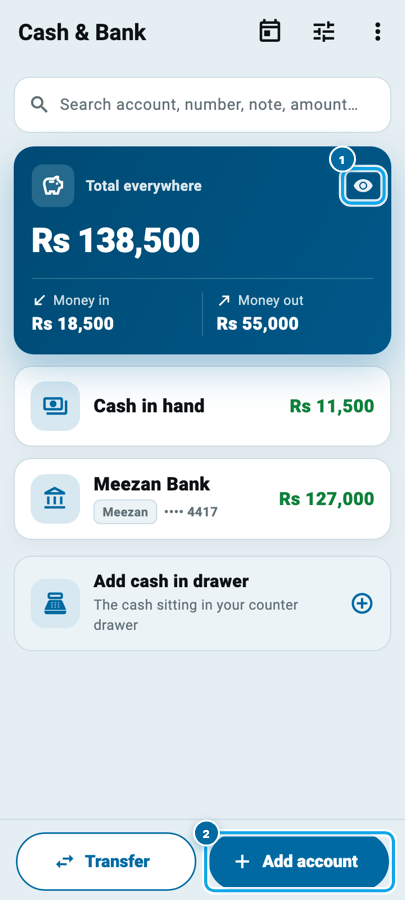
The front page reads in one glance. At the top, a search box that finds an account, an account number, a note, even an amount. Under it, a big blue card called Total everywhere: every account added up, with its Money in and Money out beneath. Then your accounts, one row each, each carrying its own balance. Press and hold a row to drag it into your own order.
One small button matters more than it looks. The eye on the blue card hides every figure on the screen. When a customer is leaning over your counter, tap it once and the balances turn to dots; tap again when he leaves.
Add your bank and wallet accounts
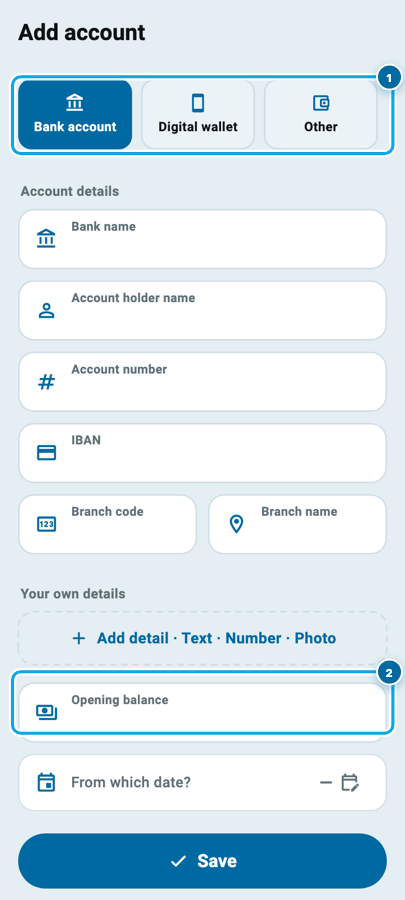
Wasoolo gives you Cash in hand on day one; you add the rest. Tap Add account and pick what it is: a Bank account, a Digital wallet, or Other for anything else, like the cash box at home.
For a bank account the page asks for the bank's name, the account holder's name, the account number, IBAN and branch. Nothing here is forced, but these lines print later on the card you send customers, so give it two minutes now.
Then the two lines that make the counting honest: Opening balance and From which date?. Say the account held Rs 125,000 the day you started keeping records; write that once, with the date, and every balance after it stands on a real starting point.
Every account gets its own page
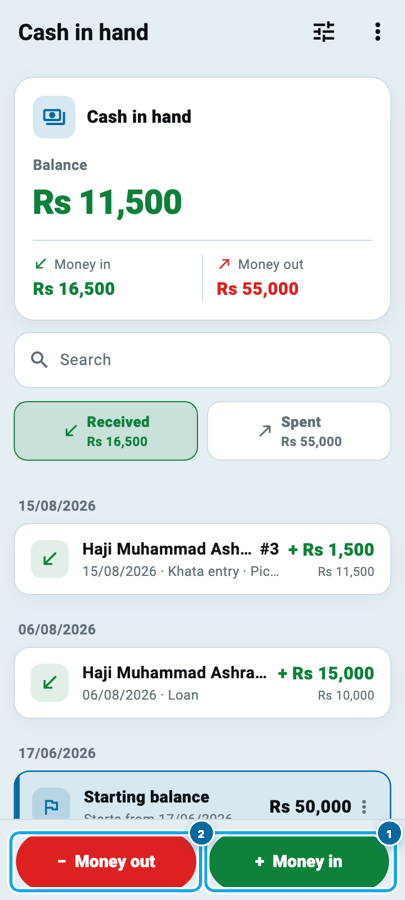
Tap any row and the account opens: the balance in big figures, green while money is in it, red if it ever falls below zero. Under it sit the totals of money in and money out, then every entry, newest first, with its own search box and a Received and Spent pair that filters the list. At the bottom of the list lives the Starting balance row, and you can change its amount or its date whenever you learn better.
The bottom of the page holds the two buttons that do the daily work: + Money in in green and − Money out in red. The same colors the whole app speaks: green when money comes to you, red when it leaves.
Money in, money out
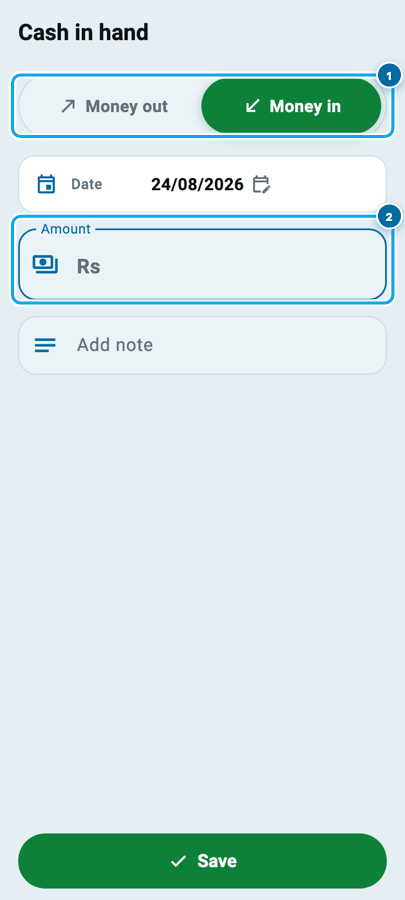
Both buttons open the same small page. A pill at the top switches between Money out and Money in; below it the date, the amount, and a note if you want one. Type the amount, tap Save, done. If an entry would push the account below zero, the page warns you in red before you save, but it does not stop you; some evenings the drawer really is short.
Here is the part that saves you time: most entries write themselves. When a customer pays his udhaar and you record it in his khata, you pick the account the money went into, and that account's page gets the entry on its own. A supplier payment, an expense, a counter sale: each lands in the account you name. The by-hand page is for everything else, like putting your own Rs 10,000 into the drawer in the morning; keeping shop money and house money apart is why that entry deserves a note.
Move money between accounts
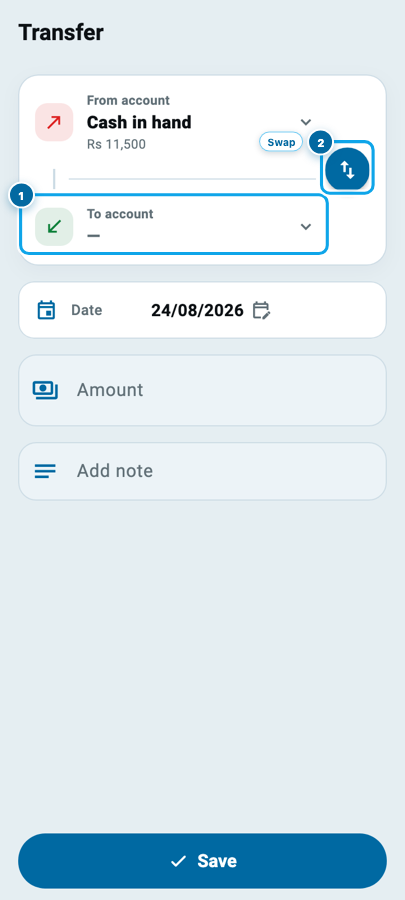
Sales pile up as cash, then you deposit them. That is a Transfer, with its own button on the front page. Choose the To account (1); if you picked them backwards, the round button (2) swaps them in one tap. Then date, amount, note, Save.
A transfer is neither earning nor spending. It is the same money changing pockets, and Wasoolo counts it that way, so a bank deposit never shows up as a second income.
Your whole day on one page
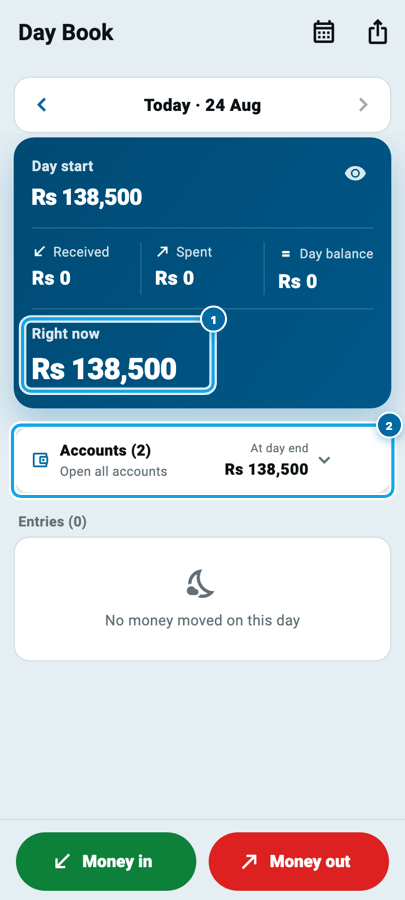
The calendar icon at the top of Cash & Bank opens the Day Book, the roznamcha. It shows one day at a time: what you started with, what came in, what went out, and Right now (1): what you should be holding this minute. The accounts row (2) opens the same day for each account: day start, received, spent, at day end.
Count the drawer at night against that figure and the guessing ends. If your cash box never matches your khata, this is the page that tells you on which day the two parted ways.
The papers, and making them yours
The three-dot menu on the front page holds the papers. Share account details builds a clean card of your account numbers, as a PDF or an image, so a customer pays into the right account instead of copying a number out of a chat. All accounts statement prints every account's money in and money out as one file, and each account's own page carries its own Statement.
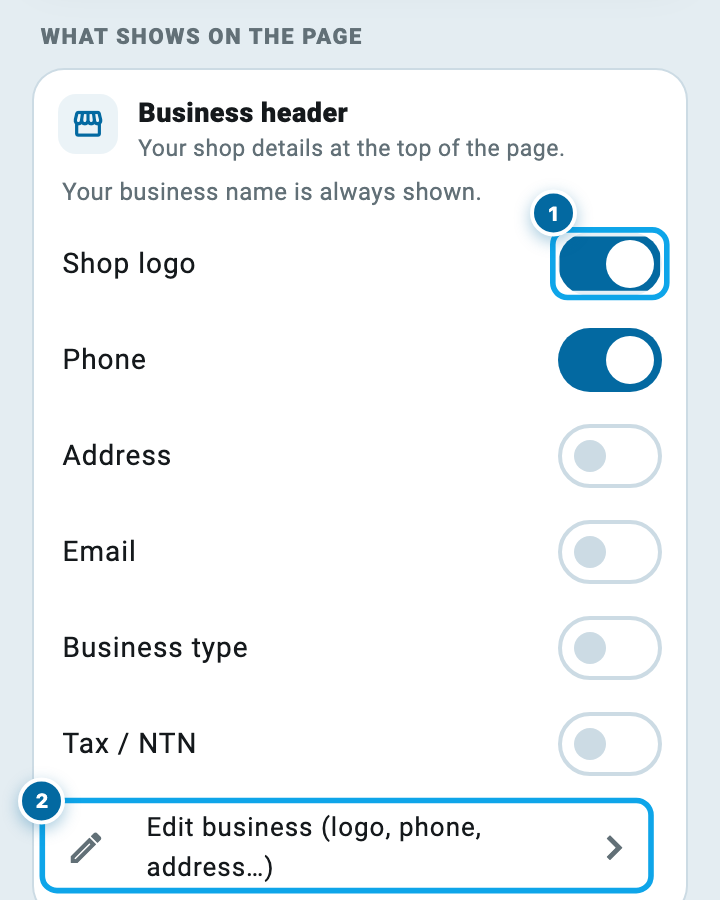
Every paper row also carries a small Customize button. Tap it and you decide what prints: the shop logo (1), phone and address at the top, and, on a statement, whether the note, the running balance and who wrote each entry print as columns. The row at the bottom (2) edits the shop details themselves. Set it once and every statement after that comes out your way; a clean statement is also half the work when you sit down to work out the shop's real profit.
The five-minute close of day
- Every payment today named its account
- Your own money went in by hand, with a note
- The bank deposit went in as a Transfer
- The drawer was counted against Day Book's Right now
- Any short amount got its own entry and note
- The deposit typed again as Money in
Start your digital khata today
Free to start. Works offline. English, Roman Urdu & Hinglish. Your customers get their app free, forever.
Common questions
Is Cash & Bank connected to my real bank account?
No. It is your own record of the account, a page of your bahi khata for it. Wasoolo never touches the money itself; it keeps the count you type and the entries the rest of the app writes for you.
Do khata payments reach these accounts on their own?
Yes. When you record a payment in a customer's khata you choose which account it landed in, and that account's page shows the entry by itself. One payment can even split, half cash and half bank, and each account gets its half.
I typed the wrong opening balance. Can I fix it?
Open the account and go to the Starting balance row at the bottom of its list. You can change the amount, change the start date, or remove it altogether. The entries you added stay exactly as they were.
Can my helper see my accounts and balances?
Only if you allow it. Team permissions carry a whole Cash & Bank section: seeing accounts, seeing balances, adding entries, transfers and statements are each a separate switch, and you can name exactly which accounts a helper is allowed to see.
What happens if an account goes below zero?
The page warns you in red and shows what the balance would become, and it saves if you confirm, because a true record beats a tidy one. The balance then shows in red until money comes back in.
A customer asks where to send money. Which paper do I send him?
Share account details. It prints your accounts as one clean card, PDF or image, ready for WhatsApp. Fill in the account number first, because a card with no number has nothing to share.
Wasoolo is 100% FREE to download on Android and iPhone, and every account you set up here follows your login to the web and desktop apps. Class 1 added the customer; this class gave his payments somewhere real to land.