
GuideApp tutorials
Class 10: how to manage and record loans
Class 10 of the Wasoolo course: keep money you lent and money you borrowed in their own ledger, correct a wrong balance, and print the statement.
What Class 10 covers, in order
- 1Open the Loans pageOne board for money you lent and money you borrowed, with both totals on top.
- 2Make the personName, numbers, address, CNIC photos, his work, and who stands behind him.
- 3Write what movedGave, Received, and every repayment, each with its own date and return day.
- 4Correct a wrong balanceWrite what the balance should be; the app posts the difference as its own line.
- 5Print the statementThe whole record as a PDF or an image, with your shop's name on it.
Money you lend a cousin is not shop udhaar, and it should not sit in a customer khata. Wasoolo keeps it in its own place: Loans, on the Home tab. One page for money you gave, money you took, and every rupee that came back. Class 10 builds one from empty.
Why loans live in their own room
A khata answers one question: what does this customer owe my shop for goods. A loan answers a different one: what did I hand this person out of my own cash box, and when is it coming back.
Mixing them ruins both. Your udhaar total stops being a sales figure, and your friend's Rs 60,000 hides inside a list of kiryana buyers. So Loans has its own page, its own people and its own totals.
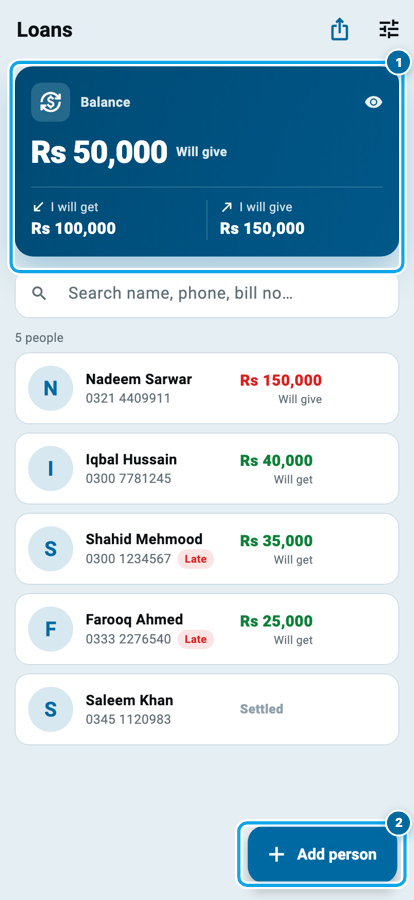
Open it from the Home tab's shortcut row. The blue card at the top says the whole story in three figures: I will get, I will give, and the net Balance in between. Under the search box, every person you have money with, each with his own amount in green or red, and a Late badge on anyone whose return day has passed.
What Class 10 covers, in order
- 1Open the Loans pageOne board for money you lent and money you borrowed, with both totals on top.
- 2Make the personName, numbers, address, CNIC photos, his work, and who stands behind him.
- 3Write what movedGave, Received, and every repayment, each with its own date and return day.
- 4Correct a wrong balanceWrite what the balance should be; the app posts the difference as its own line.
- 5Print the statementThe whole record as a PDF or an image, with your shop's name on it.
Make the loan person
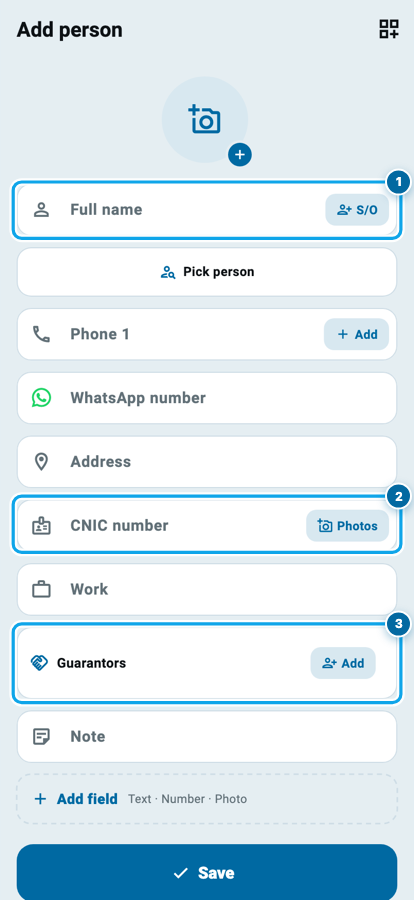
Tap Add person. The form asks only what a loan actually needs.
Full name is the one required box; S/O beside it holds the father's name, which is how most people are told apart in a bazaar. Pick person links this man to a customer or supplier you already keep, so you are not typing a name twice. On a phone, a From contacts button sits beside it and pulls the name and number out of your phone book.
Then the details worth having on the day it goes wrong: Phone 1 with + Add for a second and third number, a WhatsApp number, an Address, the CNIC number with a Photos button for the front and the back of the card, and his Work.
Guarantors is its own block. Tap + Add and pick one of your own customers to stand behind the loan; his name is saved on this man's record and prints on his paper. A guarantor here never gets a login and never sees anything, so asking for one costs him nothing.
His page, and the two buttons at the bottom
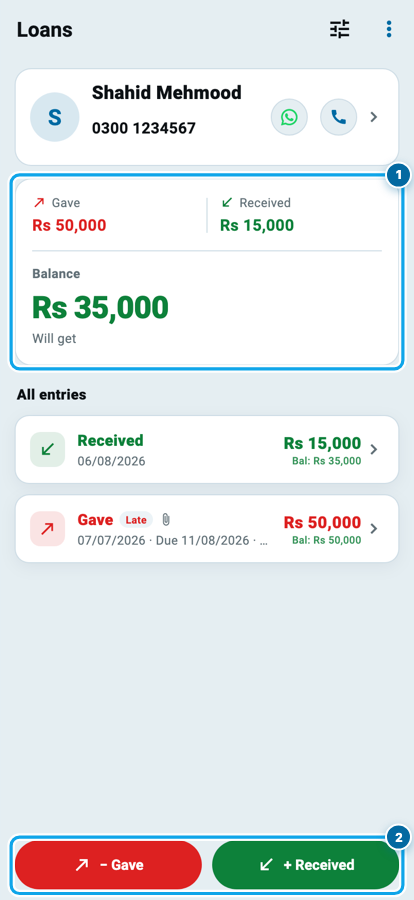
The person's page opens on his own summary: Gave in red, Received in green, and the Balance under them with Will get or Will give spelled out, so the direction is never a guess.
Below that, All entries: every line, newest first, each one showing the money, the date, a Late badge if its return day has passed, a paperclip if you photographed the paper, and the running balance after it.
Two buttons sit across the bottom: − Gave on the left in red, + Received on the right in green. Same words, same colours and same sides as everywhere else in Wasoolo.
One loan, four lines, and the balance after each
Nothing is ever added for time. Rs 60,000 went out and Rs 35,000 came back, so Rs 25,000 is the whole of what is left, on any day you open the page.
Write what actually moved
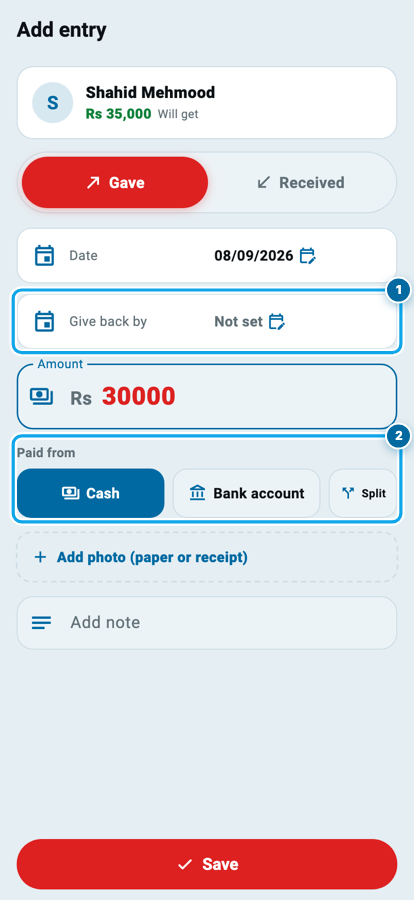
Tap − Gave and the entry page opens on that side, with Gave / Received as a switch at the top, so a line written on the wrong side is fixed instead of deleted.
Date is the day the money moved, and Give back by is the day it is meant to come home. Leave that one as Not set if there is no date; set it and the man carries a Late badge once the day passes. That badge is a status and nothing else. Nothing is ever added to what he owes because time went by.
Amount, then Add photo (paper or receipt) for a picture of whatever you both wrote and signed, then Add note. Save.
Start your digital khata today
Free to start. Works offline. English, Roman Urdu & Hinglish. Your customers get their app free, forever.
Every line moves your cash box
Write an amount and a new row appears: Paid from, with Cash, Bank account and Split.
This is the part that makes the page worth keeping. Money you hand over leaves the account you name, money that comes back enters it, and the Cash & Bank screen from Class 2 shows the movement with the man's name on it. Split is for the day you pay half from the till and half by transfer.
None of it is counted as an expense or as income, because lending is neither. Rs 60,000 leaving your cash box does not make your month look Rs 60,000 worse, and the Rs 20,000 that comes back is not a sale.
Correct a balance without inventing a payment
Sometimes the number is simply wrong: an old loan you never wrote down, a repayment taken in goods, a figure you and he agreed differently. The wrong fix is to type a fake payment.
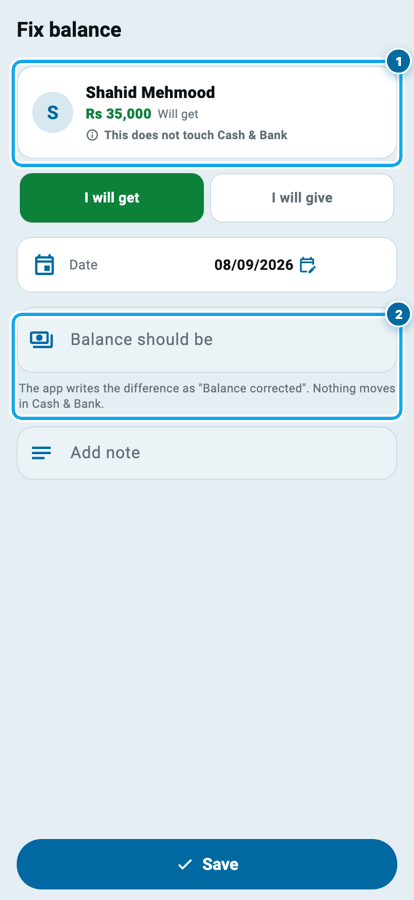
Open ⋮ → Correct balance. Choose the side, write what the balance should be, and save. Wasoolo posts the difference as its own line called Balance corrected, so the page still adds up and the correction is visible as a correction for ever.
The line under the title is the whole promise: this does not touch Cash & Bank. No money moved, so no account moves either.
The paper, and the loan that will never come back
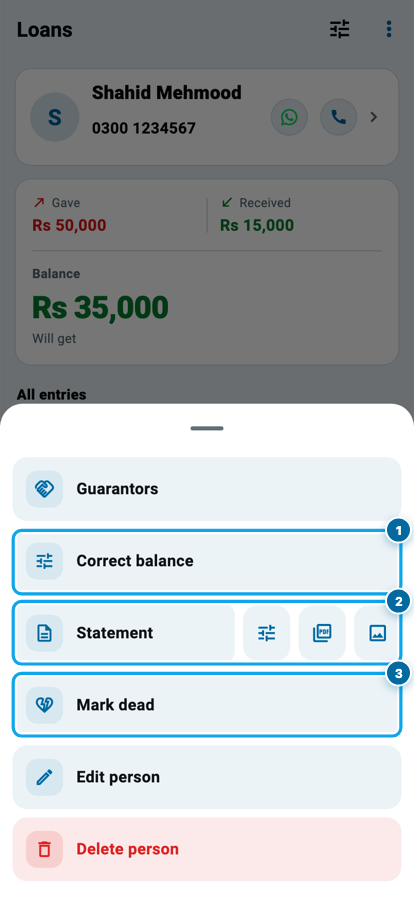
The ⋮ menu holds the rest.
Statement builds his whole record as a PDF or an image, with your shop's name, logo and phone on top; the small gear opens its own customization page, because the loan paper is its own document, separate from a customer statement. Share it on WhatsApp and the argument is over.
Mark dead is the honest button for money that is gone. Write how much will never come back, and Wasoolo tells you before you tap which way it lands: money you let go of becomes an expense and lowers your profit; money he let you off becomes a gain and adds to it. Either way it is written as a line, not erased, so next year you can still see what happened. It is the same decision as an udhaar balance that has been sitting for a year, taken deliberately instead of by forgetting.
Common questions
Does Wasoolo charge anything for a loan?
No. A loan here is a record of what went out and what came back, nothing more. No amount is ever added for time passing, and a missed return day only shows a Late badge.
My customer is also the man I borrowed from. Two records?
Use Pick person when you make him, and the loan person is linked to that same customer. His shop khata stays a khata and his loan stays a loan; the totals never mix.
I took money from someone. Which button?
+ Received writes money coming in, and his row then reads Will give in red. Your repayments to him go in as − Gave on the same page.
Can I delete a wrong entry?
Yes. Open the line and delete it, and the money it moved goes back to the account too. For a balance that is wrong without any single line being wrong, use Correct balance instead.
Where does a written-off loan show up?
On the profit view, as a loss or a gain, and on the person's page as a Marked dead line with the amount. Nothing is hidden and nothing is deleted.
Can my staff see the loans page?
Only with the loans permission switched on, and giving money and writing off money are two more keys again. A helper who records a repayment cannot forgive a debt.