
GuideApp tutorials
Class 9: how to see today's calling list
Class 9 of the Wasoolo course: open today's calling list, ring a customer from his khata, save what he said, and set the day you call him again.
What Class 9 covers, in order
- 1Open today's list on HomeThe Calling List block builds itself from every khata that is due or late.
- 2Open the customer's popupThe eye on his row opens what he owes, his number and every button you need.
- 3Call him from that popupCall, WhatsApp or message — the dialler opens with his saved number in it.
- 4Save what he saidTap the reason, and the outcome is filed with it: promised, no answer, paying now.
- 5Pick the next call day2 hours to a week, or any date — the khata comes back to the list on that day.
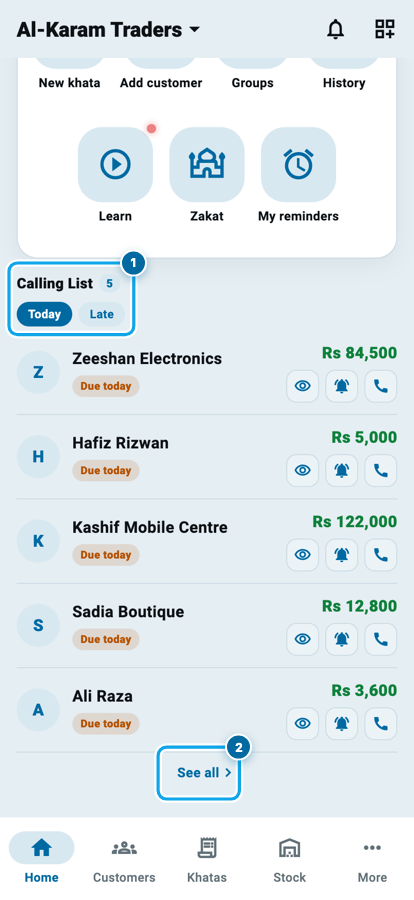
Open Wasoolo and scroll down the Home tab. The Calling List is already built: every khata that is due today or is late, with a number beside the heading. You ring a customer from his own row, save what he said, and pick the day he comes back to the list. Class 9 walks it end to end.
Where today's list comes from
Nobody writes this list. Wasoolo builds it from the due dates already on your khatas, and rebuilds it every morning.
The heading says Calling List with a small count beside it. Under it sit two chips. Today is the round: khatas due today, plus anyone who promised you for today. Late is the older pile: everything that went past its day and has not been paid.
Each row carries the customer's name, an orange Due today badge and what is still owed, in green. On the right are three round buttons: an eye, a bell and a phone. See all at the foot opens the same list on the Khatas board.
What Class 9 covers, in order
- 1Open today's list on HomeThe Calling List block builds itself from every khata that is due or late.
- 2Open the customer's popupThe eye on his row opens what he owes, his number and every button you need.
- 3Call him from that popupCall, WhatsApp or message — the dialler opens with his saved number in it.
- 4Save what he saidTap the reason, and the outcome is filed with it: promised, no answer, paying now.
- 5Pick the next call day2 hours to a week, or any date — the khata comes back to the list on that day.
Open the customer, not a spreadsheet
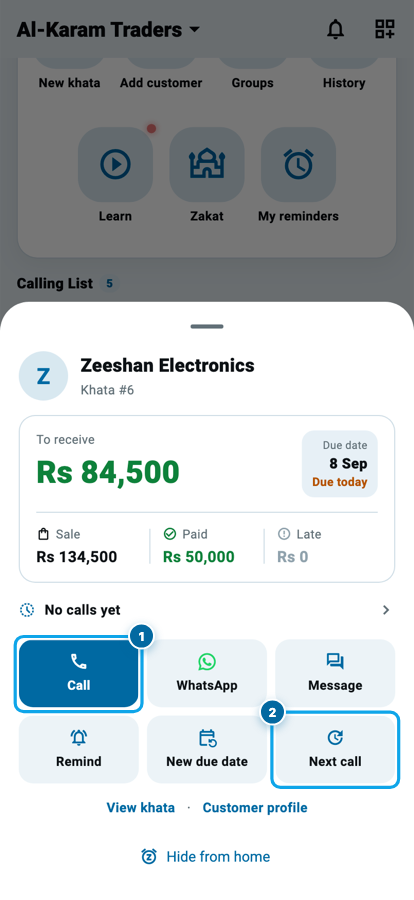
Tap the eye on a row. A popup slides up with everything a phone call needs, so you never lose your place in the list behind it.
At the top: his name, the khata number, and what he owes in big green figures. Beside that, the due date and the same Due today badge. Below, three small figures (Sale, Paid and Late) so you know before he picks up whether this is a man who pays in parts or one who has paid nothing.
Under that sits one quiet line: No calls yet, or the date of the last call. That line is a door, and the last section of this class opens it.
Call him from the popup
Six buttons fill the middle of the popup, in two rows of three.
Call opens your dialler with his saved number already in it. WhatsApp opens the chat, and the message is yours to type and yours to send; Wasoolo never sends one by itself. Message opens the in-app chat if he uses the customer app.
The second row is what you do after he answers. Remind sends a push notification into his own Wasoolo login, so it works only for a customer who has one, and it waits a while before it will send again. New due date changes the real date on the khata. Next call, the third button, is the one this class is really about.
What one morning's calling list is actually worth
The three that did not pay are the point: each one now carries its own next-call day, so none of them is remembered by you and none of them is forgotten either.
Save what he said
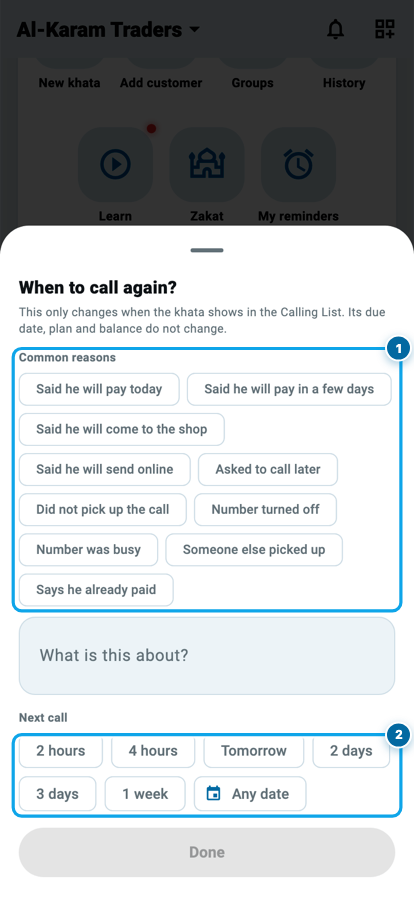
Tap Next call and a sheet opens: When to call again? A small grey line under the title tells you the truth about it: this only changes when the khata shows in the Calling List. His due date, his plan and his balance do not move.
Common reasons is a row of ready answers, and tapping one does two jobs at once. It writes the words into the note box, and it files the outcome behind them. "Said he will pay today", "Said he will come to the shop" and "Said he will send online" are filed as Promised to pay. "Did not pick up the call" and "Number turned off" become No answer. "Someone else picked up" is its own outcome, and so is a customer who is paying you right there at the counter.
Tap the lit chip again and it clears. Or ignore the chips and write your own words in the box; anything you type is saved with the call.
Choose when to call again
Next call is the second half of the sheet: 2 hours, 4 hours, Tomorrow, 2 days, 3 days, 1 week, and Any date for a day you pick on the calendar.
The hour chips matter more than they look. "Call me after lunch" is the commonest promise in any bazaar, and a whole day is the wrong size for it. Two hours takes the khata off today's list and hands it back by the clock.
Done saves it. Until a day is chosen the button stays grey, because a follow-up with no day is not a follow-up. And if you swipe the sheet away by mistake, nothing is lost as long as you had written a note and chosen a day. That much work is saved anyway.
Start your digital khata today
Free to start. Works offline. English, Roman Urdu & Hinglish. Your customers get their app free, forever.
Keep today's list short
Tap See all and the Khatas board opens on exactly the same set. The chip above the rows says Calling List · Today · only due, so you can see which question you are looking at.
Inside the blue card sits a tick: Hide late khatas. On, the board shows only what is genuinely due on the chosen day plus anyone who promised for it. Old late khatas and khatas with no due date drop away, and the card's four figures (total sales, received, remaining and late) change with them. That is the difference between a round you can finish before lunch and a list you keep putting off.
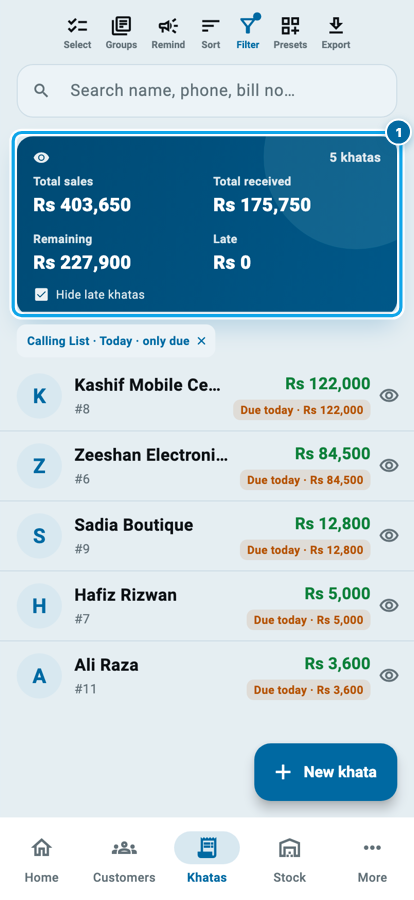
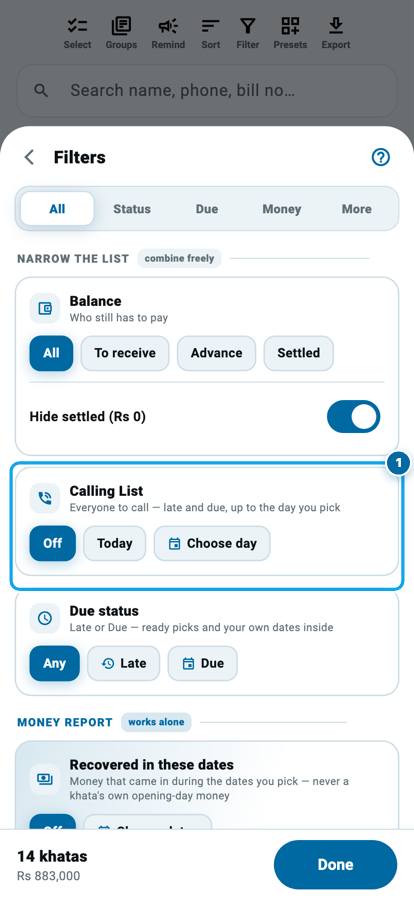
The board's own Filter has the same thing under a card called Calling List: Off, Today, or Choose day. Choose day reaches forward to next week's calls, before the week starts, and backwards, which is how you ask for only the badly late ones. The search and filter tools from Class 5 all work on top of it.
Read the whole call history
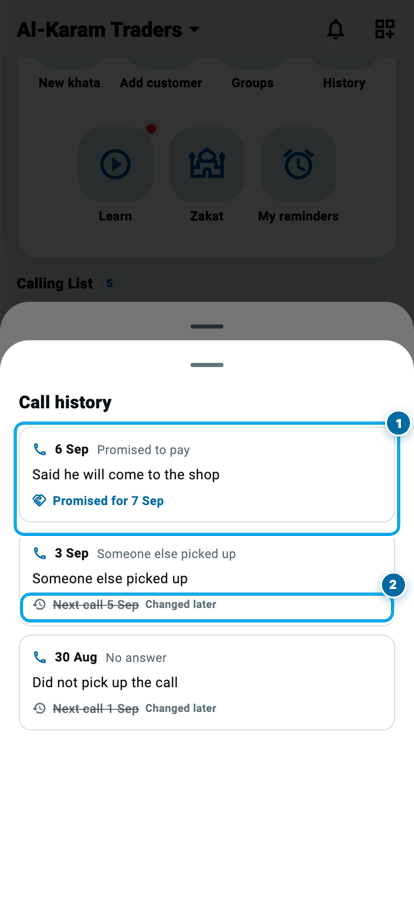
Back in the popup, tap that quiet line under the money. Call history opens, newest first, and every call you ever saved on this customer is in it.
Each card carries the date, the outcome in grey, your note in black, and the day that call set. A live follow-up is printed in blue with a handshake beside it. A day that a later call replaced is still printed, but greyed, struck through and labelled Changed later, because only the newest call can be the plan and two blue dates cannot both be the answer.
Nothing is ever rewritten here, and that is what makes it proof: when a customer says he already told you something, the call sits on the same phone as the money.
Common questions
Does setting a next call change the customer's due date?
No. It only changes when the khata comes back into the Calling List. The due date, the installment plan and the balance stay exactly as they were. The New due date button beside it is the one that moves a real date.
What if a customer has four khatas open?
Open his profile and use Next call there. It asks which khatas first, all of them ticked, so "push everything he owes to Friday" is one trip instead of four. Only khatas that still owe money are offered.
Can my salesman use this?
Yes, once you switch on his call-logging permission in the team settings. Without it the Next call button does not appear for him at all, so nothing he taps can go missing.
Does the app call or message the customer by itself?
Never. Call opens your dialler, WhatsApp opens the chat with the message ready for you to send, and Remind sends a notification into the customer's own Wasoolo app. You press send, every time.
The customer promised and then paid. Do I mark the promise as kept?
There is no button for that, on purpose. A promise is closed by money: record the payment and the balance answers the question by itself.
Why is my list empty when people clearly owe me?
The list is built from due dates, so a khata with no due date never lands on it. Open the khata, set a due date, and it appears the moment that day arrives, on the same date an entry gets when you write it.