
updateWhat's new
What's new in Wasoolo 2.7.0: move customers between your shops, an investor who buys, and a clearer invoice
Wasoolo 2.7.0 moves or copies many customers and a loan person between your shops, lets an investor buy on his own khata, and prints the rate per item.
Wasoolo 2.7.0 in seven lines
- 1Many customers at onceTick the names on Customers and move or copy them to another shop.
- 2A loan person, with his moneyEvery line goes with him, and the accounts his lines used are shared.
- 3An investor who buysGive product opens his own khata; his page shows what he owes for goods.
- 4Paid from investmentTick it instead of picking an account and it comes off his investment.
- 5Rate on the invoiceA Rate column, and Subtotal / Discount above the Total when you gave one.
- 6Your expense filter staysExpense insights opens exactly as you left it, in each shop.
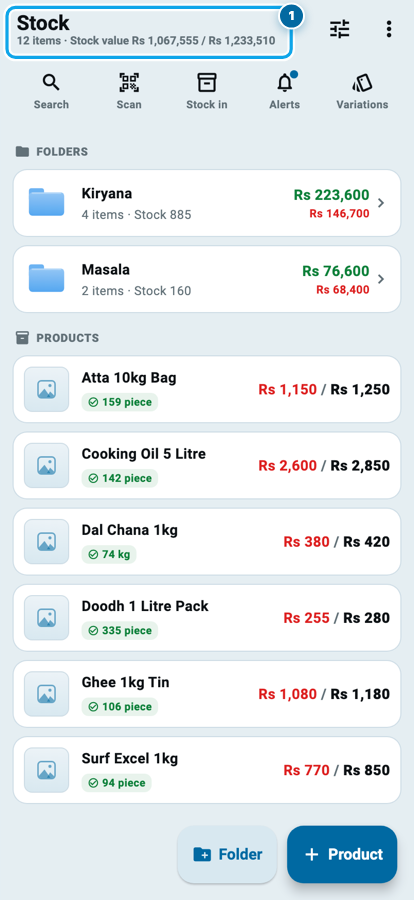
- 7Stock value at a glanceThe Products header prints what your stock cost and what it sells for.
Wasoolo 2.7.0 lets you move or copy many customers at once to another shop of yours, send a loan person across with his money, give an investor his own khata and take his payment out of his investment, and print the price of one item on the sale invoice.
Move or copy many customers at once
Until now a customer moved to your other shop one at a time, from his own page. If you opened a second counter and forty names had to go with it, that was forty trips.
Open Customers, tap Select at the top, and tick the names. The bar turns into the selection bar, and the last icon on it (1) is the new one.
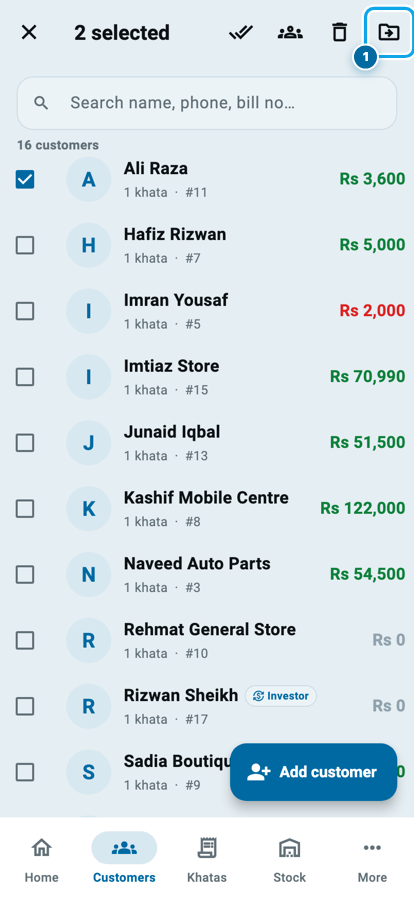
Tap it and you are asked Move to another business or Copy to another business, then which shop they go to. Confirm, and the page tells you what happened: how many went, and why any stayed. A customer who has purchase bills (goods you bought from him) is copied, never moved, because the bills belong to the shop that received them. The message names those separately, so a man still sitting in your list is never reported as done.
Say you ticked twelve names and two of them sell to you as well. Ten move, and the message reads 10 of 12 done · 2 have purchase bills, copy instead. Copy carries all twelve.
Everything the single-customer move already carried still travels: his khatas, his entries, his photos, his own fields. Deciding whether the second counter is worth it at all is a different question, and we worked through it in the article linked at the end.
A loan person moves with his money
A loan person is not a customer. He is money you lent or borrowed, with his own lines and his own accounts. Moving him used to be impossible.
Open him from Loans, tap the three dots, and the sheet has two new rows (1).
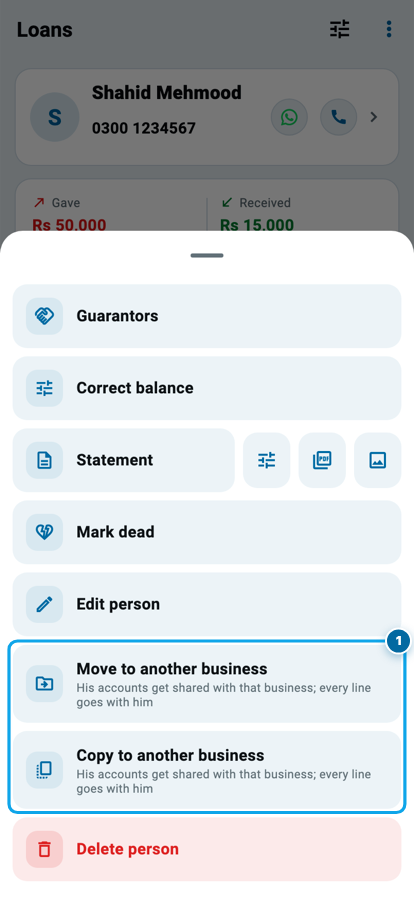
Every entry goes with him, and so does the money behind it: for each account his lines used, the target shop gets the same account shared into it, so his balance there reads exactly as it read here. Cash in hand and the drawer link to that shop's own rows; a bank or mobile account is opened there with a zero opening, because the money did not move; only the record did.
Two honest refusals, both named before anything is written. A man carrying a written-off line cannot be moved, because the loss you already took is a fact of this shop's profit; copy him instead and both sets of books stay true. And if the target shop has no cash account yet, Wasoolo says Open Cash & Bank in {shop} first rather than leaving a line with no money behind it.
His guarantors travel by name. The links to your customers do not, because those customers belong to this shop. The names are on the paper, the links are not.
An investor who buys from your own shop
The man who put money into your shop also shops there. He takes a fridge, he takes a bag of flour, and until now there was nowhere honest to write it: his investor page counts capital and profit, not goods.
Open the investor, tap the three dots, and press Give product (1).
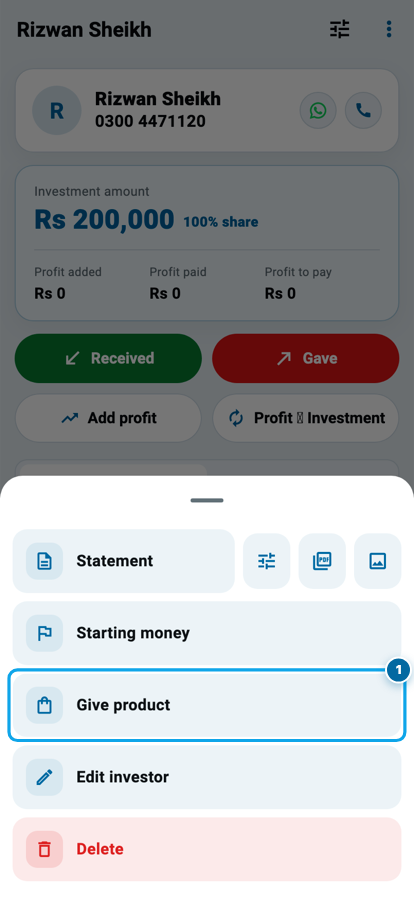
He gets a customer of his own, in his name and his number, made once and kept. The ordinary New khata form opens for him, so you sell to him exactly as you sell to anyone: items, rate, total, date. From then on his investor page carries a full-width Products khata button straight to it, and his balance card adds one line, Owes for products, beside what he invested. The two figures never mix: capital is capital, goods are goods.
On the Customers list he wears a small Investor tag next to his name, and tapping it takes you back to his investor page. If you run the shop with someone who put money in, keeping the two sets of accounts apart is the whole job, and this keeps them apart by itself.
Pay for his goods from the investment
He takes goods worth Rs 4,500 and says, "Take it out of my money." On his khata's sale form there is now a tick, Paid from investment (1), where the account card used to be.
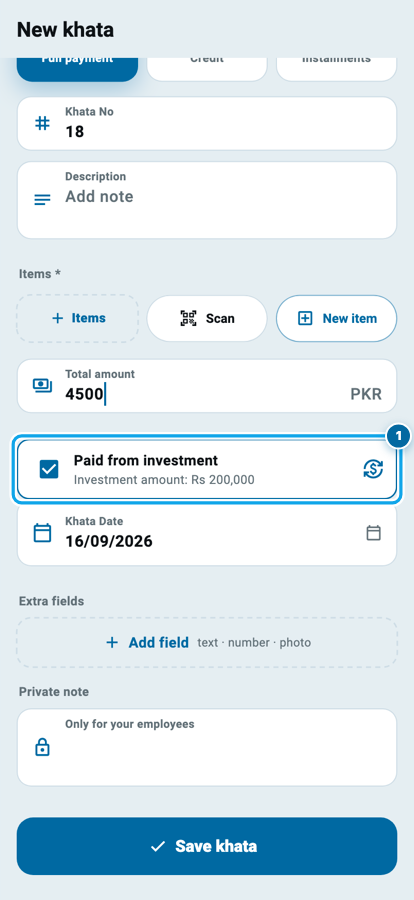
Tick it and no account is asked for, because no cash came into your drawer. The amount comes off his investment on his own page, written there as Products khata payment, and the line on the entry, the invoice and the statement says Paid from investment in plain words.
The tick also has a limit. If he has Rs 200,000 in and you try to take Rs 250,000 of goods out of it, the save is refused with His investment is only Rs 200,000, because an investor cannot go below nothing. Untick it later and the payment goes back to being an ordinary cash or bank payment; the mirror line on his investor page follows every edit, every delete and every restore.
The price of one item, on the invoice
A shopkeeper asked for this: an invoice that shows 2 × Rs 2,750 instead of only Rs 5,500. The sale invoice's item table now has a Rate column (1) between Qty and Amount.
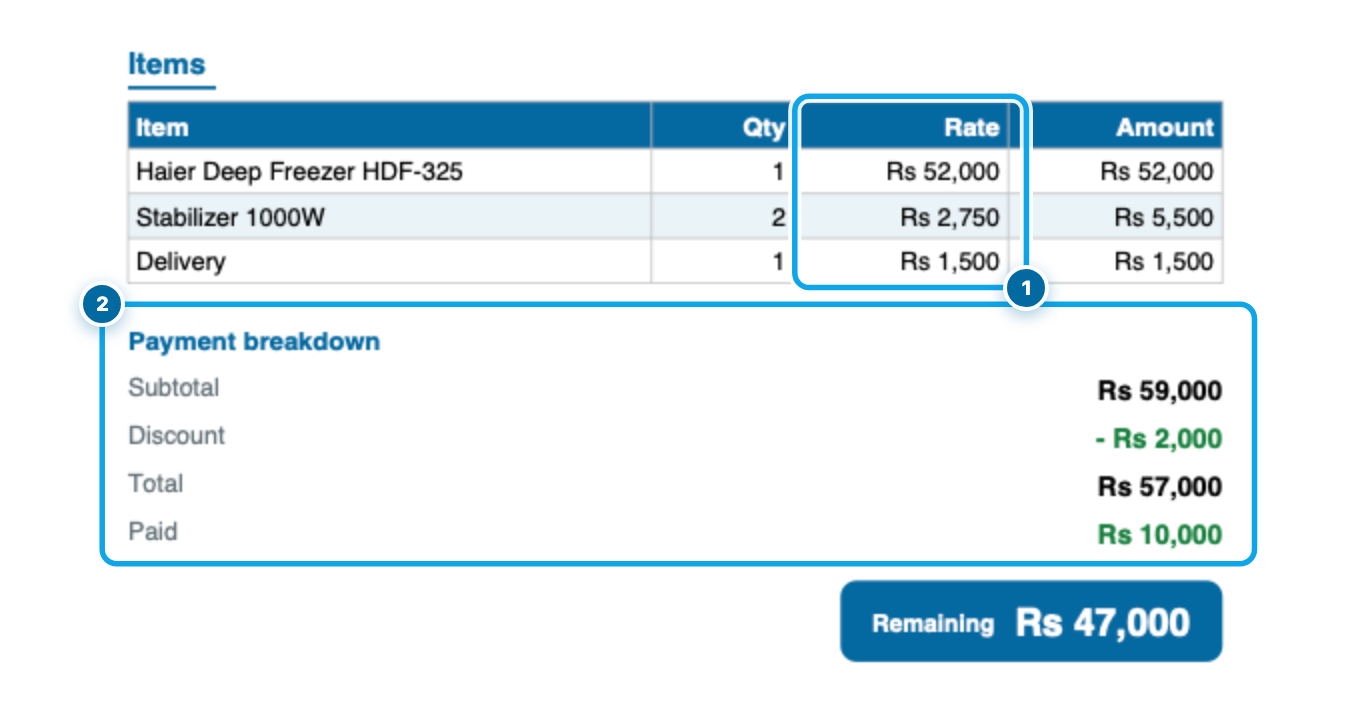
And when you gave a discount on that sale, the Payment breakdown (2) opens with two rows above the Total: Subtotal, the goods at full price, and Discount, in green, what you took off. Rs 59,000 of goods, Rs 2,000 off, Rs 57,000 to pay. The customer can check the arithmetic himself instead of asking you why the total is not what the lines add up to. With the discount rows on, each line prints its full price, so the column really does add up to the Subtotal.
Both are switches, and both are on from the moment you update. More → Customize documents → Sale invoice, in the Invoice sections card, under Item / product table (1):
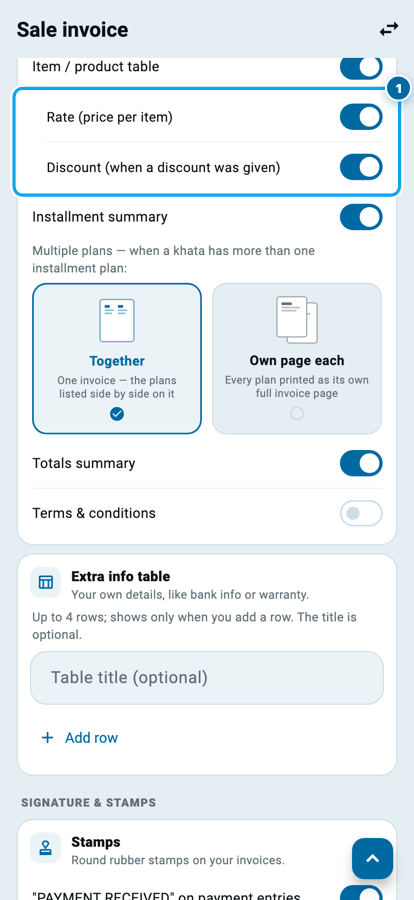
Turn Rate off and the table is the three columns you know. Turn Discount off and every line prints the price actually paid per item, so nothing on the paper contradicts anything else. The discount rows need the totals summary on, since that is where they live, and they only print where the arithmetic closes: a khata that also carries plain cash lines shows its lines at the paid price and no pair, because three rows that do not add up are a paper your customer will argue with. A rounding difference under one rupee is not a discount and is never printed as one. The rest of the invoice is unchanged, and Class 6 covers the whole paper.
Expense insights keeps the filter you chose
Expense insights used to open on this month every single time. Pick last month, look away, come back, and it is this month again.
Now the page opens exactly as you left it (1): the dates, the categories, the accounts, all of it.
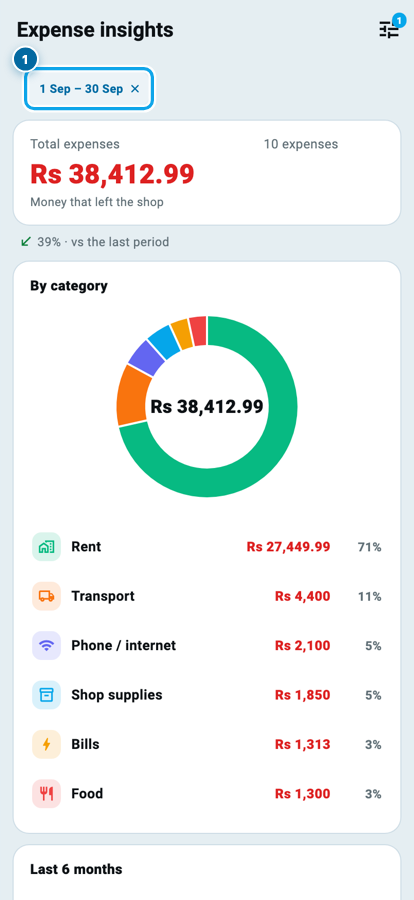
Two things worth knowing. It is saved per shop, so a range you set in one shop never shows up in another. And it is saved as you chose it, not re-worked out: a month you picked stays that month, however long the app has been closed. Only a shop that has never set a filter opens on this month. The Expenses list has its own filter and is untouched; Class 16 walks through writing an expense.
What your stock is worth, at the top of the page
The Products header used to print one figure, and on many shops that figure was Rs 0, because it counted only what stock had cost you, and a shop that never writes buy rates has no cost to count, however full the shelves.
It prints both now (1): what your stock cost you, then what it sells for. It is the same pair each folder row already shows, in the same order.
Also in this update, and how to get it
- A page always has a way back. Opening the Loans board straight from a notification or a link could leave it with no back arrow at all. It always has one now.
- Paid from investment reads the same everywhere on the entry, on the sale invoice, on the customer's statement and on the investor's own statement.
Update Wasoolo from the Play Store or the App Store, or let the store do it for you; nothing needs setting up. Every phone in your shop should update, so each one shows the same invoice and the same stock value. Wasoolo is 100% FREE to download. If you came from 2.6.0, the attendance sheet, supplier totals and buy-rate changes are here.
Common questions
Does moving a customer to my other shop delete him from this one?
Move takes him across and removes him here; Copy leaves him in both. A customer with purchase bills is always copied, and the message tells you which ones those were.
Why can I copy a loan person but not move him?
He has a written-off line. That loss is already counted in this shop's profit, and a move would take it out of both shops' books. Copy keeps this shop's record and gives the other shop his balance.
Does an investor's shopping change his investment?
Only if you tick Paid from investment. Goods he takes on credit sit in his own khata as what he owes for products, beside his investment, never mixed into it.
Where do the Rate and Discount columns come from?
The rate stored on each sale line, and the difference between the full price and what was charged. If a sale carries no discount, no discount rows print, whatever the switch says.
My invoice shows the Rate column but no Subtotal and Discount rows.
Either that sale had no discount, or the totals summary is switched off. The two rows live inside the payment breakdown, so they need it on.
Will my expense filter change on its own after a month passes?
No. It stays exactly as you set it, in that shop, until you change it. A shop that has never set one still opens on the current month.
Two partners, one shop, one set of accounts sits well beside the investor changes, and when to open a second shop beside moving customers between them.