
updateWhat's new
What's new in Wasoolo 2.6.0: an attendance sheet, supplier totals by date, and your own buy rate
Wasoolo 2.6.0 prints an attendance register, reminds you at 6 pm, totals supplier payments by date and counts profit from the buy rate you write.
Wasoolo 2.6.0 in six lines
- 1Attendance on paperA register for any dates, and a reminder at 6 pm when it is not marked.
- 2Supplier totals by datePaid to them, Purchased and Bonus given, for the dates you pick.
- 3Your buy rate leadsThe rate you write on a product is the base of the profit.
- 4Fix alerts in placeAdd a missing rate or barcode on the card itself.
- 5Returns, smarterThe bill comes ticked, refunds can go above the goods, the loss shows on the bill.
- 6Link a typed itemTie a hand-typed line to a stock product; the price stays as typed.
Wasoolo 2.6.0 brings an attendance sheet you can print, a 6 pm reminder when attendance is not marked, paid and purchased totals for your suppliers on any dates, your own buy rate as the base of profit, returns that can refund more than the goods, and a way to link a hand-typed item to a product in stock.
Attendance: a register on paper, and a reminder at 6 pm
Staff books used to live in a copy under the counter. Now Wasoolo prints the register for you. Open Employees, tap the export icon at the top and choose Attendance sheet (1). Pick the dates, a week or a month, and you get one row per person and one box per day.

Each box carries one letter: P present, HD half day, A absent, L leave, WO weekly off, PH holiday, and a dash for a day nobody marked. The totals sit at the end of each row and a legend under the grid, so the paper explains itself to anyone who reads it. The same sheet is one tap away from the Attendance page too, from the share icon in its top corner.
A register needs room, so on a receipt roll or an A5 paper size it prints on A4, and the sheet says so. It counts as one PDF on the Free plan, like any other document. The owner can always make it; a staff member needs the switch for making staff papers.
The second half is the reminder. Around 6 pm, if your shop usually marks attendance and has not marked it today, the people who mark attendance get a notification: attendance not marked today. Tap it and the Attendance page opens. It only goes to shops that really use attendance, and only to the people who mark it (or the owner when nobody else does).
The midnight notice that said attendance was missing is gone. It was never a reminder: it was the salary writer saying it could not write a day's pay yet. Daily-wage staff are never mentioned in it now, and a weekly or monthly notice waits until after 8 in the morning.
The reminder shares a switch with your own reminders. In Settings, Notification preferences, the Reminders & promises row (1) now says so, and turning it off silences all three.

Suppliers: what you paid and what you bought, for any dates
"How much did I pay my suppliers last month, and how much did I buy?" Until now the Suppliers page could only show balances. Now its filter answers both.
Open Suppliers and tap the tune icon. The first card is Date (1): Any, or Choose dates, where Today, This month, Last 7 days, Last month and your own range live. Pick it once. Under it, Show (2) decides what the page counts in those dates: Balances (the page you know), Paid to them, Purchased or Bonus given.

Choose Paid to them and the card at the top says how much money left your shop for suppliers in those dates (1), and every row under it is one supplier's share. Purchased does the same for the bills you received, Bonus given for the bonuses suppliers gave you. The rows always add up to the card. A bonus a supplier cut from your bill is not money you paid, so it is counted under Bonus given, never under Paid to them.

Today and This month roll over by themselves at midnight and on the first of the month, so a filter you left on "This month" is still this month tomorrow. Bills and payments you dated ahead of today are counted in All time, just as on each supplier's own page.
Your own buy rate now sets the profit
The buy rate you write on a product is now the rate profit is counted from. Open a product: under the selling rate, the Rates card lists your Buy rate (1) first, ahead of the last and the average buying rate, and the Profit line under them is worked out from it.

When you sell that product on a khata or a counter bill, the profit on that sale is worked out from your buy rate. If a product has no buy rate written, the average of what you actually paid for it is used, as before. A stock-in with a buying rate updates the product's buy rate for you, and deleting that purchase puts the rate before it back. On a product you bought at more than one rate, the rates list on the sale line now starts with Your buy rate.
Only new sales use it. Sales you have already saved keep the cost they were saved with, so last month's profit does not move because you changed a rate today.
Fix a missing rate or barcode right where you see it
The Needs attention page on Products used to tell you what was wrong and send you somewhere else to fix it. Now you fix it on the spot.
Tap No buying rate and every item is a full product card with an Add rate button (1) that opens a box right on the card. Write what you pay for it, save, and the item leaves the list, because its profit can be counted now. Tap No barcode and each card has Scan and Type for the barcode. If that barcode already belongs to another product, Wasoolo warns you before it saves.

Items that already carry a buy rate no longer show up on the No buying rate list at all.
Returns: the bill already ticked, and refunds above the goods
Return items now opens with the bill already picked. On a counter bill, or a khata sale you opened the return from, every line is ticked at the quantity still left to return. Untick what did not come back and save.

Sometimes you give back more than the goods were worth, to keep a customer happy. On Refund cash you can now do that. The form shows the Goods value, and when your refund is higher it says how much more than the goods, counted as loss. Wasoolo asks once, Pay more than the goods?, before the money goes out. Adjust in khata still stops at the goods value, because a khata cannot owe the customer money.
A full cash refund of a whole bill asks Return the whole bill? first, since one tap now picks everything. And a bill that is fully returned no longer offers Return items at all.
What a return costs you is now written on the sale itself. On the counter bill and on the sale entry's page, a Loss in returns row (1) sits under the Profit row: the refund minus what the goods cost you. Tap it and the Profit entries page opens with that return lit up. Only the owner sees it; the customer's copy never shows it.

Link a hand-typed item to a product in stock
When you type an item on a khata that is not in your products, Wasoolo shows a red line: this item is not in your products, so no stock or profit will be counted. Under that line there is now a way out: Link a stock product (1), pick it from your products.

Pick the product and the line takes the product's name, the stock goes down by the quantity sold, and the buying cost is recorded, so profit is counted from now on. The price and the quantity you typed stay exactly as they were, and so does the khata total and what the customer owes.
It works on a new khata, on a counter bill, and on khatas you saved long ago, even old ones where the item was only written as the entry's note. On a khata that already has payments, where the amounts are locked, the tile still works: it links, and moves no money.
More in this update
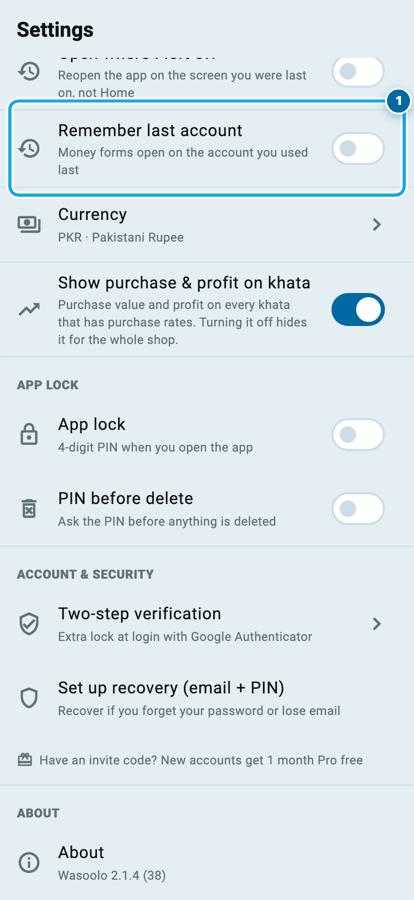
- Remember the last account. Turn on Remember last account (1) in Settings and every new money form opens on the account you used last in that shop, whichever form it was: pay a supplier from your Drawer and the next payment you receive opens on the Drawer, pay from a bank and the next form opens on that bank. It stays off until you turn it on, and an entry you are editing always keeps its own account.
- Filters stay in their own shop. If you run more than one shop, a filter, a sort, a saved khata board view or an export template you set in one shop no longer shows up in the others. Switch back and each shop opens with the filter you last used there.
- Staff papers get their own settings. In More, Customize invoices & receipts opens the list of papers, and it has a new Staff group: Salary statement (the salary slip follows it) and Attendance sheet. The settings icon on each staff paper now opens its own page, not the customer statement's. Your current look carries over unchanged.

- One way to write dates in filters. Nineteen filter screens now write a date range the same way, like 1 Jul → 31 Jul, and add the year when a range crosses one. The Counter sales date filter is now the same card the Khatas board uses.
- Duplicate alerts tell the truth. A refund is never called a duplicate of its own sale any more, the raw code on the card is gone, and the number on the bell matches the page. Two refunds of the same bill on the same day from two phones are still raised: open the extra refund and delete it there.
- A refund could be capped at Rs 0. On a product with no selling rate, priced by typing the khata total, the sale line was saved at Rs 0, so its return and profit said Rs 0 too. New sales save the real price.
- The khata total stays as you saved it. On some older khatas, tapping New item or linking an item could quietly change the total and lower what the customer owed. The total now stays exactly as saved.
- No jump when a bill opens. The counter bill's items no longer jump as the page slides in, and the Profit rows on the day book, the entry, the khata, the account and the Profit pages load in place.
- The buy rate you type on a product's page now shows and counts on that page straight away.
How to get it
Update Wasoolo from the Play Store or the App Store, or let the store do it for you; nothing needs setting up. Every phone in your shop should update, so each one counts profit and returns the same way.
On an iPhone, 2.6.0 comes straight after 2.5.0, so it also brings everything from 2.5.1 and 2.5.2: far less mobile data on every sync, explained in the 2.5.2 article, and profit on every entry, the buy rate you really paid and stock-in pre-filled, in the 2.5.1 article. Wasoolo is 100% FREE to download.
Common questions
Will changing a product's buy rate change my old profit?
No. Every sale keeps the cost it was saved with. Only sales made after the change use the new buy rate.
Who gets the 6 pm attendance reminder?
The people in your shop who mark attendance, or the owner when nobody else does, and only on days it has not been marked. Turn it off with Reminders & promises in Notification preferences.
Can I refund more than the goods on a khata return?
Only with Refund cash. Adjust in khata stops at the goods value, because the customer cannot end up owing you less than nothing for goods.
Does linking a typed item change what the customer owes?
No. The price, the quantity and the khata total stay as they were. Only the stock and the profit start counting.
My helper's phone shows "Edited · sale_items" in History.
That is a link made on an updated phone, seen from a phone still on an older version. Update his phone and it reads as a linked item.
The attendance sheet printed on A4, not my roll size. Why?
A register with a box for every day does not fit a receipt roll or an A5 page, so it always prints on A4 and says so on the sheet.
Keeping a helper's salary and advance straight pairs well with the new register, and buying stock on credit with the supplier totals.