
GuideApp tutorials
Class 18: the investor khata and the profit split in Wasoolo
Class 18 of the Wasoolo course: add an investor, mark him a sleeping partner or a shopkeeper, divide the profit by investment, and add it to every khata.
What Class 18 covers, in order
- 1Add the investorFrom Business Tools: his name, his own shop, his phone, and the money he put into yours.
- 2Sleeping partner, or shopkeeperA man whose money alone is in the shop, or one who also runs it and takes a part for that work.
- 3Type the profitTick the men who are in, type the profit, and tap Calculate. The page answers only when you ask it to.
- 4The work share comes off the topThe shopkeeper's part is taken first, and only what is left divides by each man's investment.
- 5Each man's share, to the rupeeEvery share shows with its percent, and the shares always add up to exactly the profit you typed.
- 6Add the profit to their khatasOne tap writes each man's share into his own profile, and the same share can never be written twice.
An investor khata answers one question: whose money is in your shop, and what is each man owed when the month ends. Class 18 walks through the whole investor side of Wasoolo: adding a partner, working out each person's share of the profit, and writing that profit into every man's own khata.
Open Investors and see whose money is in the shop
Adnan put Rs 500,000 into the shop two years ago and has never asked for a rupee back. Sana's Rs 200,000 came last Eid. Bilal put in Rs 300,000, then started standing at the counter six days a week. The month a real profit finally arrives, three people work out three different numbers in their heads, and only one can be right.
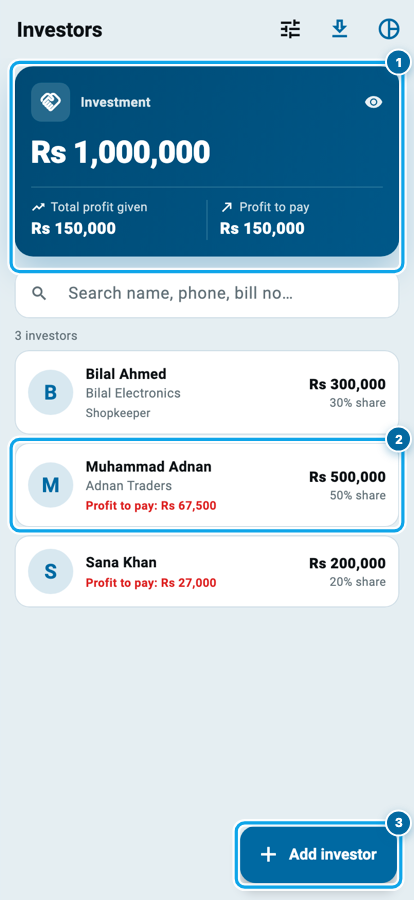
Open More, then Business Tools, then Investors. Business Tools belongs to the shop owner alone, so a team member on an employee login never sees this page.
The blue card is the whole shop in three figures. Investment is everyone's money added together, Total profit given is what you have already credited to them, and Profit to pay is what is still owed. Under it, every man has a row with what he put in and the percent of the capital that makes.
Add an investor, and say what he is
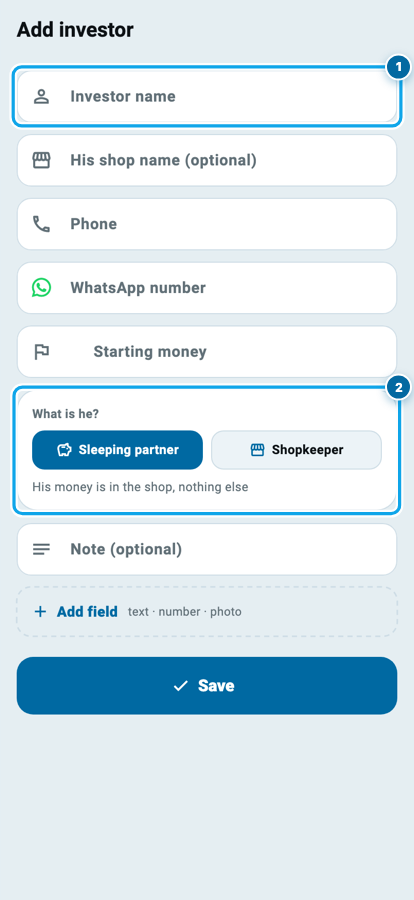
Tap Add investor. Investor name is the only thing the form insists on. His shop name is optional, for a man who runs a business of his own, and it prints beside his name on the paper you send him. Phone and WhatsApp number are separate boxes. Starting money is what he already has in your shop the day you add him.
Then comes the question that decides his money. What is he?
- Sleeping partner is a man whose money is in the shop and nothing else.
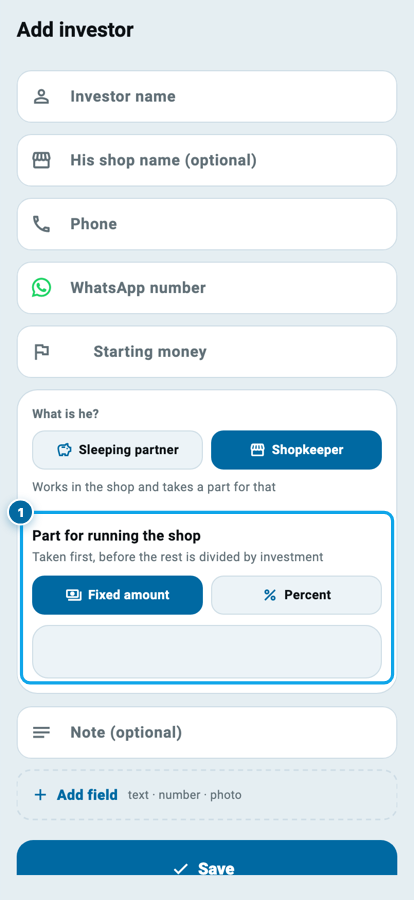
- Shopkeeper is a partner who also runs the shop, and takes a part for that work.
Choose Shopkeeper and one more box opens: Part for running the shop, as either a Fixed amount or a Percent. The line under it says when that part is taken, which is first, before anything is divided by investment. Two partners can each have their own, because this belongs to the person, not to the calculator.
His own page: investment, profit, and his khata
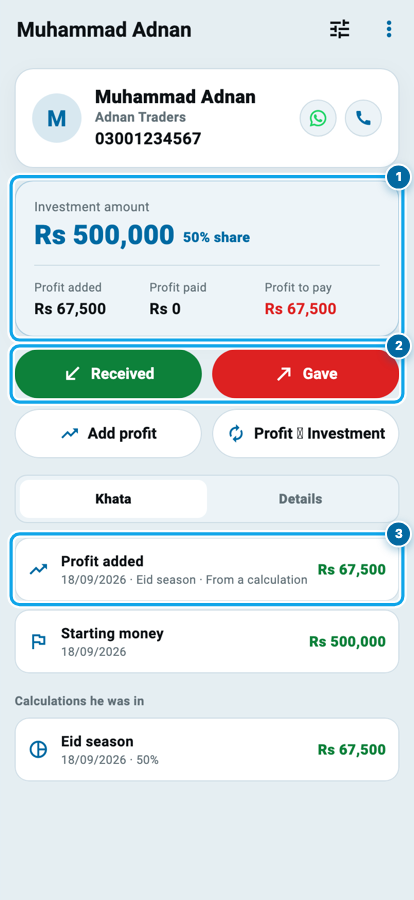
Tap a man to open his page. The top card carries his Investment amount and, beside it, his share of all the money in the shop as a percent. Under that sit three figures worth keeping apart. Profit added is profit you have credited to him, Profit paid is what has actually left your hand, and Profit to pay is the difference you still owe.
The two fat buttons are real money in the app's own colours: Received in green for money coming from him, Gave in red for money going to him. The two below move no money at all. Add profit credits profit he has earned but not taken, and Profit to Investment turns that profit into more capital, which raises his percent next time.
Under Khata every line sits newest first, and one that came out of a calculation says so. Calculations he was in lists each split his name appeared in, with the percent he held that day. The account the money moved through is chosen the same way as in Class 2.
Tick, type, Calculate
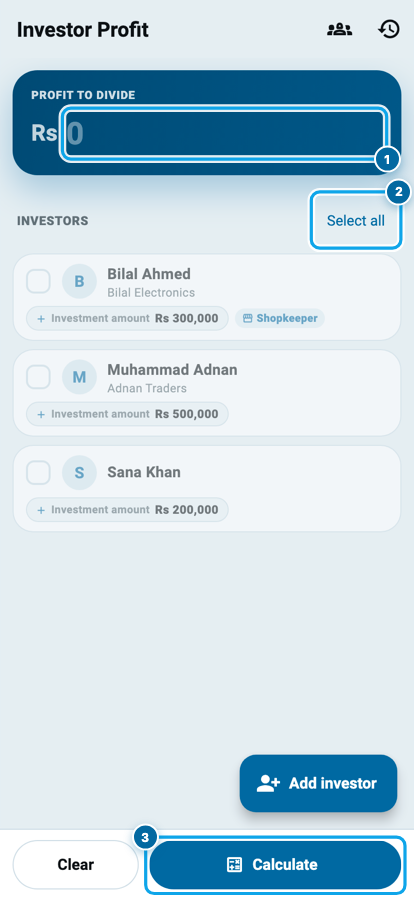
Open Investor Profit. The big box at the top asks for one number, the profit you are dividing. Work it out the way you already do, sales minus what you spent, and Class 16 covers the expense half.
Select all ticks everybody, or tap only the men who were in this one. A Total investment pill shows the capital of the men you ticked, so you can see what the ratio is built from before you commit. Then tap Calculate. The page does not recompute while you type: it answers when you ask it to.
The work share first, then the investment
The answer arrives in two steps, and the order is the whole point.
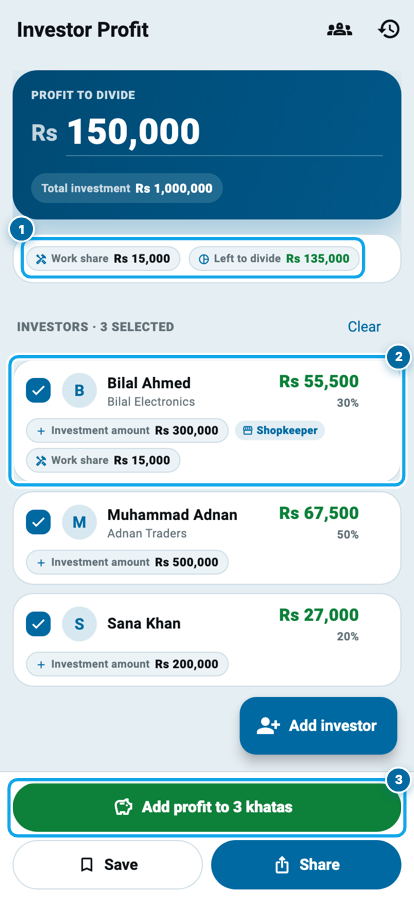
Anybody marked Shopkeeper takes his part for running the shop off the top. Work share shows that total and Left to divide shows what survives it. Only that remainder splits by investment, so each man's row carries his money and his percent.
Every share is a whole figure you can hand over, and together they add up to exactly the profit you typed, never a rupee more or less. If the month lost money, type the loss with a minus in front: nobody is paid for the work, and the loss divides by the same ratio.
One profit, three people, and who gets what
The order is what makes this fair. Bilal's Rs 15,000 is for running the shop, so it comes off the top before anything is divided; the remaining Rs 135,000 then splits by what each man has in the shop. That is why Bilal ends up with Rs 55,500 on Rs 300,000 while Adnan gets Rs 67,500 on Rs 500,000. The shares always add up to the exact rupee you typed — never Rs 1 more, never Rs 1 less. A loss divides the same way, except that nobody is paid for the work: you cannot take a wage out of a month that lost money.
Start your digital khata today
Free to start. Works offline. English, Roman Urdu & Hinglish. Your customers get their app free, forever.
Add the profit to every khata, in one tap
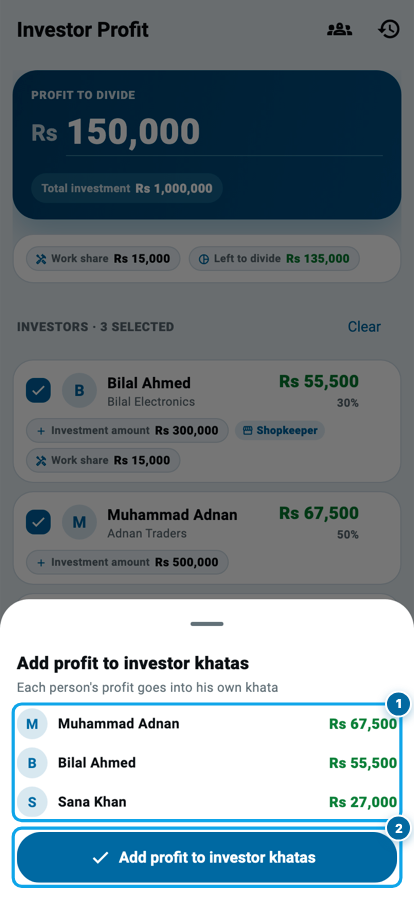
A calculation on a screen is not yet anybody's money. The green Add profit to 3 khatas button turns it into a record, and it counts the men it is about to write to.
Wasoolo asks for a name to save it under, such as Eid season. Then a sheet lists every man with the amount about to land in his khata, and nothing is written until you tap the button at the bottom. Close it instead and nothing has moved.
Tap it and each man's share becomes a Profit added line in his own profile, dated, carrying that name. The same share can never be written twice: a man already credited is marked Already added, so a second tap cannot pay anybody twice.
What you keep, and what you send
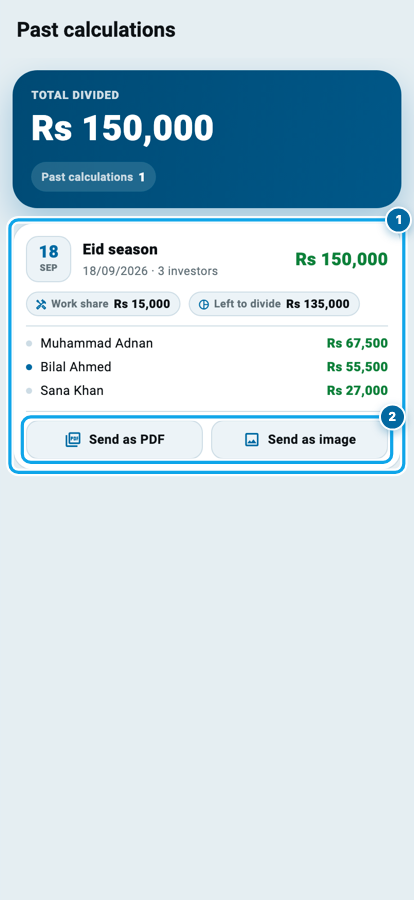
Every saved calculation lives under Past calculations, newest first, with the work share, what was left, and each man's amount on the card. Total divided at the top adds up everything you have ever split.
From the same card you can Send as PDF or Send as image, the paper to put in a partner's hand when he asks how his number was reached. A man's own page carries his statement too, the way a supplier has one in Class 17.
Common questions
Can my staff open Investors and see who put in how much?
No. Business Tools opens for the shop owner only, so an employee login never reaches the investors page or the saved calculations.
What if one partner also works in the shop?
Mark him Shopkeeper and give him a part for running the shop, as an amount or a percent. It comes off the profit first, and the rest is divided by everyone's investment.
What happens if the month was a loss?
Type the loss with a minus in front. Nobody is paid for the work that month, and the loss divides between everyone by the same ratio.
Does adding profit to a khata take money out of my cash or bank?
No. Add profit only records what you owe him. The money moves when you tap Gave and choose the account it came from.
I tapped the button twice. Has anyone been paid twice?
No. A share already in a man's khata is marked Already added and skipped, so one calculation can never be written into a profile twice.
A partner wants his profit left in the shop. Can I do that?
Yes. Use Profit to Investment on his page. The profit stops being money you owe and becomes part of his capital, which raises his percent in later calculations.