
GuideApp tutorials
Class 17: the supplier khata in Wasoolo, full walkthrough
Class 17 of the Wasoolo course: add a supplier, record purchases on Stock in, pay them, send goods back, write the refund and share their statement.
What Class 17 covers, in order
- 1Add the supplierFrom Suppliers: a name, a shop name, a phone, and what you already owe.
- 2Record a purchasePurchase opens Stock in with the supplier chosen: the bill, its items and their rates.
- 3Pay, in full or in partPay tells you what will still be owed, or how much becomes advance.
- 4Send goods backReturn lists the goods this supplier sold you, and the stock goes back.
- 5Write the money that came backReceived: a refund, a bonus, or only an entry, into the account it landed in.
- 6Share the statementThe ⋮ menu makes a supplier statement for the dates you pick.
A supplier khata keeps what you buy on credit straight: every bill, every payment, the goods you send back and the cash that comes back for them. Class 17 walks through the whole supplier side of Wasoolo, from adding a supplier to sharing their statement, with the balance right after every entry.
Open Suppliers and see who you owe
The Madina Traders van stops outside at eleven. Twenty tins of cooking oil come off with bill MT-2231 for Rs 52,000, and Rs 40,000 of it is due by Friday. Then the ghee arrives, and two leaking tins go back. By month end, nobody at the counter can say what is still owed, and buying stock on credit only helps while that number is known.
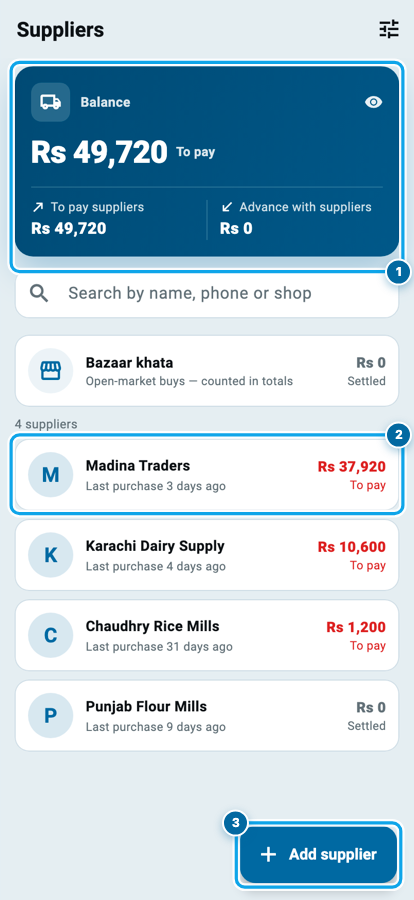
Open Suppliers. The blue card at the top shows the Balance you owe all your suppliers together, split into To pay suppliers and Advance with suppliers. The search box finds anyone by name, phone or shop.
Bazaar khata holds open-market buys that belong to no supplier. Under it, each supplier has a row: the name, the last purchase, and what you owe in red.
Add a supplier, with what you already owe
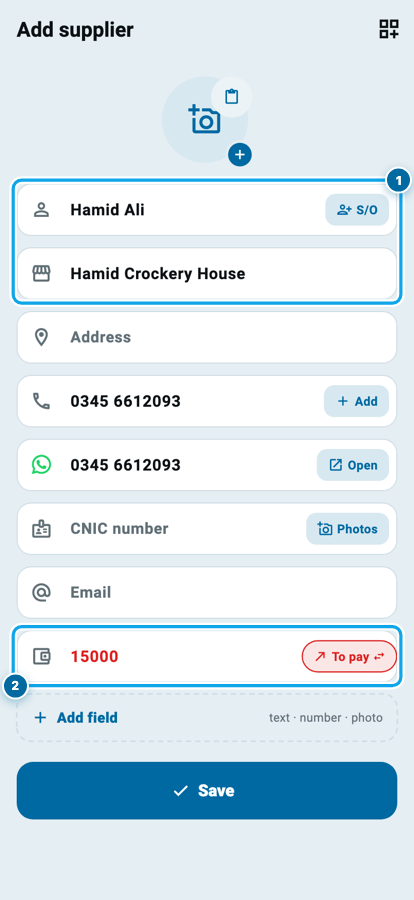
Tap Add supplier. The form needs a Full name and has room for a Shop name, the name printed on the supplier's bills. Type a phone and the WhatsApp number fills in by itself.
Owed this supplier money before you started with Wasoolo? Type it in Starting balance. The red To pay chip beside it flips to Advance when the supplier is holding your money instead. Tap Save.
The supplier's page: one balance, four buttons
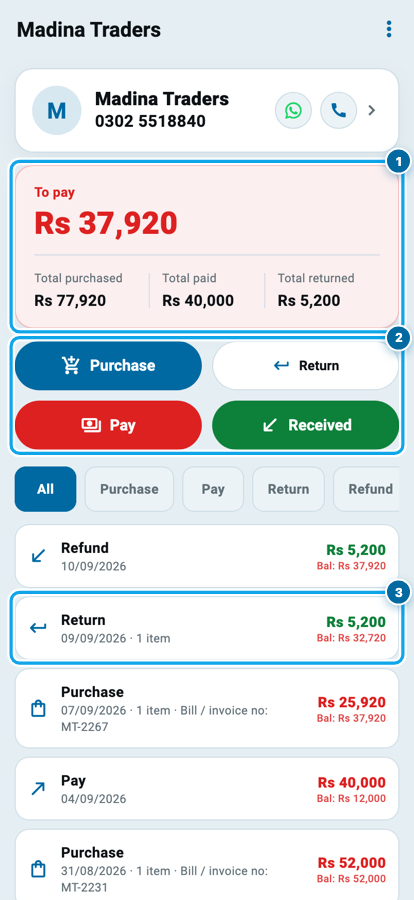
Tap a supplier to open their page. The card says To pay with the amount in red, and Total purchased, Total paid and Total returned under it. Pay more than you owe and the same card turns green and says Advance.
The four buttons come in pairs. Purchase and Return are goods coming in and going back. Pay and Received are money going out and coming back.
Every entry sits in one list, newest first, and Bal shows what you owed right after it. The chips above the list (All, Purchase, Pay, Return, Refund) show one kind at a time.
Record a purchase on Stock in
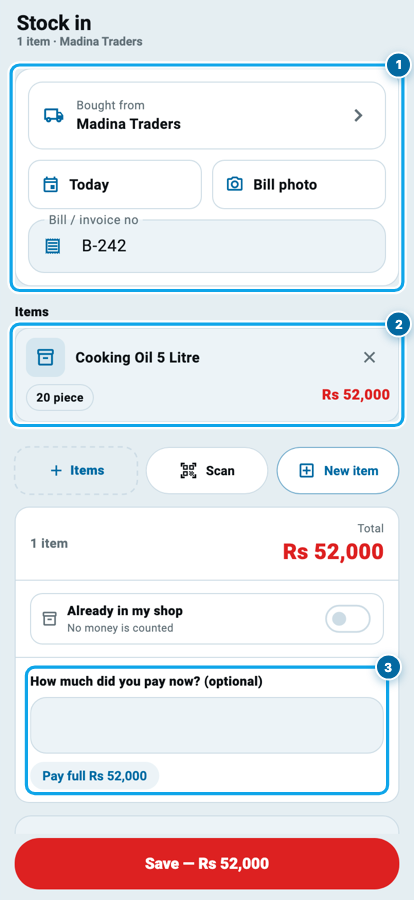
Tap Purchase. It opens Stock in with the supplier already filled in under Bought from, because a purchase and the stock it brings are one entry in Wasoolo.
The top card is the paper: the date, a Bill photo, and the Bill / invoice no. Tap Items, pick Cooking Oil 5 Litre and type how many came: 20. The buying rate is already there from the product, Rs 2,600, so the line shows Rs 52,000. Class 12 walks through this item page in full.
Under the total, How much did you pay now? (optional) takes whatever you handed the driver, with Pay full one tap away. Leave it empty for a bill on credit. Tap Save: the stock goes up and the bill lands on the supplier's page.
Start your digital khata today
Free to start. Works offline. English, Roman Urdu & Hinglish. Your customers get their app free, forever.
Pay the supplier, in full or in part
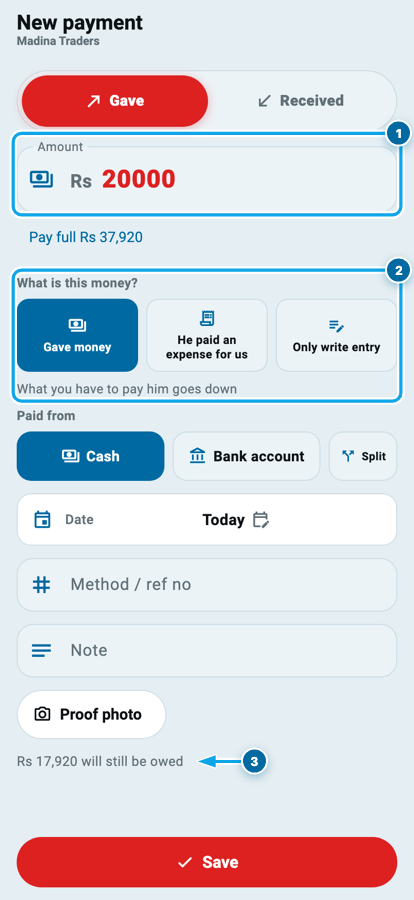
Tap Pay. New payment opens on Gave. Type the amount, or tap Pay full Rs 37,920 to clear the whole balance.
What is this money? has three answers. Gave money is the usual payment. He paid an expense for us is when the supplier paid something for you, like unloading labour: it adds to what you owe and to your expenses. Only write entry keeps the record of a payment that moved through none of your accounts.
Paid from picks Cash, Bank account or Split, and that account goes down, as in Class 2. A cheque or transfer number goes in Method / ref no, and a Proof photo if you have one.
The last line tells you where this payment leaves you: Rs 17,920 will still be owed, or, when you type more than you owe, how much becomes advance.
Send goods back with Return
Two tins of that oil were dented and leaking at the seam. On the next round, the driver takes them back.
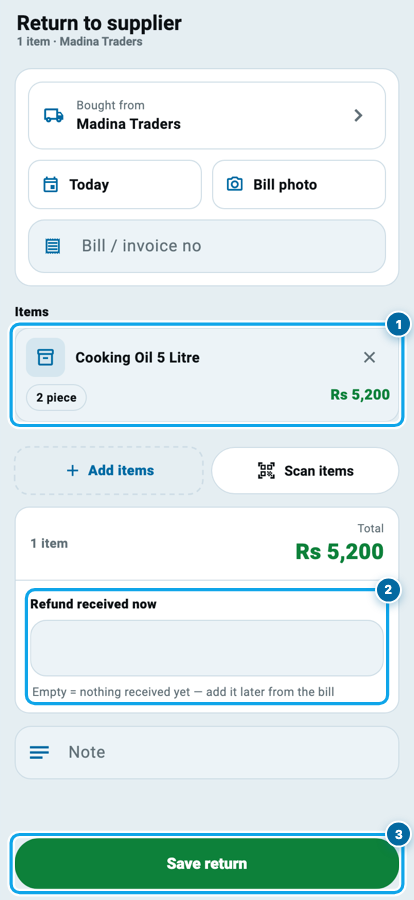
Tap Return. Return to supplier looks like Stock in, but Add items lists the goods this supplier actually sold you, less anything already sent back. Pick the oil, type 2 under How many, and add its buying rate, Rs 2,600. The total turns green, because Rs 5,200 comes off what you owe.
Cash for the tins there and then goes in Refund received now; leave it empty and add it later from the bill. Tap Save return and the two tins leave your stock.
Five entries and the balance after each
The return took Rs 5,200 off the balance, and the cash refund put it back on. That is not a mistake: you kept Rs 72,720 of goods and your payments now come to Rs 34,800 after the refund, so Rs 37,920 is still owed. Had the supplier kept the Rs 5,200 against the next bill instead, you would write the return and no refund, and the balance would stay at Rs 32,720.
When money comes back: Received
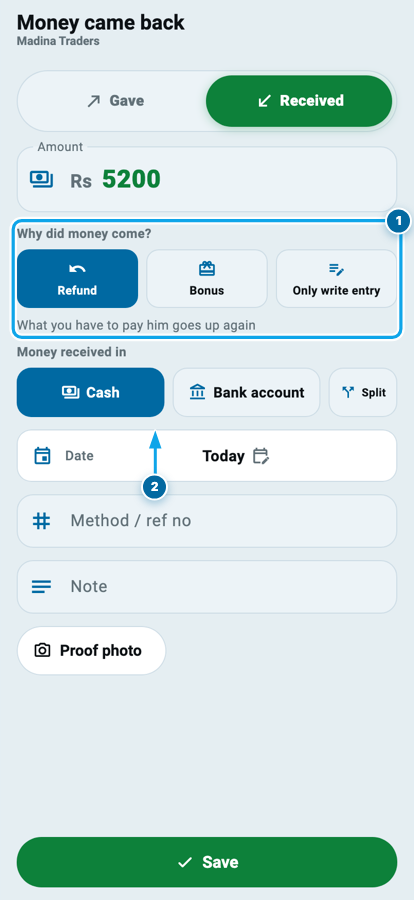
Money can also come back days after a return. Tap Received and Money came back opens with Received switched on.
Why did money come? decides what the money does to your balance:
- Refund is cash for goods you sent back. The screen says What you have to pay him goes up again, because the return already took that amount off.
- Bonus is a scheme or a gift. It does not change what you owe, unless you answer yes to cutting it from what you have to pay.
- Only write entry keeps the record without moving any account.
Choose where the money landed in Money received in, then tap Save.
Statement, reminder and a balance fix
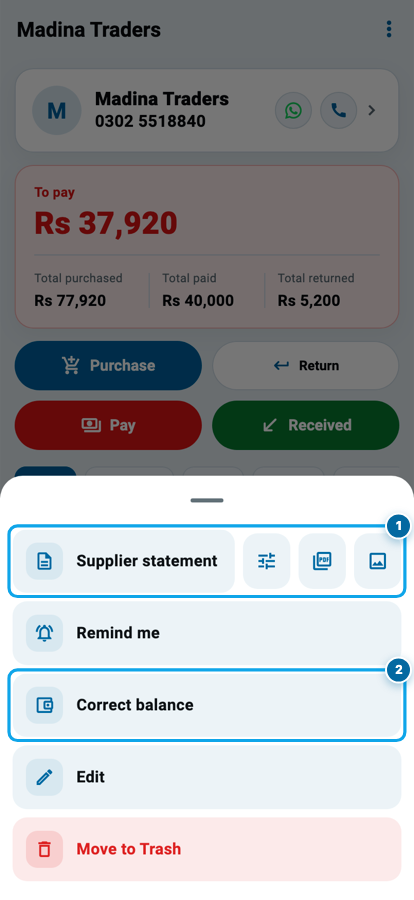
The ⋮ menu at the top of the supplier's page holds the rest.
Supplier statement asks for a Statement period (all time, this month, last month or your own dates) and makes a PDF to share, or an image from the icon beside it. Send it when your totals do not match.
Remind me asks for a day, and that morning Wasoolo reminds you to pay this supplier. Correct balance asks what you owe right now and records only the difference, so a mismatch is fixed without deleting a single entry.
Common questions
Does a purchase in Wasoolo add stock too?
Yes. Purchase opens Stock in with the supplier filled in, so one Save adds the items to your stock and puts the bill on the supplier's page.
What if I pay a supplier more than I owe?
Before you save, the payment tells you how much becomes advance. After it, the supplier's card turns green and says Advance instead of To pay.
The supplier gave me a bonus, not a refund. What do I choose?
Tap Received and choose Bonus. The money goes into the account you pick and does not change what you owe, unless you choose to cut it from what you have to pay.
Where do goods bought from the open market go?
Into Bazaar khata at the top of the Suppliers page. It holds purchases and payments that belong to no supplier, and they still count in your totals.
I owed this supplier before I started using Wasoolo. Where does that go?
Into Starting balance when you add the supplier. For a supplier already in the app, open the ⋮ menu, tap Correct balance and type what you owe today.
Can my staff record purchases and pay suppliers?
Only with your permission. Seeing suppliers, purchases, payments, returns and refunds, and the statement are separate permissions for each team member.