
GuideApp tutorials
Class 19: the employee khata and attendance in Wasoolo
Class 19 of the Wasoolo course: add an employee, set how he is paid, mark attendance in one tap, and keep his salary, advance and bonus in one khata.
What Class 19 covers, in order
- 1Open EmployeesOne page for every man who works for you, with what the shop owes him on the right of his name.
- 2Add the manHis name, his work, his phone, and the money he already has from you before today.
- 3Say how he is paidMonthly, weekly, daily or hourly, his pay day, his weekly off, and whether the app writes the salary by itself.
- 4Mark the dayPresent, half day, absent or leave, one tap per man, or the whole shop present in a single tap.
- 5Write the moneySalary written, salary given, an advance he took, a bonus, a fine — every line on his own khata.
- 6Hand him the paperA salary slip for the month, an attendance sheet for the shop, and his full statement when he asks.
Your khata knows every customer by name. The men who work for you sit on a diary page, or nowhere at all. Class 19 opens the whole employee side of Wasoolo: adding a man, saying how he is paid, marking attendance in one tap, and keeping his salary, advance and bonus in one khata.
Open Employees and see what every man is owed
It is the first of the month. Usman asks for his salary, Shakeel says two extra days are owed to him, and you are doing both sums in your head. Three answers, one diary, and none of them agree.
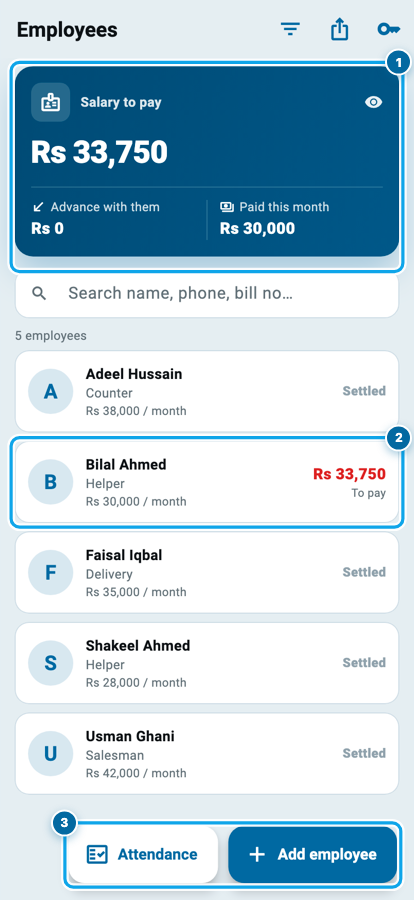
On the home screen tap Employees. The blue card is your whole staff bill in three figures: Salary to pay is what you owe everybody, Advance with them is your money sitting in their pockets, and Paid this month is what has gone out.
Under it every man has a row with his work, his rate and his own figure on the right: green when the shop owes him, red when he is carrying your money, grey when you are square. Search finds him by name or phone.
Add the man, and say what he does
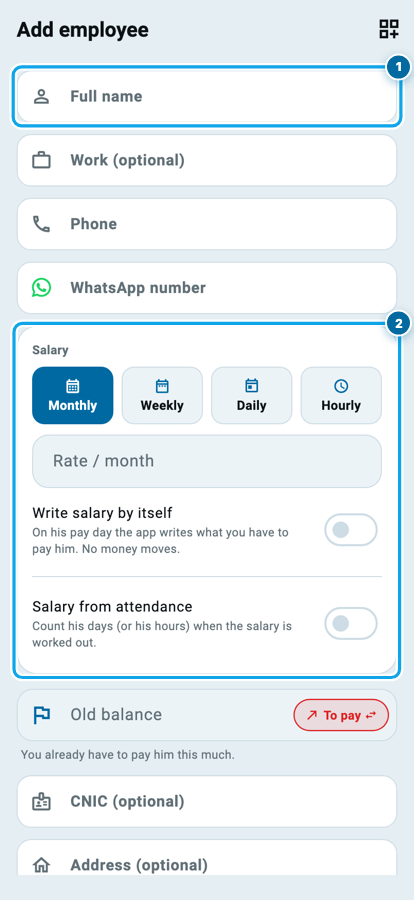
Tap Add employee. Full name is the only box the form insists on. Work is what he does in your shop, such as Salesman, Delivery or Counter, and it prints under his name afterwards. Phone and WhatsApp number are separate boxes, because the number a man answers is often not the number on his SIM.
Then comes the part that decides his money. Salary asks how he is paid: Monthly, Weekly, Daily or Hourly, and the box under it changes its own label to match, so a daily worker is asked for a rate per day.
Further down sit CNIC, address, joining date and a note. Add field keeps anything the form never asked for, as text, a number or a photo.
Say how he is paid, before you mark a single day
Scroll the same form down. Two switches decide how much the app does for you.
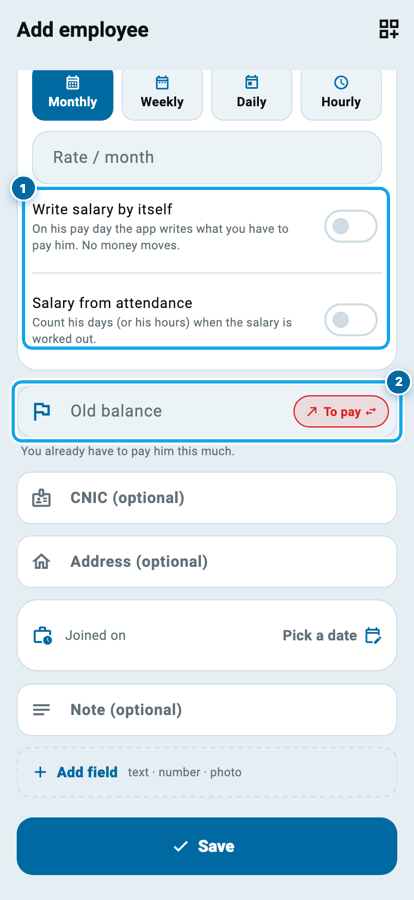
Write salary by itself posts his salary on his own pay day, without you opening anything. No money moves: it writes down what you now owe him.
Salary from attendance counts his days, or his hours, when that salary is worked out. Turn it on and you can cut for absent days, with a few free leaves in the month before the cut starts.
Old balance is the line most shopkeepers need on day one. Type what you already owe him, or put a minus in front if he is carrying your money, and his khata starts from the truth instead of from zero.
Mark the day in one tap
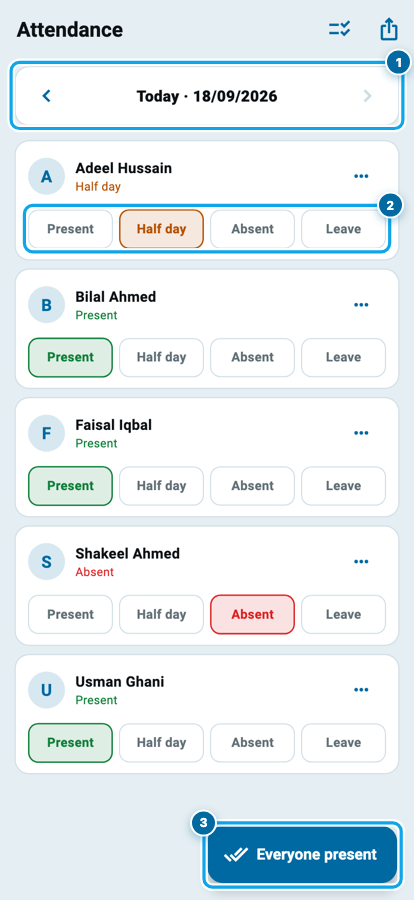
Nine in the morning is not the time for a form. Open Attendance from the employees page and the whole shop is one list, one day at a time, with arrows to walk back through the week.
Every man carries four chips: Present, Half day, Absent and Leave. The chip you tap is the mark, and tapping it again clears it. A man paid by the hour gets In and Out instead, plus an Hours button for the days nobody punched and you simply know he worked eight hours.
Everyone present marks the whole shop at once, and it fills only the men who have no mark yet, so the leave you recorded at eight can never be wiped by the tap you make at nine.
His page: what he earned, what he took
Tap a man to open his own page. The blue card carries one figure and says which way it points, We have to pay him or He is carrying our money. Under it, He earned is his salary and bonus less any fine, and He got is everything he has taken, advances included, less what he gave back.
The four buttons under it are the money doors. Received in green and Gave in red move real money and ask which account it came from, as in Class 2. Write salary and Write bonus record what you owe without touching your cash, and Fine takes an amount off it.
At the bottom, Khata lists every line newest first, Attendance is his own month, and Details holds the rest.
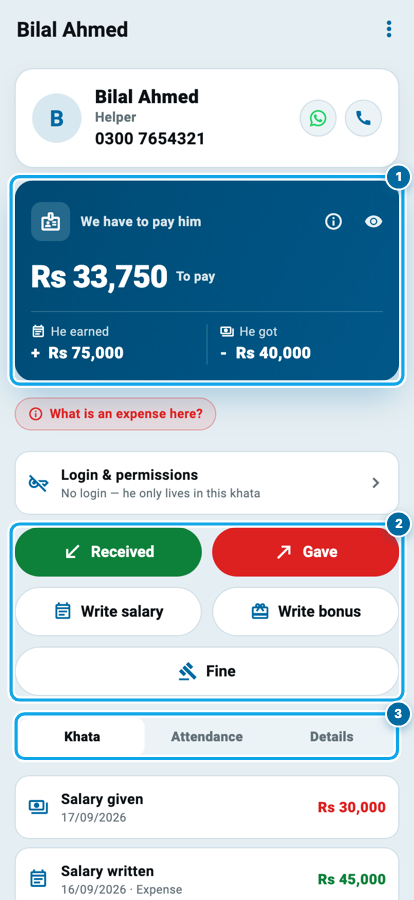
One month, one man, and what is still his
Notice what the advance did. It is not an expense of its own: the shop already counted the whole Rs 45,000 the day the salary was written, and the Rs 5,000 he took early only moved money out of the drawer against it. The fine takes Rs 500 off what you owe and moves no money at all. So the figure at the bottom is the only one you have to remember on pay day, and it is the same figure he sees if you let him read his own khata.
Start your digital khata today
Free to start. Works offline. English, Roman Urdu & Hinglish. Your customers get their app free, forever.
The line that moves no money, and the paper he can hold
The mistake that costs a shopkeeper a whole month is counting one salary twice: once when it went into the diary, again when the notes were handed over. Wasoolo makes them two doors and says so on the screen.
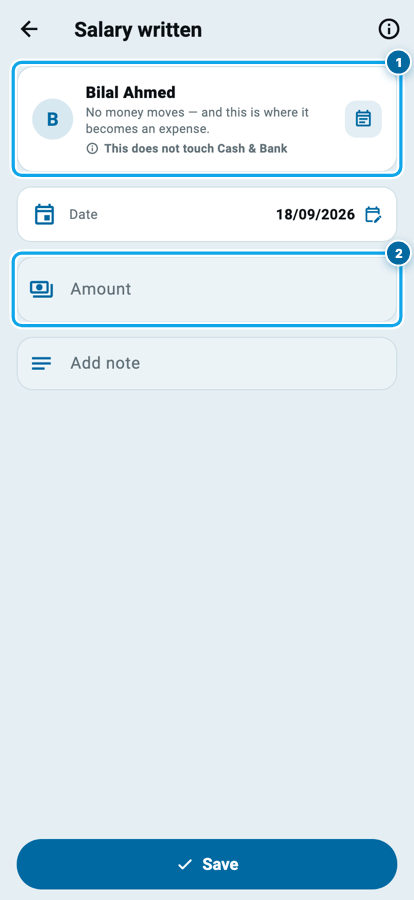
Write salary, a page headed Salary written, records what you owe. No money moves, and this is the moment it becomes an expense, so it lands in the expenses you already keep in Class 16. Gave is the money leaving your cash or bank, and it is not counted as an expense again. Write first or pay first: the shop counts it one time. An advance follows the same rule, and his next salary cuts it, which this guide to a helper's salary and advance works through slowly.
From the same page you can hand him paper: a salary slip on a small roll with his days and his money, an attendance sheet for the whole shop's month, and a statement of his full khata, the way a supplier or an investor gets one.
His own login, and what he may see
Login & permissions on his page is the second door, and it says which state the man is in: he can sign in to the app, or he only lives in this khata. Give him a login and you choose what he may do with it.
One switch is worth knowing about. He can see his own khata puts a My khata row in his own More tab, where he reads his salary, his advances and his days, and changes nothing. A man who can check his own number stops asking every Friday.
If he leaves, use He has left the job: he goes out of attendance, no new salary is written, his login is removed, and his khata stays as it is until you are square.
Start your digital khata today
Free to start. Works offline. English, Roman Urdu & Hinglish. Your customers get their app free, forever.
Common questions
Do I have to mark attendance every day for the salary to be right?
Only if you turned on Salary from attendance. A man on a plain monthly wage is paid the same either way, so his days are then only a record you keep.
I paid an advance in the middle of the month. Is that an expense?
No. An advance is money he takes before he earns it, so it is never an expense of its own, and his next salary cuts it. The expense was the salary you wrote down.
What if I write the salary and pay it on the same day?
Write it, then tap Gave and choose the account. The shop counts one salary once: writing makes it an expense, paying moves the money.
Can my employee see other people's pay?
No. He sees his own khata only, and only if you turn that switch on. What the others earn stays with you.
Can I pay by the hour?
Yes. Set his salary to Hourly and attendance gives him In and Out, or an Hours button when nobody punched. The month adds his hours and counts overtime past your limit.
What happens to his record if I delete him?
His khata and his attendance go with him, and every rupee they moved is undone. His login is untouched. Use He has left the job to take him off the daily list instead.