
updateWhat's new
What's new in Wasoolo 3.3.0: type the last installment yourself, and print each customer's address in your khatas list
Wasoolo 3.3.0 lets you type the last installment of a qist plan and shares the rest equally above it, and adds an Address column to your khatas list.
Wasoolo 3.3.0 in four lines
- 1Type the last installmentIt has its own box now, like the rest.
- 2The rest is shared equallyOver the unpaid installments above it.
- 3Paid ones never movePaid and part-paid installments stay as they are.
- 4Address in your khatas listA new column for the PDF or Excel export.
Wasoolo 3.3.0 brings two changes. The last installment of a qist plan is no longer locked: type the amount you want, and what is left is shared equally across the installments above it. And the khatas list you export can now carry each customer's address in its own column.
Type the last installment yourself
Until now, every installment on the plan page had a box you could type in except the last one. The last one simply took whatever was left over. That was fine for an even plan, but many deals end differently. A customer buying a phone says, "Let the last one be small, I will clear it the month my bonus comes." You agree, and then the screen would not let you write it.
Now the last installment has its own box, like every other row. If you have never made an installment plan before, Class 4 walks through the whole page first.
- For a new khata, pick Installments and tap Set up installments. For a khata that already has a plan, open it and tap Edit on the Installment plan card.
- Set the Number of payments.
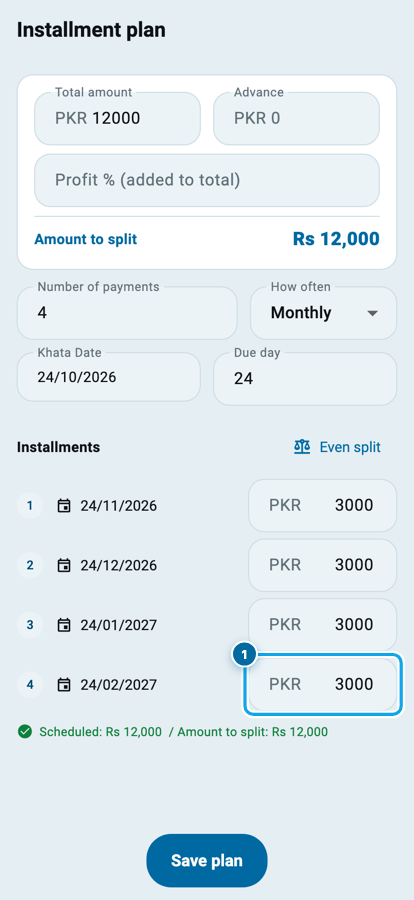
- Type the amount you want in the last installment (1).
The rest is shared equally
The moment you type, Wasoolo keeps your last installment as it is and shares the rest of the amount equally across the unpaid installments above it.
Say a phone sells for Rs 12,000 in four monthly installments, so each one is Rs 3,000. The customer wants a small last one of Rs 1,500. Type 1500 in the last box, and the three above become Rs 3,500 each. Three times Rs 3,500 is Rs 10,500, plus Rs 1,500 makes Rs 12,000, so the plan still adds up to the full amount.
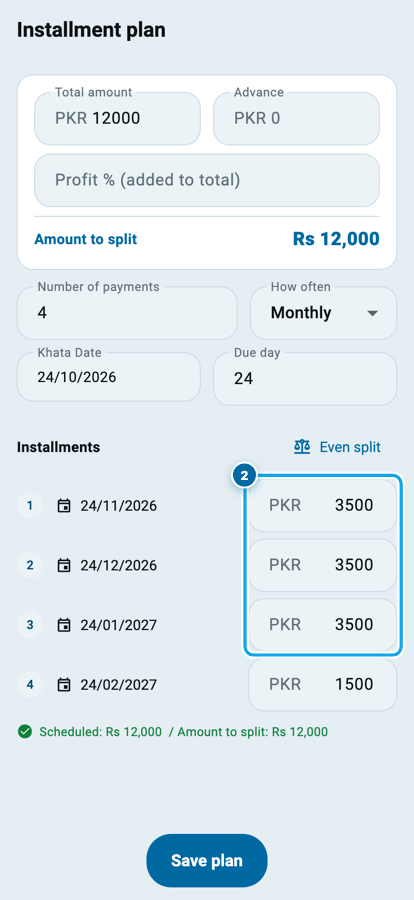
The green line under the list, Scheduled, shows the same total as Amount to split, so you can see at a glance that nothing is missing.
The shares are whole rupees, like the rest of the plan. When the amount does not divide evenly, the installment just above the last one takes the few extra rupees. Rs 10,000 in four installments with a last one of Rs 2,000 becomes Rs 2,666, Rs 2,666, Rs 2,668 and Rs 2,000.
Paid installments stay as they are
When you edit a plan the customer has already started paying, the money already received is safe:
- An installment that is fully paid shows a lock and never changes.
- An installment that is partly paid keeps its amount too.
- Only the unpaid installments above the last one share the difference.
If there is no unpaid installment above the last one, its box stays locked. That happens on a plan with a single installment, or when every earlier installment already has money in it. There is simply no other installment to take the difference.
If you type more than the amount to split, a red line says Payments add up to more than the amount and Save plan stays off until you lower it.
For the bigger question of when a running plan should change at all, read when a qist plan has to change halfway through.
Change a row higher up later
Once you have typed the last installment, it stays put. Change an installment higher up, and only the installments in between move.
Take the plan above: Rs 3,500, Rs 3,500, Rs 3,500 and Rs 1,500. Now type Rs 5,000 in the first one. The second and third become Rs 2,750 each, and the last one stays at Rs 1,500.
There is one exception. If you change the installment right above the last one, nothing sits in between, so the last one takes the difference. That keeps the plan adding up to the full amount at every step.
This is remembered while you are on the page. When you open the plan again later, the last installment is an ordinary row: change one above it, and every installment below that one is shared again, the last one included. On a plan with nothing paid yet, Even split at the top of the list still makes every installment equal again.
Print each customer's address in your khatas list
The khatas list you download from the Khatas tab has a new column: Address. A recovery round goes faster when the paper in your hand already says where each customer lives. Class 8 covers the whole export sheet; here is the new part.
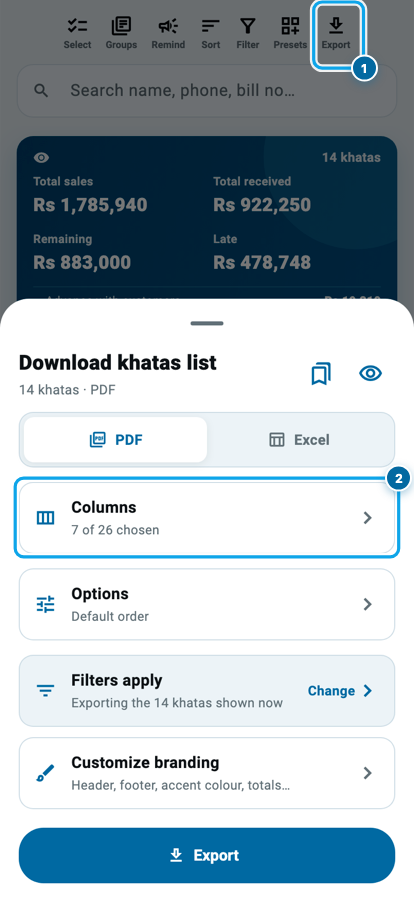
- Open the Khatas tab and tap Export (1) at the top.
- Tap Columns (2).
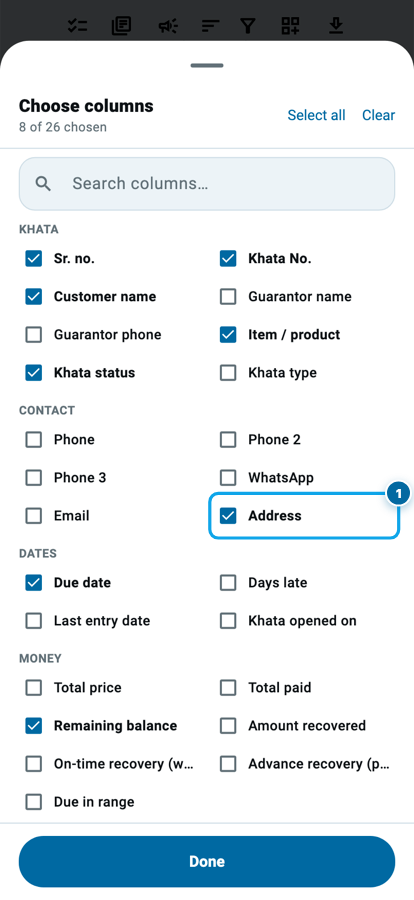
- Under Contact, tick Address (1), next to Email, and tap Done.
- Pick PDF or Excel and tap Export.
Each row now shows the address saved on that customer. An address written on two lines prints on one line, joined with a comma, so the row stays neat. A customer with no address saved gets an empty cell.
To add or fix an address, open the customer, tap the ⋮ menu, choose Edit profile and fill in Address. Why that small habit pays back is in keep every customer's number and address current.
Common questions
Can I still type the other installments?
Yes. Every unpaid installment still has its own box. Changing one shares the difference over the installments below it, as before, and a last installment you typed stays as it is.
Why is my last installment still locked?
Because no unpaid installment sits above it to take the difference. That is a plan with one installment, or a plan where every earlier installment already has money in it.
Does typing the last installment change what the customer owes?
No. The total and the amount to split stay the same. Only the way it is divided between the installments changes.
Will a paid installment ever change?
No. A fully paid installment is locked, and a partly paid one keeps its amount when you type the last installment.
Where does the Address column take the address from?
From the Address saved on each customer's profile. A customer without one gets an empty cell.
Do I need to set anything up after updating?
No. Update the app and both changes are ready. The Address column is off until you tick it.