
GuideApp tutorials
Class 8: how to export your recovery list
Class 8 of the Wasoolo course: narrow your khatas down to the people who still owe, then export that recovery list as a PDF or an Excel file.
What Class 8 covers, in order
- 1Open the Khatas boardEvery khata your shop has, with the money still owed on each one.
- 2Filter down to who owesBalance, due status, days without a payment — the list you export is the list you see.
- 3Pick PDF or ExcelA PDF to hand over or print; an Excel file to sort and total yourself.
- 4Choose the columnsTwenty-five to pick from: name, phone, remaining balance, due date, guarantor.
- 5Export and send itThe file lands in your share sheet — WhatsApp, email, print, or save.
Your recovery list is the Khatas board, narrowed. Filter it down to the people who still owe you, tap Export, and Wasoolo builds that same list as a PDF you can hand over or an Excel file you can sort yourself. Class 8 does it end to end.
Where the recovery list lives
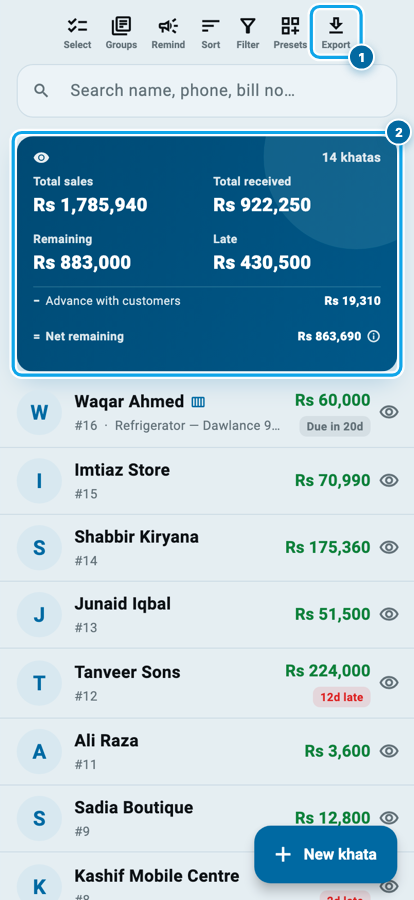
Open the Khatas tab. Every khata your shop has opened is here, newest number first, with what is still owed showing in green on the right.
Above the list sits a row of seven small icons: Select, Groups, Remind, Sort, Filter, Presets and Export. Export is the last one, and it is the whole class.
The blue card under the search box is the shop's own arithmetic for whatever is on screen: total sales, total received, what is remaining, and how much of that is already late. Change the filter and all four figures change with it. That is the first thing to understand about this feature: the export is a photograph of the list you are looking at, not a fixed report.
What Class 8 covers, in order
- 1Open the Khatas boardEvery khata your shop has, with the money still owed on each one.
- 2Filter down to who owesBalance, due status, days without a payment — the list you export is the list you see.
- 3Pick PDF or ExcelA PDF to hand over or print; an Excel file to sort and total yourself.
- 4Choose the columnsTwenty-five to pick from: name, phone, remaining balance, due date, guarantor.
- 5Export and send itThe file lands in your share sheet — WhatsApp, email, print, or save.
First, decide who is on it
It is Thursday night and you want to know who to call in the morning. Nobody needs a list of everyone. Tap Filter.
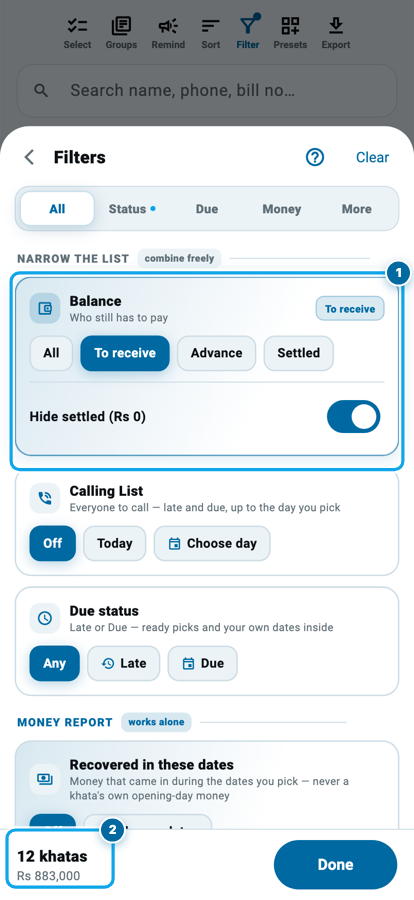
The Balance card at the top is the one that matters here. Four choices sit in it: All, To receive, Advance and Settled. Pick To receive and the board keeps only the people whose khata still has money in it. On the shop in the picture, fourteen khatas become twelve.
Under it, Calling List and Due status cut deeper. Due status has ready picks for late by one to seven days, eight to thirty days, over a month, over two months, over three months. No payment received finds a different kind of person: the one who has not paid a rupee in sixty days even though he keeps buying. The filters combine freely, and the same search and filter tools Class 5 walked through are on this screen too.
Watch the bottom bar while you tap. It counts the khatas that survive and adds up what they owe, so the round gets smaller and sharper in front of you.
Open Export and pick the paper
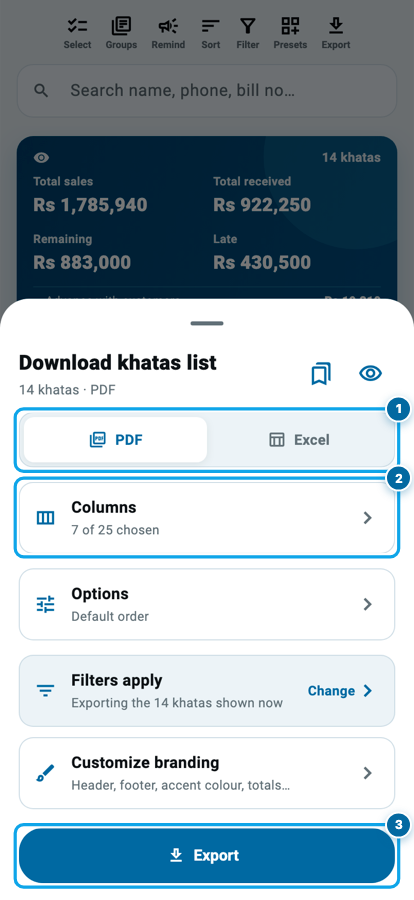
Back on the board, tap Export. The sheet that opens says Download khatas list and, under it, how many khatas and which format.
PDF is a printed page: columns, headings, your shop on top, a total line at the end. It is what you hand to a helper, print for the counter drawer, or send on WhatsApp to a partner. Excel is the raw table: no page, no width limit, and you can sort or total it any way you like on a computer. PDF holds fourteen columns before the page gets tight, and the sheet offers to switch you to Excel past that.
Under the format sit the two rooms this class spends its time in, Columns and Options, then a grey line reminding you that your filters are still on. The blue Export button at the bottom builds the file and opens your phone's share sheet.
Choose the columns
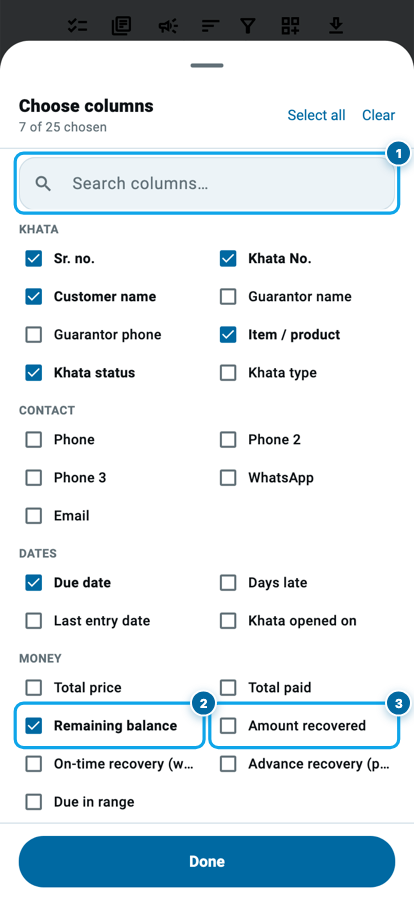
Twenty-five columns are on offer, grouped as Khata, Contact, Dates and Money, with a search box on top when you know the one you want.
For a recovery round, four earn their place: Customer name, Phone, Remaining balance and Due date. Add Guarantor name and Guarantor phone when the khatas carry a guarantor, because the second number is the one you call in the second week. Amount recovered is the other useful one: it shows what has already come in, which turns a chasing list into a progress sheet.
Leave the rest off. A page with six columns is read at a glance across a counter; a page with twelve is squinted at.
What the total line at the end of an exported list adds up
Every money column you tick gets its own total on that line, and each one is added from the rows above it — nothing on the paper is typed by hand.
Group it, sort it, name it
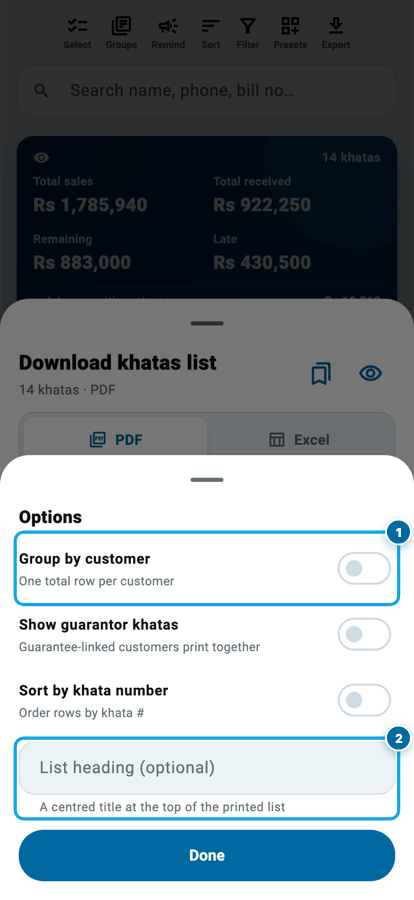
Options holds three switches and one text box.
Group by customer matters when one person has several khatas. Instead of his name appearing four times, his four rows print together with a bold total under them, and you make one call instead of four. Show guarantor khatas goes further and prints a guarantor's people as one block. Sort by khata number puts the list back in the order your register grew.
The text box is List heading, and it is worth typing in. "Bazaar round" or "Pending over 30 days" is centred at the top of the printed page, so the sheet in the drawer says what it is three weeks later.
Start your digital khata today
Free to start. Works offline. English, Roman Urdu & Hinglish. Your customers get their app free, forever.
What prints around the table
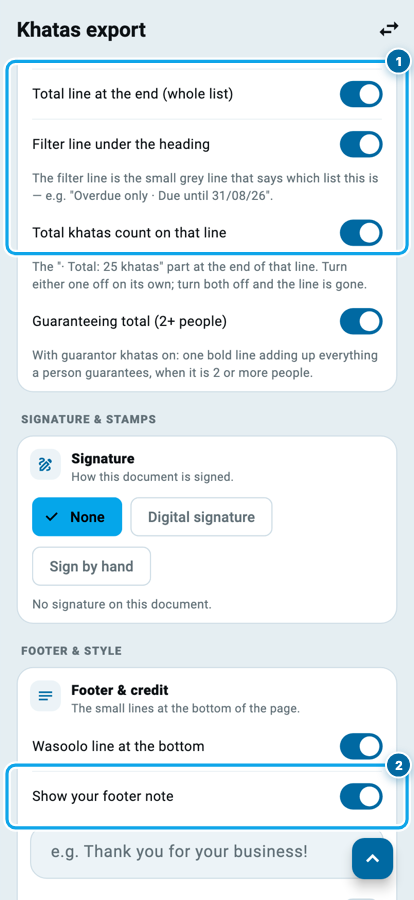
Customize branding opens the same room Class 6 was about, on the Khatas export page. Your shop name, logo, phone and address print at the top. Three switches below decide what wraps the table.
Total line at the end adds up every money column across the whole list. Filter line under the heading prints the small grey line that says which list this is, and Total khatas count on that line adds how many rows are in it. That second one has its own switch on purpose: a sheet you hand to a customer is one place you may not want to print how many people owe you money.
Further down, your footer note prints one line at the bottom of every page. A phone number, or a sentence such as "Please clear before the 10th", is more useful there than a blank margin.
Sending it, and who is allowed to
Press Export and the file appears in your phone's share sheet as wasoolo-khatas.pdf, or wasoolo-khatas.xlsx if you chose Excel. From there: WhatsApp, email, a printer, or your files. Nothing leaves the phone until you choose where it goes.
Two things are worth knowing. The eye at the top right shows the real first page before you build it, and a preview costs nothing against your monthly document count; the free plan allows 500 documents a month. If a team member is on your shop, exporting the board needs his export permission switched on, because names, numbers and balances all leave in one file.
Every choice you made is remembered. Open the sheet next Thursday and your columns, your format, your grouping and your heading are already set, so the second recovery list takes one tap. Whether you build it every week or once a month is a decision worth making on purpose.
Common questions
Does the export include khatas I cannot see on screen?
No. The file is exactly the list your filters left behind, in the order you sorted it. If twelve khatas are on the board, twelve rows are in the file. That is why the filter comes first.
Can I export only one customer instead of the whole board?
Yes, but that is a different paper. A single account prints as a khata statement or a customer statement from the documents screen. This export is for many people at once.
Will the exported list show phone numbers?
Only if you tick them. Phone, Phone 2, Phone 3, WhatsApp and Email are separate columns, and none prints unless it is selected in the column picker.
Is Excel or PDF better for a recovery round?
PDF for the round itself, because it prints and reads on paper. Excel when you want to sort by amount or keep a copy for your own working.
Do I have to pick the columns again every time?
No. Your columns, format, grouping and heading are saved with your shop and follow your login onto another device, so the next export opens ready to go.
What if the customer says my figure is wrong?
Open his khata and show the entries behind the number. The list is a summary; the khata is the proof, and that is the conversation the entries settle.