
updateWhat's new
What's new in Wasoolo 3.2.0: your suppliers list as PDF or Excel, and khatas by customer with their guarantees
Wasoolo 3.2.0 adds a suppliers list you can download as PDF or Excel, and a Khatas filter by customer that can also count the khatas they guarantee.
Wasoolo 3.2.0 in four lines
- 1Your suppliers listPDF or Excel, from the Suppliers page.
- 2Pick every columnTo pay, advance, purchases, paid and more.
- 3Filter khatas by customerOne customer or many, on the Khatas tab.
- 4Add what they guaranteeOne tick, and every total counts them.
Wasoolo 3.2.0 puts your whole suppliers book on one paper. From the Suppliers page you can download every supplier, what you still have to pay them and what they still owe you back, as a PDF or an Excel file. And on the Khatas tab, a customer filter can now count the khatas that customer stands guarantee for.
Download your suppliers list
Before this update you could print one supplier's statement at a time. To see all of them together, you had to open each page and write the figures down. Now the full list is one tap away. If you are new to the supplier side of the app, the supplier khata class walks through it from the first bill.
- Open Suppliers (from Home or from More).
- Tap the download button at the top (1), next to the filter button.
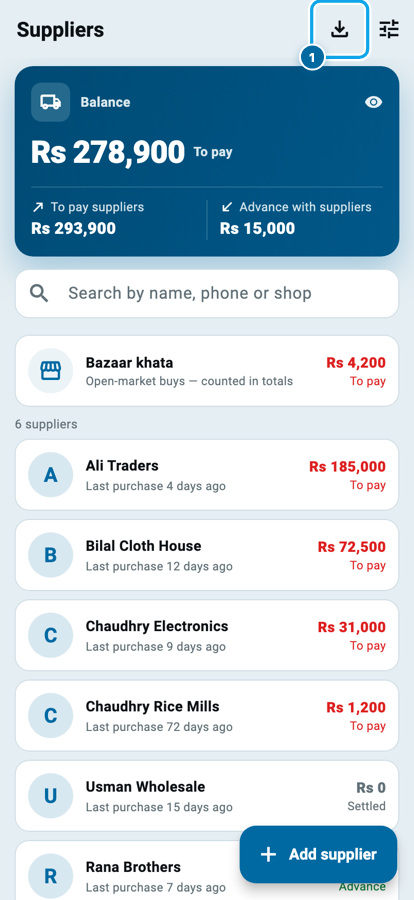
The Download suppliers list sheet opens. It shows how many names will be on the paper and whether it will be a PDF or an Excel file.
- Pick PDF to print or share the list, or Excel to work on it in a spreadsheet.
- Tap Columns (1) to choose what each row shows, and Options (2) for the extra parts of the list.
- Tap Export.
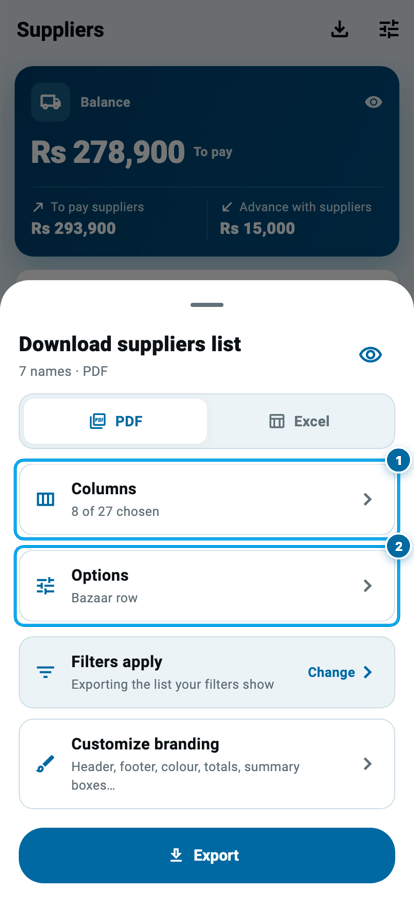
The eye at the top of the sheet opens the real first page, so you can check it before anything is saved or sent.
The list follows the Suppliers page. If you filtered it to To pay only, or searched for one name, the paper shows exactly that. Filters apply has a Change button that takes you to the filters and brings you back to the sheet.
Choose every column
A wholesaler and a corner shop do not need the same paper. So you pick the columns yourself, out of twenty-seven, in four groups: Supplier, Contact, Dates and Money.
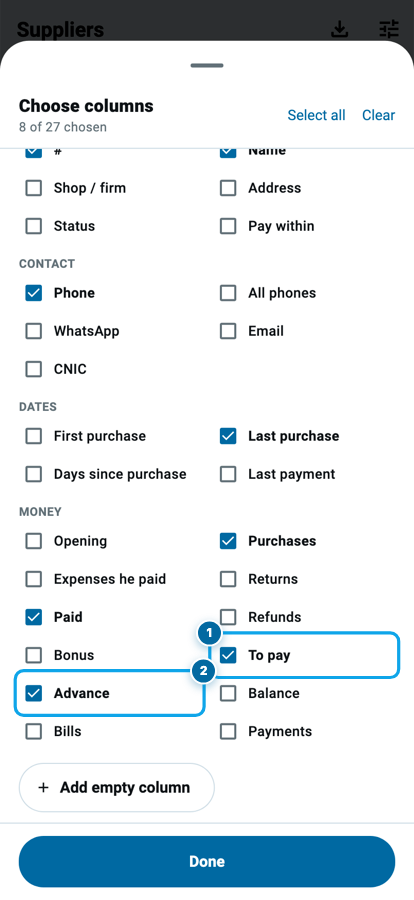
The ones most shops keep are:
- Name, Phone and Last purchase, so you know who to call and when you last bought.
- Purchases and Paid, the two halves of every supplier khata.
- To pay (1): what you still have to give that supplier.
- Advance (2): money you paid ahead, which you will get back in goods or cash.
Under Money you also find Opening, Returns, Bonus, Refunds, a Balance column that says "to pay" or "advance" in words, and a count of Bills and Payments. The search box at the top finds any column by name, and Add empty column puts a blank column on the paper, for a signature or a note written by hand.
Options adds three more choices:
- Bazaar row: your market purchases with no supplier, as one line.
- Customers you bought from: people who are your customers but once sold you something. They print as their own part, under a heading, with their own total.
- Money only in the filter dates: shown when the Suppliers page has a date filter, like This month. Purchases, payments and bonus then count only those days, while To pay and Advance stay today's figures. The paper says which dates it used.
What the paper looks like
The PDF opens with your shop's name, then four boxes: how many suppliers, the total To pay, the total Advance, and the Balance between them. These are the same three figures as the card at the top of the Suppliers page.
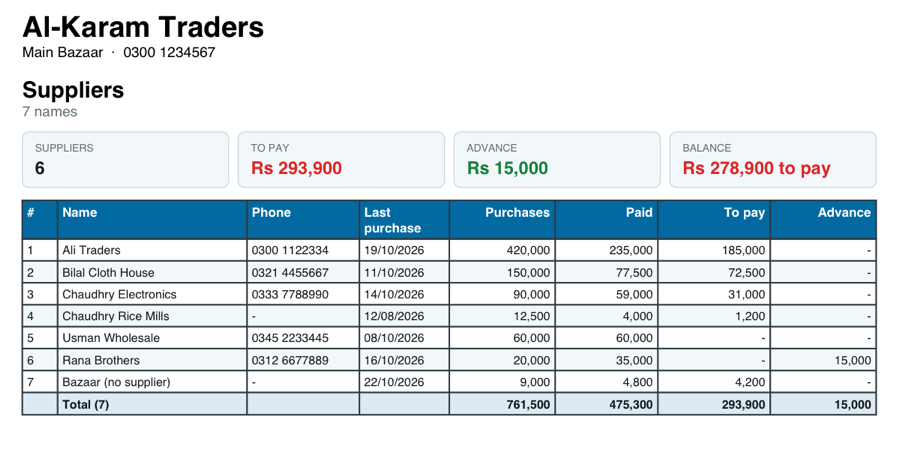
Below the boxes comes one row per supplier and a Total line that adds up every money column. With eight columns the page stays upright. When you pick more, it turns sideways by itself so every column fits.
Say you owe Ali Traders Rs 185,000 and Bilal Cloth House Rs 72,500, and you paid Rana Brothers Rs 15,000 ahead. The boxes read To pay Rs 257,500, Advance Rs 15,000 and Balance Rs 242,500 to pay. Every row underneath shows where those figures came from.
The Excel file carries the same rows, and every amount is a real number, so you can add, sort and filter it in any spreadsheet.
Make it your shop's paper
On the sheet, Customize branding opens the settings for this paper alone, called Suppliers list. You can also find it under More, Customize invoices & receipts.
There you choose your logo, header, colours and footer, and switch these on or off:
- Summary boxes at the top
- Total line at the end
- Filter line under the heading and How many names on that line
- Repeat column headings on every page, for long lists (Pro Lite and Pro)
The preview on that page uses your own suppliers, so every switch shows its effect right away.
If employees use the app, the owner can ask for approval before they download it. Open More, then Users & permissions, then Employees, and open the employee. On the Approvals tab, tap Documents (need my OK): Suppliers list has its own switch, separate from the supplier statement.
Filter your khatas by customer
This filter reached Android in version 3.1.1. Now it is on the iPhone, the Mac, the web app and Windows too.
- Open the Khatas tab and tap Filter at the top.
- Find Customers (1) and tap Choose customers.
- Search and tick one customer or many, then tap Save.
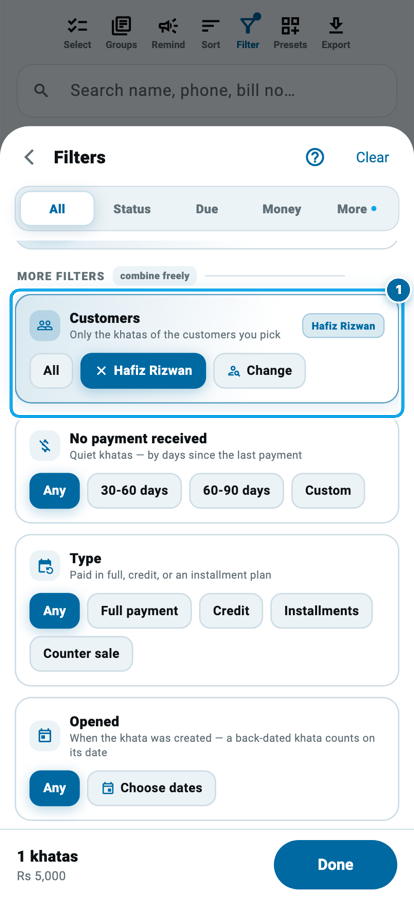
The list, the totals card at the top and your export now show only those customers' khatas. It works with every other filter, so "Hafiz Rizwan's khatas that are late" or "Recovered this month from these three" are both one question. Each picked customer shows above the list with an ✕ to remove them.
Add the khatas they guarantee
Many shops sell on qist with a guarantor, the zamin who promises to pay if the customer stops. Often the same trusted person stands guarantee for several customers. Now you can see all of that money in one place.
- Pick the customer in the Customers filter, as above.
- On the totals card at the top of the Khatas tab, tick Also khatas they are guarantor of (1).
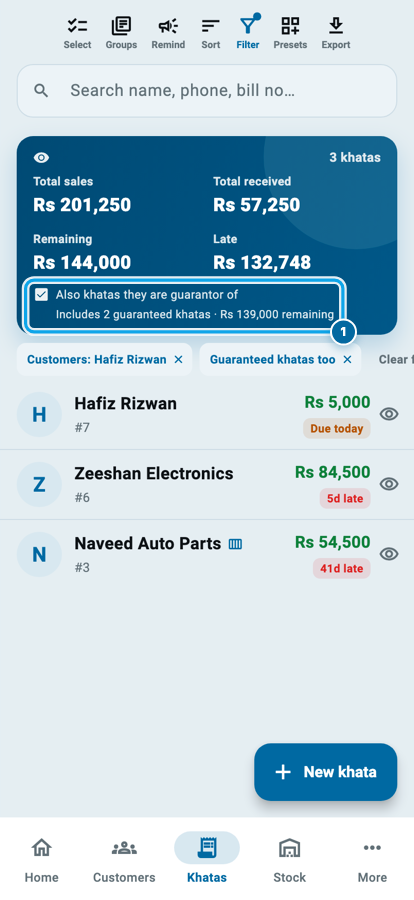
Every khata they guarantee joins their own. The list, Total sales, Remaining, Late, the recovery figures, Select all, Remind all and the export all count them. A small line under the tick says how much of the total comes from the guaranteed khatas, like "Includes 2 guaranteed khatas · Rs 139,000 remaining". A chip, Guaranteed khatas too, shows above the list while it is on.
Untick it, and you are back to the customer's own khatas. The tick is remembered with your filter and with saved views. If you remove the customer, it switches off by itself.
When to ask for a guarantor covers the judgement side of zamin, before the khata is opened.
Common questions
Where is the suppliers list download?
Open Suppliers and tap the download button at the top, next to the filter. It is also under More, Generate documents, as Download suppliers list.
Does the suppliers list cost anything?
No. PDF and Excel are both free. Only repeating the column headings on every page needs Pro Lite or Pro.
Can I download only the suppliers I still owe?
Yes. Filter the Suppliers page to To pay first, then download. The paper always follows the page's filters and search.
Will ticking the guaranteed khatas change any customer's balance?
No. It only changes which khatas the Khatas tab shows and adds up. No khata or payment is touched.
Can an employee download the suppliers list?
Yes, if they have the Export / download data permission. The owner can also ask for approval first with the Suppliers list switch under Approvals.
Do I need to set anything up after updating?
No. Update the app and both features are ready. The guaranteed khatas tick starts switched off.
To see why a supplier's total and yours sometimes disagree, read when your supplier's total and yours do not match.