
updateWhat's new
What's new in Wasoolo 3.0.0: your own khata form, purchase bills that show what is pending, and note suggestions
Wasoolo 3.0.0 lets you shape the New khata form, prints what is pending on every purchase bill, suggests your old notes, and makes sign-up shorter.
Wasoolo 3.0.0 in nine lines
- 1Your own New khata formTurn rows off and drag them into your order.
- 2Purchase bills show what is pendingPending on this bill, Previous balance, Total pending.
- 3Note suggestionsYour old notes, one tap away.
- 4Cash in hand on a gave entryDrawer, Cash in hand or No money moved.
- 5Get Pro freeShare your story or invite a friend.
- 6A shorter sign-upEmail and a password, or Google.
- 7Suggest a featureIn More, under Help.
- 8Neater papersAn even Urdu receipt, a stamp that keeps off the signature.
- 9Smaller fixesA tips switch, safer edits and more.
Wasoolo 3.0.0 lets you shape the New khata form your own way, prints what is still pending on every purchase bill, and suggests your old notes while you type. Sign-up is shorter, a gave entry can use Cash in hand, and shop owners on the Free plan can earn Pro Lite by sharing their story.
Your own New khata form
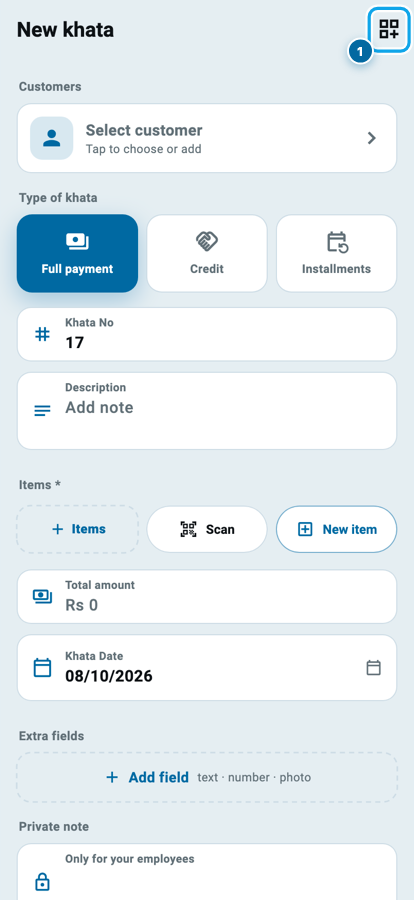
Every shop fills the New khata form differently. A mobile shop always writes a description and never touches guarantors. A grocery store never writes a khata number and wants the date right under the items. Until now everyone scrolled past the same rows.
Now the form is yours to arrange:
- Open New khata and tap the customize button at the top right (1).
- On Customize this page, turn off any row you never use with its switch (1).
- Hold the dots on the left of a row (2) and drag it up or down.
- Rows a khata cannot live without, like Customers, Items, Total amount and the Installment plan, show a lock (3) and always stay.
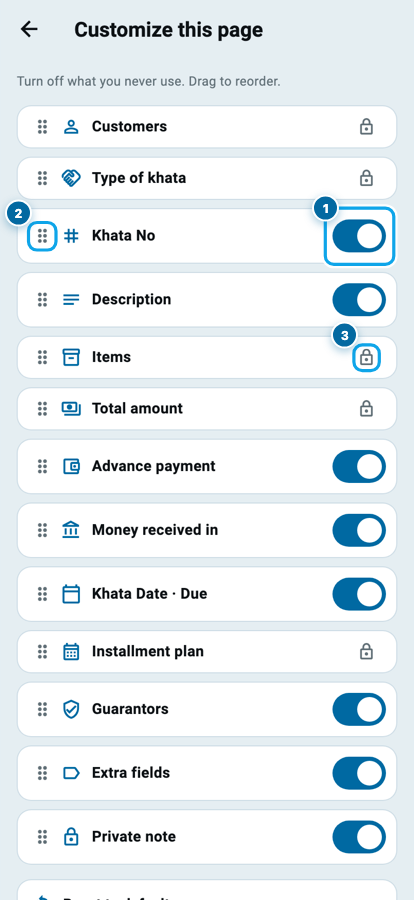
The layout is saved for your shop and used every time you open a new khata or edit an old one. Switching a row off only hides the question: a khata that already holds something in that row keeps it. Changed your mind? Reset to default at the bottom of the list puts the form back the way it shipped. The counter sale keeps its own form.
If you are new to khatas, Class 3 walks through making one.
Purchase bills that say what is still pending
Imran from the wholesale market drops off a bag of rice and asks, "How much do I still have to collect from you, in total?" Until now your purchase bill showed only that one bill, so you opened the supplier's khata to work it out.
Now a purchase bill ends with three lines under the payments:
- Pending on this bill: what is left to pay on this bill after the money you paid with it.
- Previous balance: what you already owed this supplier before this bill.
- Total pending: what you owe this supplier today, the same figure his khata shows.
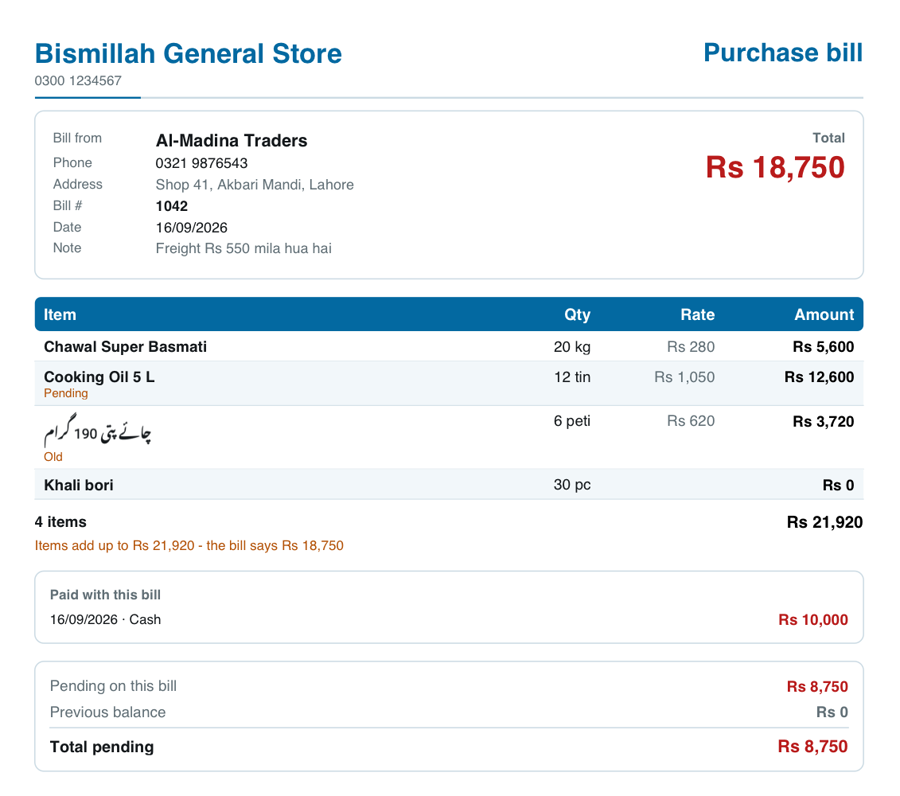
Paid the supplier more than you owed? The paper says it in words, never with a minus sign: Paid extra on this bill, Previous advance and Total advance. Print an older bill again and it adds Added after this bill or Reduced after this bill when later entries moved the total. A return slip has no pending line.
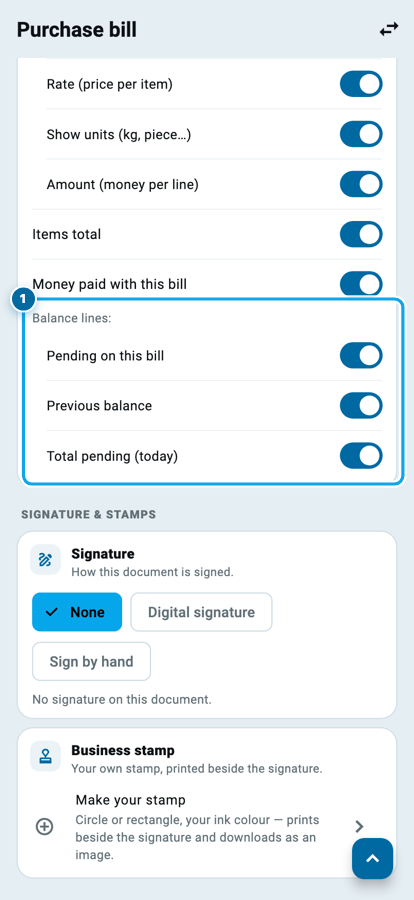
Each line has its own switch, and all three are on to start. To change them:
- Open More and tap Customize invoices & receipts.
- Open Purchase bill and scroll to Balance lines (1).
Class 17 covers the whole supplier khata, from the first bill to the last payment.
Note suggestions while you type
You write the same few notes again and again: "rent", "electricity bill", "Friday wages", "returned 2 bottles". Now, as soon as you start typing in a note box, your old notes appear under it as suggestions. Tap one and it fills in.
Each kind of note suggests its own kind. An expense note suggests your expense notes, a stock note suggests your stock notes, and a supplier, employee, investor or loan page suggests notes from that same kind of page. Notes the app writes by itself are never suggested, and a staff member only sees notes from lists they are allowed to open.
You choose where the suggestions come from. Open More, then Settings, then Note suggestions (1):
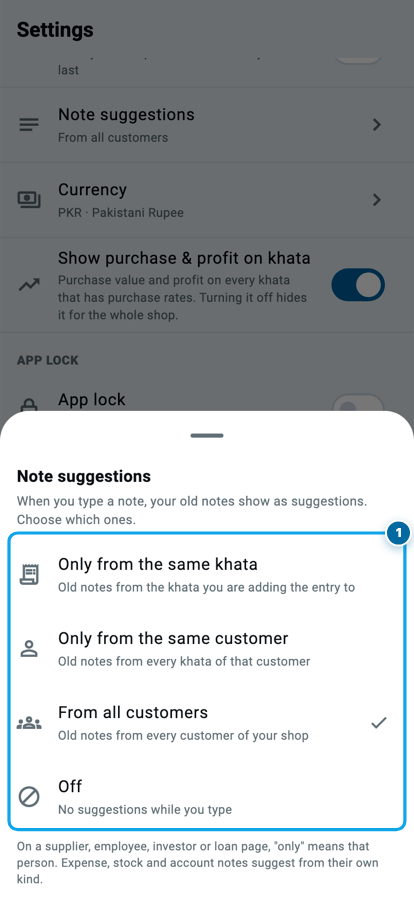
- Only from the same khata: old notes from the khata you are adding the entry to.
- Only from the same customer: old notes from every khata of that customer.
- From all customers: old notes from every customer of your shop.
- Off: no suggestions while you type.
Cash in hand on a gave entry
When you received money, tapping Drawer already let you pick Cash in hand instead. A gave entry could not: tapping Drawer only unticked it, so money you paid out of your pocket had nowhere to go.
Now, in a shop that keeps a drawer, a gave entry works the same way:
- On a gave entry, tap Drawer (1).
- Pick Cash in drawer, Cash in hand, or No money moved for goods given on credit (2).
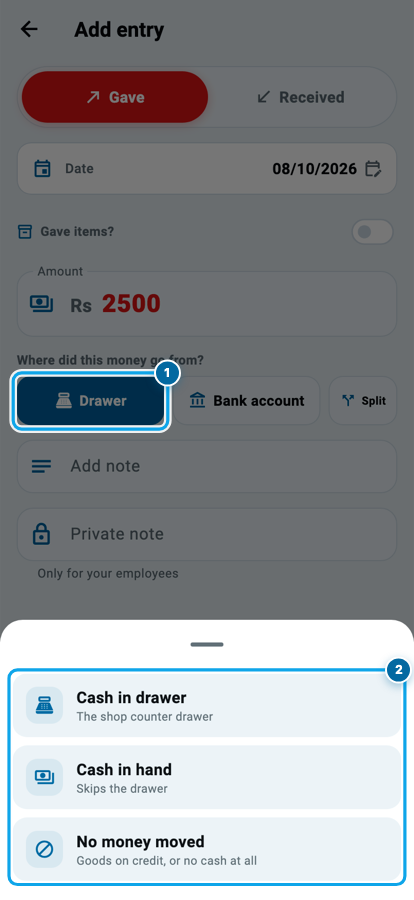
A new gave entry starts on the account you picked last time, so a shop that always pays from the pocket picks it once. Tapping a bank account opens the account list again, like on a received entry.
Get Pro free: share your story or invite a friend
If your shop is on the Free plan, Home can now show a Get Pro FREE card with two ways in:
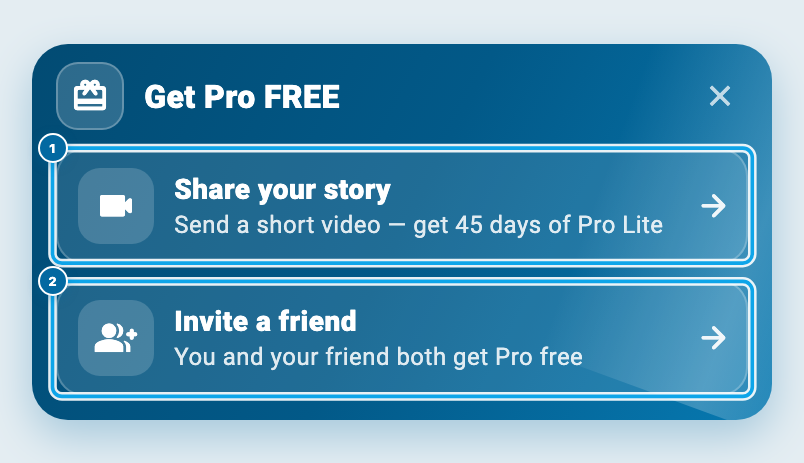
- Share your story: send a short video about your shop and get 45 days of Pro Lite.
- Invite a friend: you and your friend both get Pro free.
To share your story, the shop owner opens More, then Share your story. Record a 15 to 30 second video with your phone's own camera first: who you are, your shop, and how the app helps you. Then:
- Tap Choose video (1) and pick it.
- Read and tick both permission boxes.
- Tap Send video.
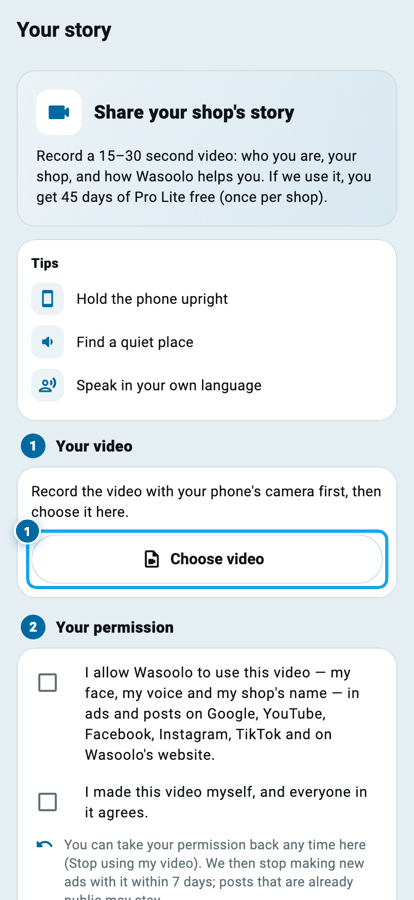
The Wasoolo team watches it. If we use it, your shop gets 45 days of Pro Lite, once per shop. If you already pay through the store, the 45 days start after your current plan. The phone keeps its screen on while the video sends, so a long upload is not cut off.
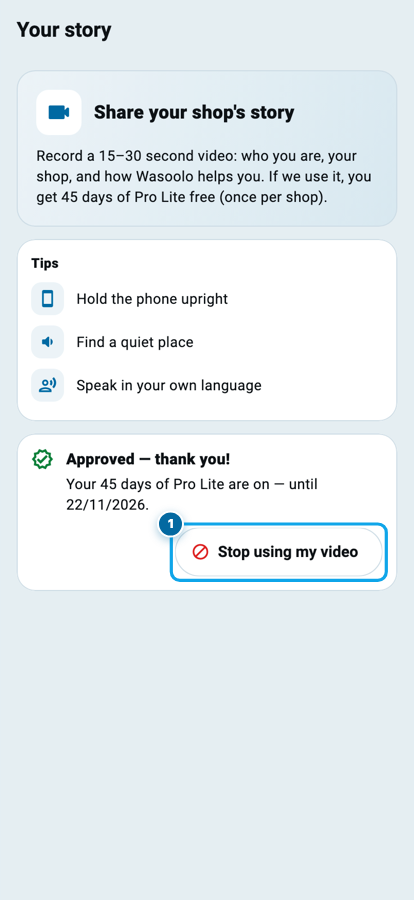
Changed your mind later? Your story stays in More, now called Your story and marked Approved — thank you! Tap Stop using my video (1) at any time. We stop making new ads with it within 7 days; posts that are already public may stay.
A shorter sign-up
A new shopkeeper should reach their first khata in a minute. Create account now asks only for an email and a password, or one tap on Continue with Google (1). On an iPhone there is Continue with Apple as well. A 6-digit code still comes to your email to prove it is yours.
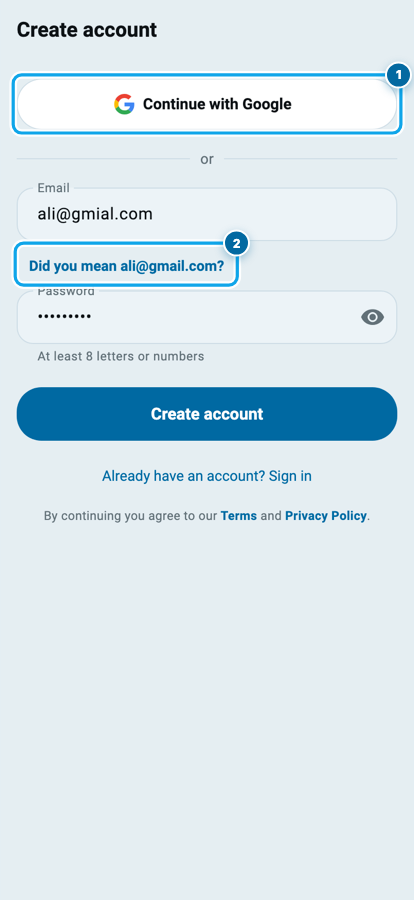
Typed ali@gmial.com by mistake? The page asks Did you mean ali@gmail.com? (2) under the box. One tap fixes it, so the code goes to an inbox you can open.
Suggest a feature, and rate Wasoolo in one tap
Have an idea that would save your shop time? Open More and look under Help: Suggest a feature (1) opens a small box. Write it in your own words and tap Send suggestion. It goes straight to the Wasoolo team.
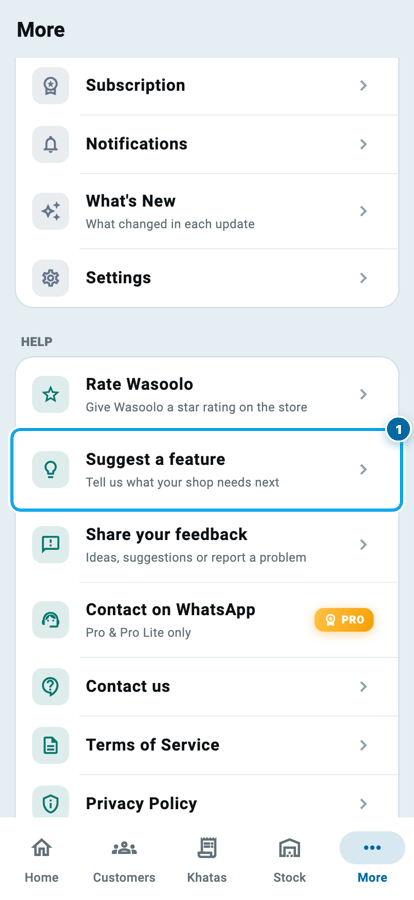
Just above it, Rate Wasoolo now opens the Play Store or the App Store page straight away, with no popup in between.
Neater papers, and the smaller fixes
The Urdu entry receipt now lines up in one even spacing from top to bottom. The item sits in its value column, and the words under the QR code are centred.
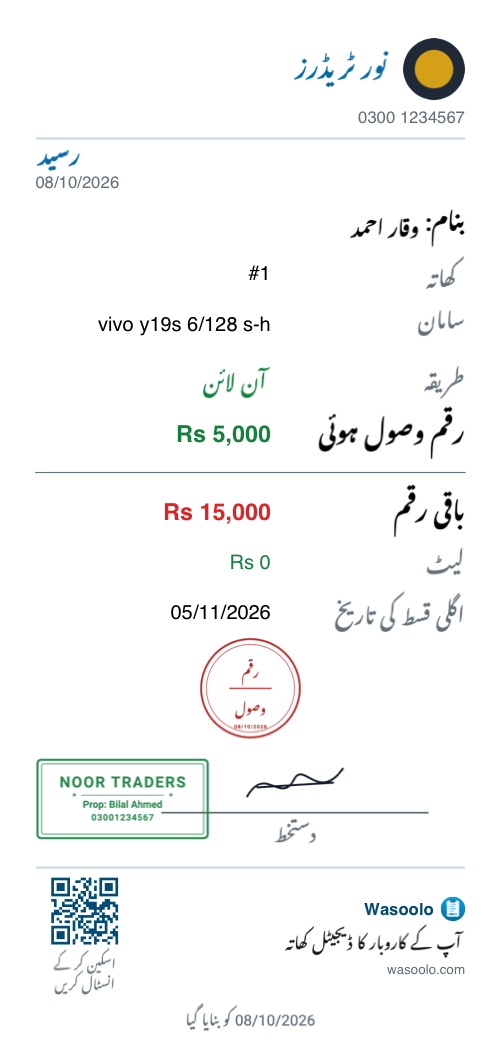
When your shop stamp sits on the signature line, on any paper, it now touches only the end of the line and never covers the signature itself.
Also in this update:
- Tips from Wasoolo: shop owners get a switch for it in More, then Notifications. A short tip now and then, never more than two notifications a week. Announcements still come.
- A new shop needs only its name. The Phone box is optional, and the address and the rest wait under More details (optional).
- Investor money lines are safer. An investor's money line can no longer be edited below what they already took back.
- A product renamed while offline leaves old khatas as they were, and the product page offers Update old khatas once you are back online.
- Dozens of smaller fixes from a full review of the app.
Update from the Play Store or the App Store, or let the store do it by itself. On a computer, the Mac App Store, Windows and web apps get the khata form, purchase bill, note and paper changes too. Wasoolo is 100% FREE to download. Coming from an older version? 2.9.0 gave every sale its own invoice.
Common questions
Can I hide rows on the New khata form?
Yes. Tap the customize button at the top of New khata and switch off any row that has a switch. Locked rows always stay, and Reset to default brings the shipped form back.
Does switching a row off delete what my old khatas hold?
No. It only hides the question on the form. An old khata that already has something in that row keeps it.
Why does my purchase bill say Total advance?
You have paid this supplier more than you owe. The paper says advance in words instead of printing a minus sign.
Can I turn off note suggestions?
Yes. Open More, then Settings, then Note suggestions, and pick Off. You can also limit them to the same khata or the same customer.
Who can send a story video?
Only the shop owner, from a phone. If the team uses it, the shop gets 45 days of Pro Lite once, and you can tap Stop using my video at any time.
Do I need to set anything up after updating?
No. Everything works after the update. The purchase bill's three balance lines start switched on, and you can turn any of them off.
If the purchase bill made you think about your supplier credit, buying stock on credit without choking your cash goes deeper.