
updateWhat's new
What's new in Wasoolo 2.9.0: an invoice for every sale, tidier small receipts, and a qist plan change you can take back
Wasoolo 2.9.0 gives every sale its own invoice ending with the Total remaining, tidies small roll receipts, and lets you undo a qist plan change.
Wasoolo 2.9.0 in eight lines
- 1One sale, one invoiceEach bill ends with the customer's Total remaining.
- 2Tidier small receiptsName, phones and address fit the 80 mm and 58 mm roll.
- 3Undo a qist plan changeDelete the newest Plan changed line, one at a time.
- 4A quicker startA new shop needs only its name.
- 5One question at sign-outThen straight to the login screen.
- 6Change your login emailFor Google and Apple sign-in too.
- 7An empty Home if you want oneOne Make it yours card brings blocks back.
- 8Big screensiPad and computer Home follow your arrangement.
Wasoolo 2.9.0 gives every sale its own invoice that ends with the customer's Total remaining, prints tidier receipts on the small roll, and lets you undo a qist plan change. A new shop now needs only its name, signing out asks one question, and Home can be emptied if you want it bare.
Every sale gets its own invoice
Zeeshan comes in on Saturday holding the invoice you gave him on Thursday. "This says Rs 12,250," he says, "but my son thinks we owe you more. Which one is right?" Both are. Thursday's paper only knew about Thursday.
Until now the sale invoice was the khata's paper: every sale's items piled under one total, and only the first sale on a khata could open it. A second or third sale printed the small single-entry slip instead.
Now every sale of goods opens its own A4 invoice, with its own items. Under the total, the paper walks your customer from that bill to what he owes today:
- Previous balance: what he already owed before this bill.
- Purchases after this bill: what he bought later, when you print an older bill again.
- Total remaining: the one figure he has to pay, and the same figure his khata shows.
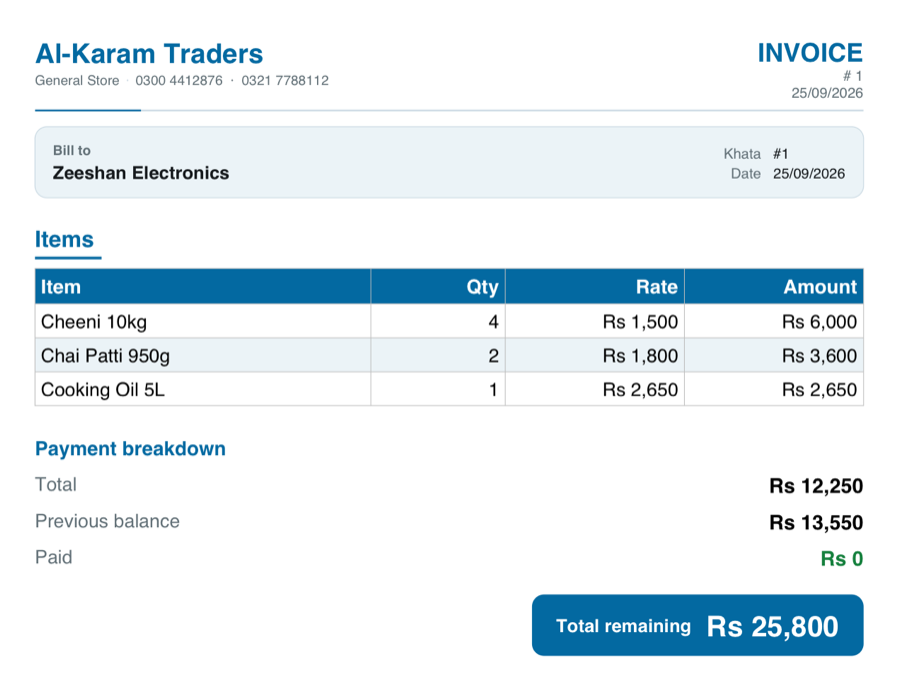
The bill never lists the other bill's goods. It carries only the money forward, so the last line always matches the khata:
Say a customer has two bills on one khata
Returns and refunds that happened after a bill sit below its total, because they came after it.
Two switches decide how much history the paper carries. Open More, tap Customize invoices & receipts, open the Sale invoice, and scroll to the totals:
- Previous balance. On, the bill ends with his Total remaining. Off, the bill talks only about that one sale.
- Number every bill (#4-1, #4-2). On, each bill prints its own number: khata 4, first bill, second bill. Bills are numbered in the order you wrote them, so a sale you back-date later never renumbers a bill the customer already holds.
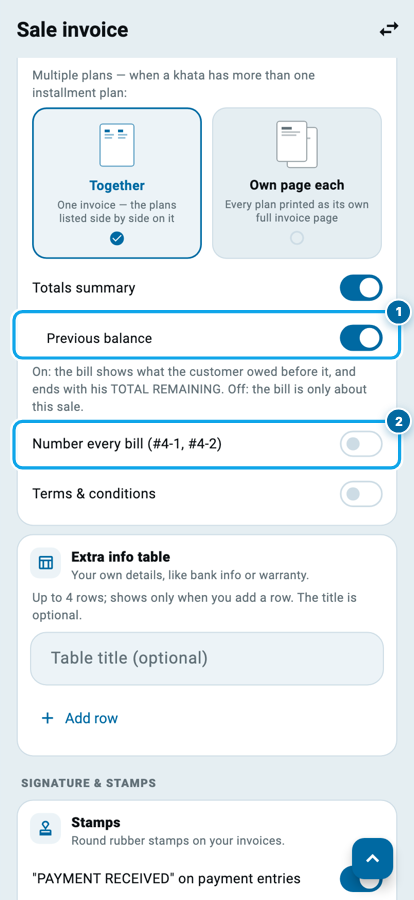
Both switches are free on every plan. Class 6 walks through the whole papers page.
Tidier receipts on the small roll
If you print on an 80 mm or 58 mm thermal roll, you have seen the letterhead fall apart: the shop name split in two, one phone number stranded on its own line, a long address running off the edge of the paper. The roll is narrow and the old layout did not respect it.
Now the name sits on a row of its own, the phone numbers share one line, and the address and email wrap inside the paper when you switch them on.
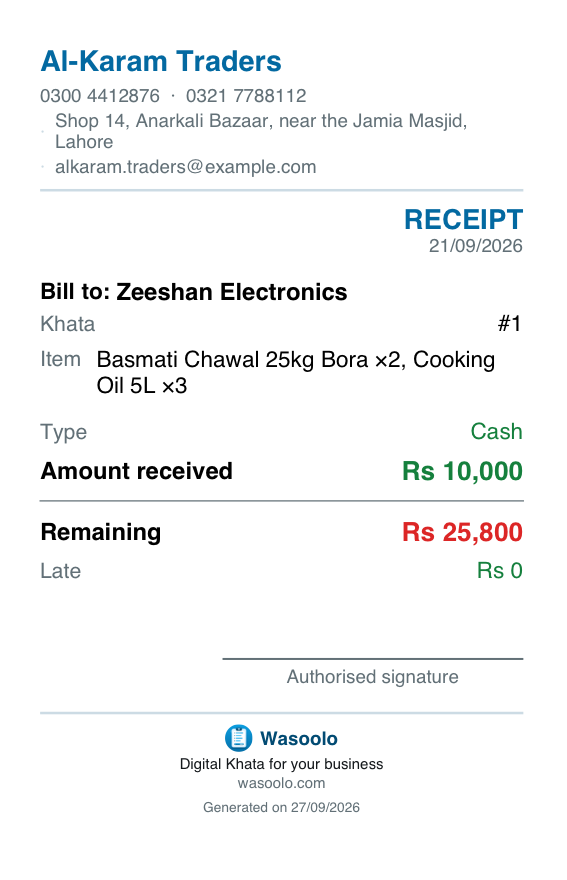
One more fix is on the coloured headers. On the Modern design, the paper's own name, like INVOICE, was printed in the same colour as the band behind it, so it simply was not there. It prints clearly again.
Undo a qist plan change
It is nine at night and Rafiq is waiting at the counter. You open his qist plan to move him from twelve months to ten, tap the wrong option, and save. The profit on his khata moves, every due date moves, and until now there was no clean way back.
Now a plan change that moves the profit leaves a line on the khata: Plan changed · profit added, or Plan changed · profit reduced.
Taking back a qist plan change
- 1A change leaves a linePlan changed · profit added (or reduced) appears on the khata.
- 2Open the newest oneTap Delete on that line.
- 3Read where it goes backThe app names the plan and its price first.
- 4The khata goes backDues and the profit line return to that plan.
- 5Then the one beforeOlder changes come off in the same way, one at a time.
- Open the khata and tap the newest Plan changed line.
- Tap Delete. Before anything happens, the app tells you the plan it goes back to and its price, for example Back to: Rs 12,000 · 9 installments.
- Confirm, and the khata is back on that plan, with its dues and its profit line.
The change before it can be undone next, the same way. An older line asks you to delete the newest change first, so the plans always come off in the order they went on. A switch between two plans of the same price moves nothing, so it leaves no line to delete.
If you are sizing a plan for the first time, building a qist plan that stays fair covers the arithmetic.
A quicker start for a new shop
Opening a second shop used to feel like a form at a bank. Now only the shop name is needed. The phone box is optional, and the address, email and everything else wait under More details (optional) (1).
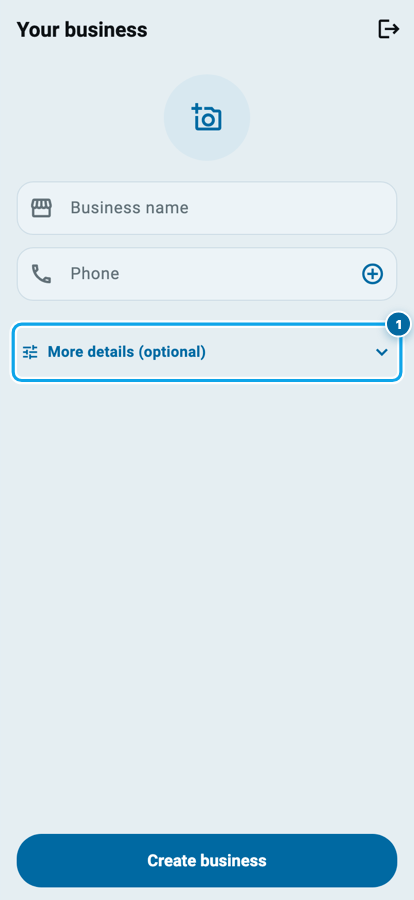
The Create business button stays above the keyboard, so you never have to close the keyboard to find it. On an iPhone, the keyboard also stops closing and opening again each time you move from one box to the next.
Signing out, and your login email
Signing out now asks exactly one question: Sign out? Your data stays safe online. If some of your changes have not uploaded yet, you see that warning instead, never two popups one after the other. Wait for the upload if you can; the warning is there so you can.
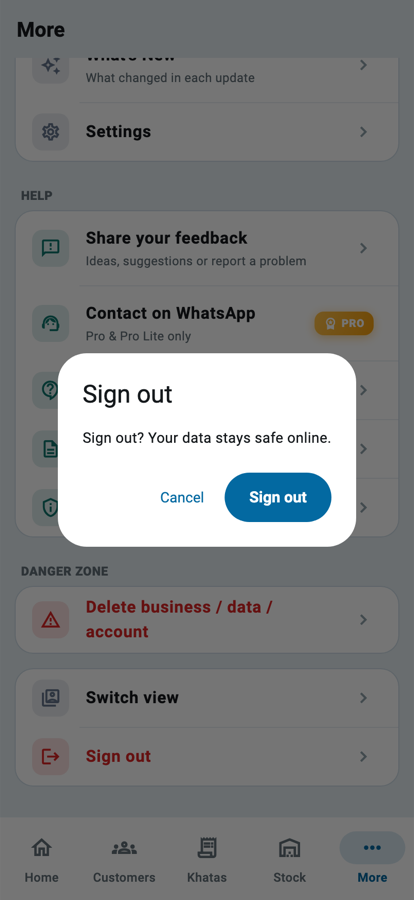
After you say yes, the app goes straight to the login screen. The flash of an empty screen that used to sit between the two is gone.
Signed in with Google or Apple? You can change your login email now too: More, then Settings, then Account & security, then Login email.
An empty Home, if you want one
Some shopkeepers run the whole day from the Khatas tab and want a Home with nothing on it. You could switch every block off before, and Home quietly put them all back.
Now, turn every block off in Make it yours and Home really empties. It keeps one card with a Make it yours button (1), so the way back is always one tap away.
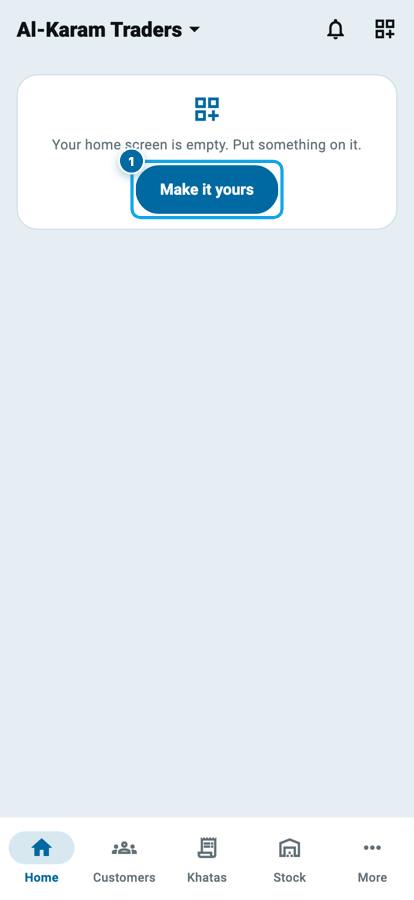
On the Make it yours page itself, the Learn Wasoolo block now shows a one-line note on days when it has nothing to show, instead of a sample card Home would never draw. Class 22 covers the whole page.
On an iPad or a computer, and the smaller fixes
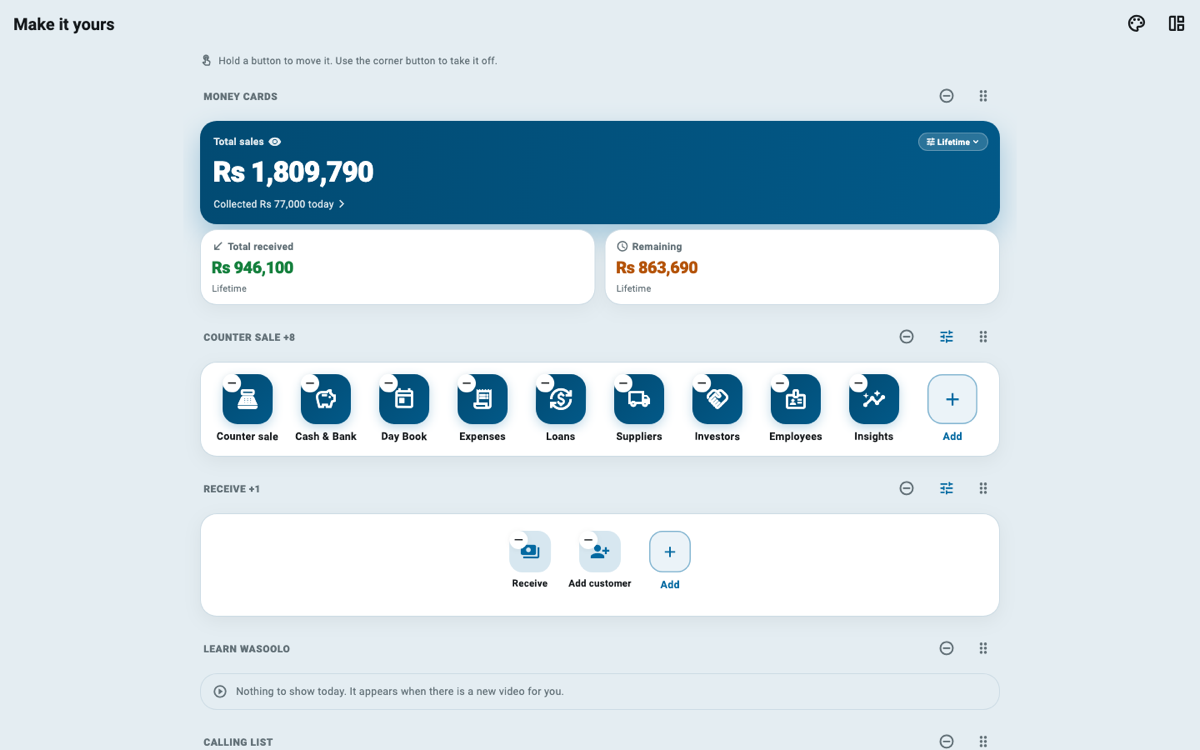
On a wide screen, Home now follows your Make it yours arrangement, with as many buttons in a row as the screen holds instead of a phone's five. The Make it yours page shows that same wide Home, at the same width, with the remove, add and drag controls still on every button.
Also in this update:
- Popups are normal size on an iPad or a computer, instead of stretching across the whole screen.
- The Stock photo and folder grids and the Expense categories fill a wide screen.
- The Home banner's photo sits small beside its words on a wide screen.
- Cash & Bank's This month moves to the new month by itself. It used to stay on the day you first picked it.
- On a computer, Sign out from the sidebar's menu asks first too, and goes to the login screen in one move.
Update from the Play Store or the App Store, or let the store do it by itself. Nothing needs setting up. Wasoolo is 100% FREE to download. Coming from an older version? 2.8.0 put your papers in Urdu.
Common questions
Does every sale have its own invoice now, even an old one?
Yes. Open any sale of goods and its paper shows that sale's own items. An older bill printed again also names what the customer bought after it, so the Total remaining is right on every copy.
Can I print a bill without the customer's old balance?
Yes. In Customize invoices & receipts, open the Sale invoice and turn off Previous balance. The bill then talks only about that one sale.
Do the two new invoice switches cost anything?
No. Previous balance and Number every bill are free on every plan, like the rest of the sale invoice's basic settings.
I changed a qist plan and see no Plan changed line. Why?
A line appears only when the change moves the profit. Switching between two plans with the same price changes nothing on the khata, so there is nothing to undo.
Why does my Home show only one card?
Every block is switched off in Make it yours. Tap the Make it yours button on that card and switch on the blocks you want back.
Does signing out delete anything?
No. Your data stays safe online. If some changes have not uploaded yet, the app says so before you sign out, so you can wait for the upload first.
If your customers ask for a slip after every purchase, the piece on giving a slip for every sale pairs well with the new invoice.