
updateWhat's new
What's new in Wasoolo 2.8.0: your papers in Urdu, a design for nearly every document, and a rename that reaches old khatas
Wasoolo 2.8.0 prints your invoices, receipts and statements in real Urdu, gives nearly every paper five designs to pick from, and renames old khata lines.
Wasoolo 2.8.0 in nine lines
- 1Your papers in UrduSeven customer papers each get their own Urdu switch. Free on every plan.
- 2Pick how a paper looksClassic and Modern free; Minimal, Bold and Compact with Pro Lite or Pro.
- 3A new name reaches old khatasRename a product and every old sold and bought line can take the new name.
- 4A receipt for every returnWhat came back and the money, on paper. A return can be edited now too.
- 5A paper for every purchase billEvery item, quantity, rate and amount on your own letterhead.
- 6Items on a quick entryA switch puts the item list on the form itself, above the amount box.
- 7Forms that fit your shopThe add-investor form can be trimmed, and the hours sheet reaches 24 hours.
- 8Check your payment methodsOn some shops a saved account title or QR went missing. Write it once more.
- 9Smaller changesUnits on paper, bigger quantities, Old balance, and Select on the Customers list.
Wasoolo 2.8.0 prints your invoices, receipts and statements in real Urdu, right to left, free on every plan. Nearly every paper also gets a Choose design card with five looks, a renamed product now reaches your old khatas, and every return and every purchase bill has a paper of its own.
Your papers in Urdu
The slip you hand across the counter is the only part of your khata a customer ever reads. If he reads Urdu and the slip says Item · Qty · Rate · Amount, he reads the figure at the bottom and takes the rest on trust.
You know the scene. It is nine at night, Akram's father has sent the boy with last month's statement, and the boy holds it sideways under the tube light and asks you what the second column means. You end up reading your own paper out loud to him, line by line, while two more customers wait behind him. The paper was supposed to save you that conversation.
Now it can be written in his language. Open More, tap Customize invoices & receipts, pick a paper, and switch on Urdu paper (اردو) in the Paper language card.
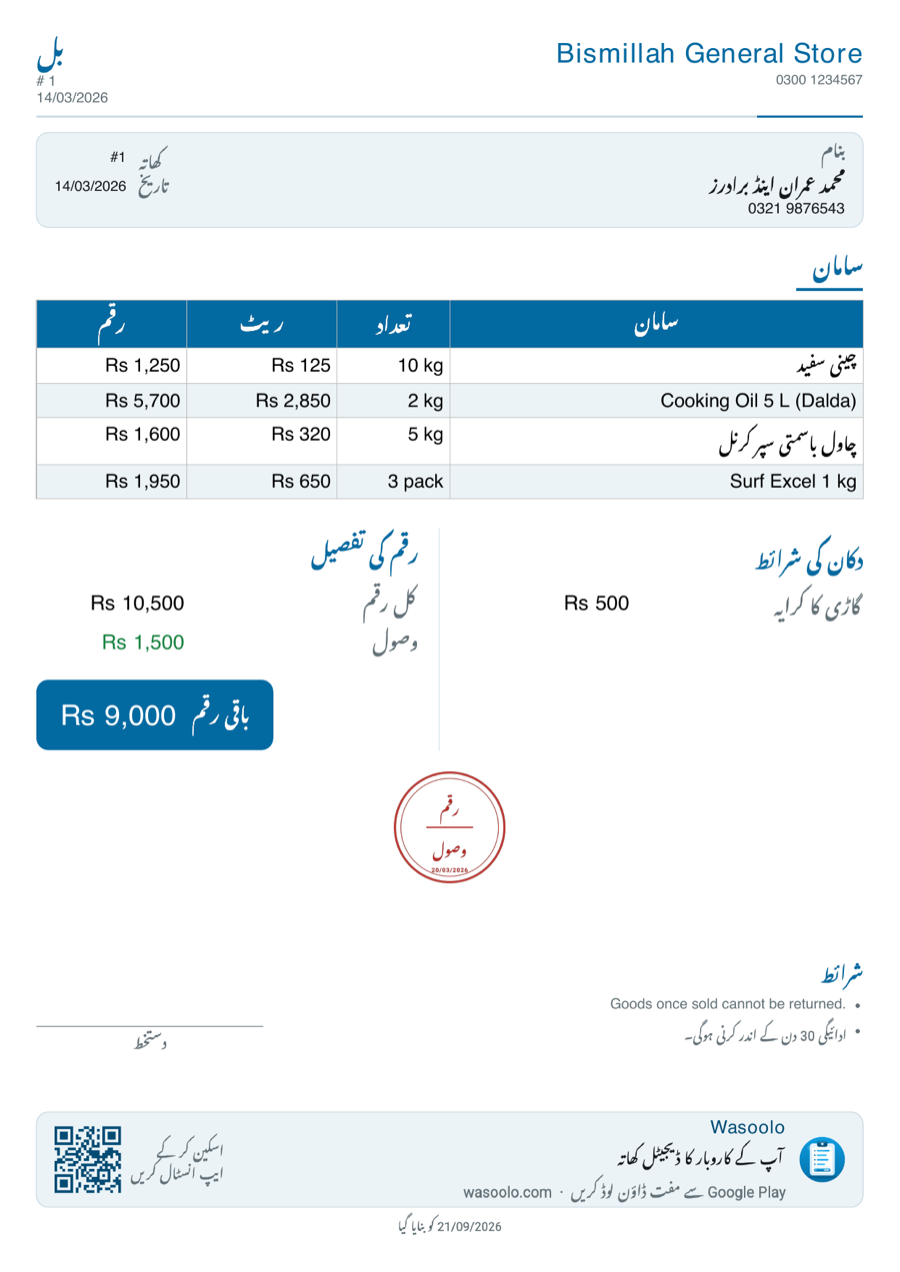
Seven papers have a switch of their own: Khata statement, Person statement, Sale invoice, Entry receipt, Counter sale receipt, Return receipt and Account details. They are separate on purpose, so the counter slip can go Urdu while the statement you keep for yourself stays in English.
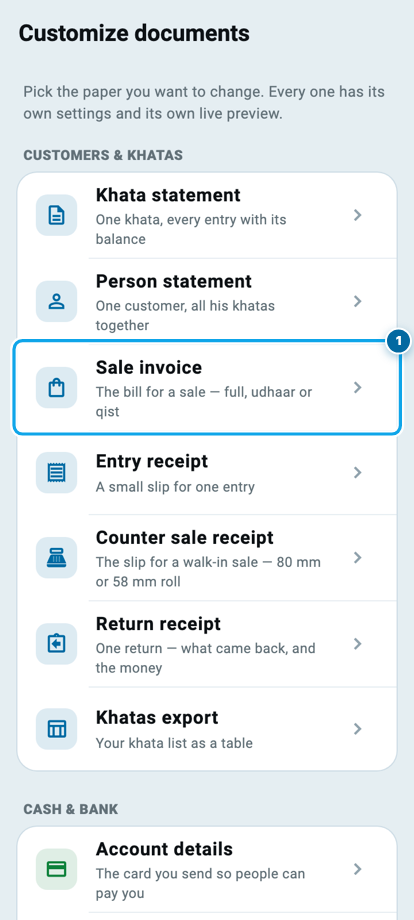
Three things do not move when you turn it on. Your own writing stays your own writing: a product you typed as Cooking Oil 5 L (Dalda) prints exactly like that, because the app never translates what you wrote. The money stays Rs 9,250, in the digits you already read, so nobody at the counter has to convert a figure in his head. And your shop heading, your terms and your footer print word for word as you wrote them.
Your reports, your exports and your staff papers are untouched. Those are for you, not for the customer, and none of them is offered the switch.
The whole thing is free on every plan. If you have never opened that screen before, Class 6 walks through the papers.
Pick how a paper looks
Nearly every paper's page in Customize now carries a Choose design card, high up, holding five looks: Classic, Modern, Minimal, Bold and Compact. Same figures, same columns, five different faces.
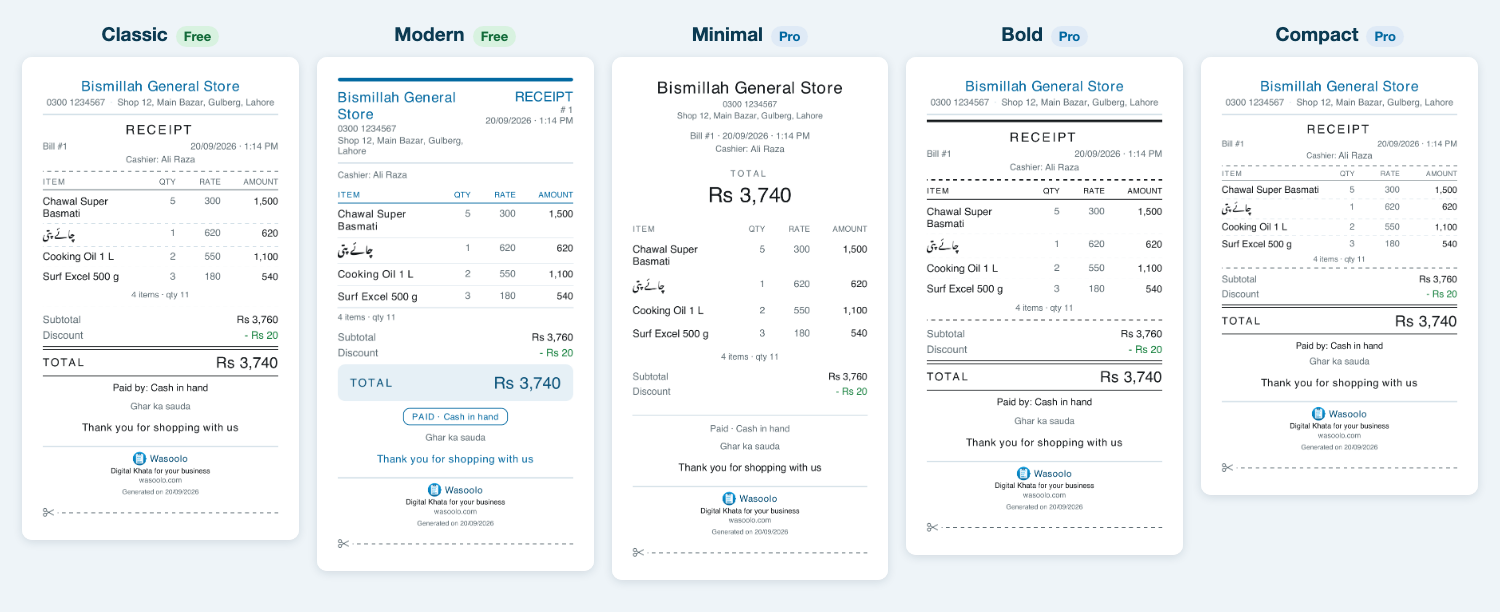
Classic and Modern are free. Minimal, Bold and Compact are part of Pro Lite and Pro.
One consequence is worth saying plainly, because it may change a slip you already print. If your shop is on the free plan and you had picked Minimal, Bold or Compact for your counter sale receipt, that slip now comes out as the plain Modern one instead. Nothing about the sale changes and nothing is deleted: your pick is still saved, and it comes back the day your plan does.
Two papers keep a single shape and show no picker at all, because they draw themselves differently: the Account details card you send so people can pay you, and the profit calculation slip. Everything else offers the five.
A product's new name reaches your old khatas
You wrote a product in a hurry, and for months it has been sitting in your list spelt wrong. Fixing the spelling used to fix only what you sold from tomorrow. Every khata line already written kept the old spelling for ever, and the customer holding last month's bill saw one name while your list showed another.
Rename it now and the app asks you one question: Change the name in old khatas too?
What a product rename touches now
- 1You fix the spelling and saveThe app asks: Change the name in old khatas too?
- 2Say Change themEvery old sold line and every old bought line takes the new name.
- 3The papers followInvoices, statements and receipts you print after that carry the new name.
- 4The money notes follow tooThe Cash & Bank notes that name that product are restated with it.
- 5What is never touchedA name you typed by hand on a line stays exactly as you typed it.
Tap Change them and every old sold line and every old bought line takes the new spelling, on the papers you print as well, together with the notes in Cash & Bank that name that product. A name you typed by hand on a line is never touched, because that was your sentence, not the product's label.
Said no in the moment and changed your mind? The product page's three-dot menu now carries Update old khatas, with the count of lines still waiting beside it.
A receipt for every return, and a return you can fix
A return is the moment a customer trusts you least. He is handing goods back and waiting to see what you write. Until now you could write it, but you could not hand him anything.
Open a return and tap Return receipt for a PDF or a picture he can keep: what came back, how many, at what rate, and the money that went with it.
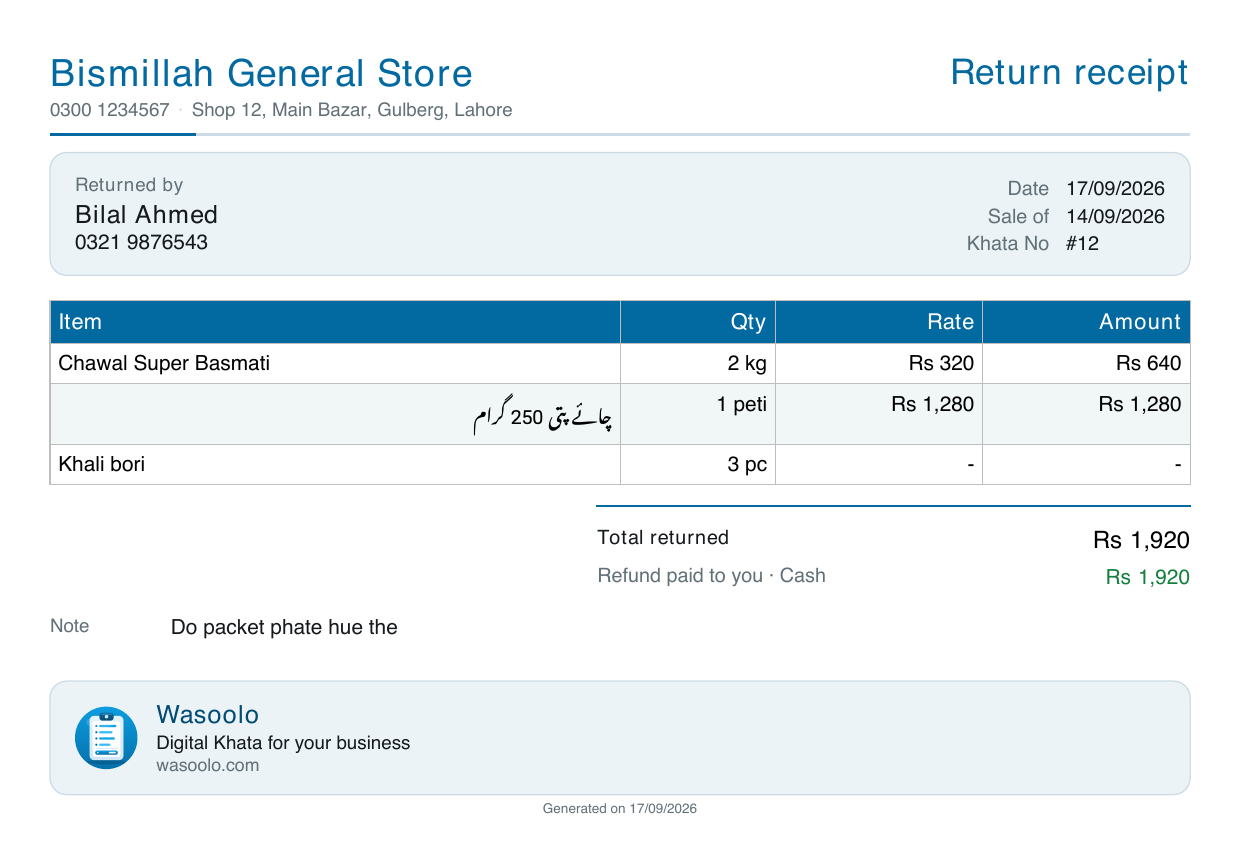
A return can also be corrected now. Open it, tap Edit entry, and fix what you got wrong instead of deleting the whole thing and writing it again. The arithmetic behind a return is worth understanding before you make one, and we worked through it here.
A paper for every purchase bill
The bill you get from your supplier is his paper, in his handwriting, and it goes missing. What you wrote in Wasoolo was only ever a screen.
Open a purchase bill and tap Bill paper. Every item, quantity, rate and amount comes out on your own letterhead, ready to file, send to the supplier, or hand to whoever pays him.
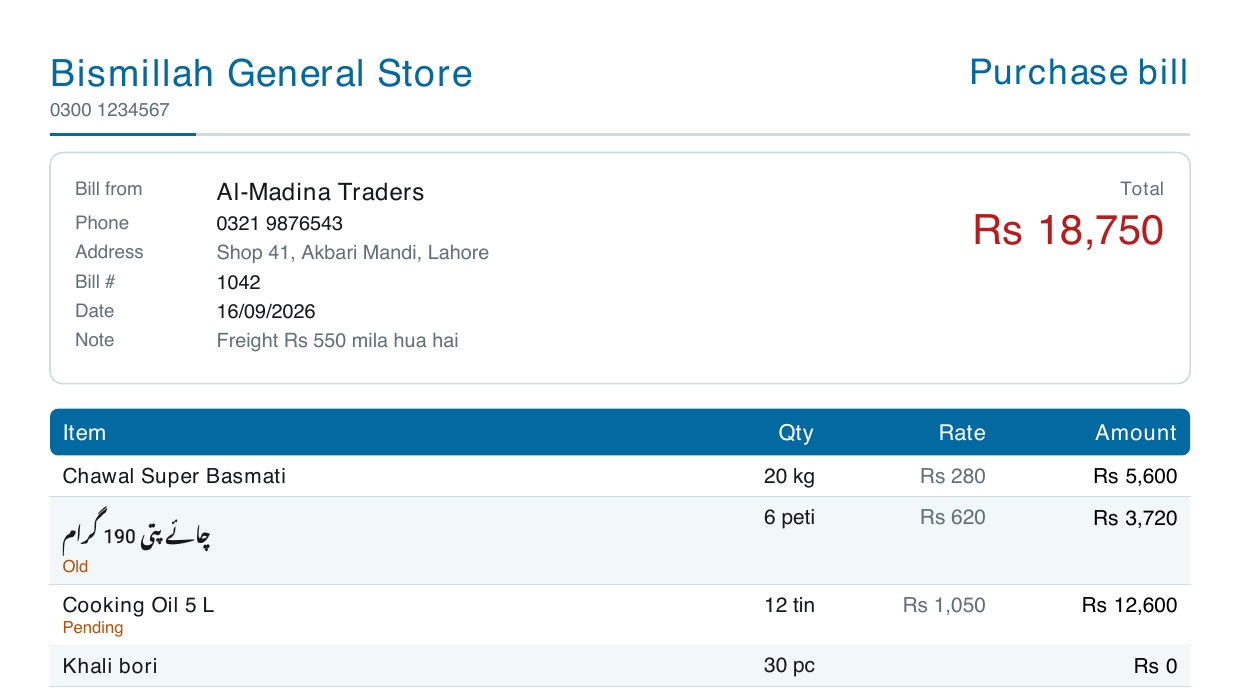
It sits in Customize beside the others, so you can change its heading, its size and its design like any other paper. If buying on credit is most of your month, this is the piece on keeping supplier credit from choking your cash.
Items on a quick entry, right on the form
Adding goods to a quick entry used to open a separate box on top of the form. You picked there, came back, and hoped the amount matched.
The entry form for goods going out now has a Gave items? switch. Turn it on and the item list appears on the form itself, above the amount box, where you can see both at once.
Say you are charging Rs 9,000 for Rs 9,250 of goods
Then type the total you are actually charging. The item prices move to match it, and the line under the box tells you whether you gave a discount or added something on top, so the printed bill still adds up to what the customer pays. An entry that gives goods no longer asks you which account to use either, because no money changed hands.
That last part matters more than it sounds. A regular loads his rickshaw at six in the evening, you round the lot down to a clean figure because he has been buying from you for nine years, and until now the bill you printed showed item prices that did not add up to the figure you wrote at the bottom. He never said anything about it. He just looked at it a second longer than he needed to.
Forms that fit your shop
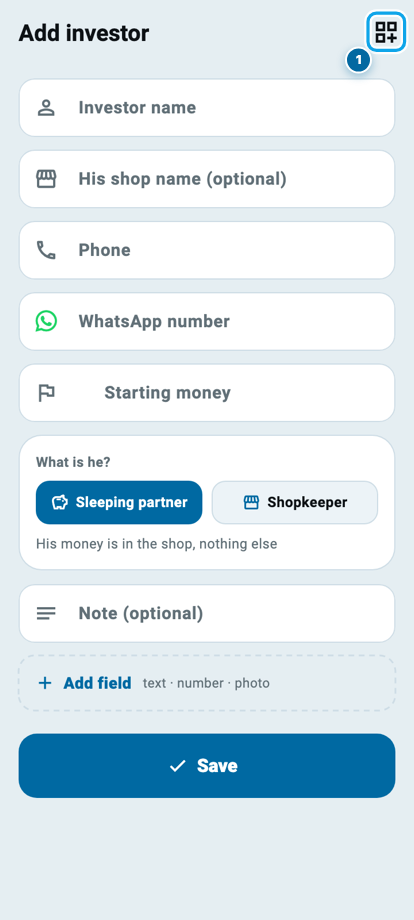
The add-investor form now carries the same Customize this page button the customer, supplier and product forms already have. Close the sections you never fill and the form gets shorter. Name and Phone always stay, because an entry without them is a stranger.
On Attendance, a person's hours sheet is three short rows of eight now, running from 1 to 24 hours instead of stopping at 14, with a minus and a plus pair on the total for the odd half hour.
One thing to check, and how to get the update
Please open your payment methods once. On some shops a saved account title or a QR picture never reached the server, so it looks blank on a second phone. Open More, then Payment methods: if one of them is empty, write it in again. It stays this time. The same repair sends your guarantor names and your blocked chats to your other phones again.
Also in this update:
- Units on paper are yours to choose. The sale invoice, counter sale receipt, return receipt and purchase bill each carry a switch for showing or hiding the unit (kg, piece, tin) beside the quantity.
- A sale line takes a quantity up to 999,999, for the shops that count in pieces rather than in kilos.
- A khata opened from an old balance now says Old balance on the list instead of showing nothing at all. A khata where you wrote your own description keeps your words.
- Saving a product takes you back. It used to save and then re-open the edit page, which looked exactly like a save that had not worked.
- On the Customers list, tap Select at the top to tick many names at once. Press and hold only opens a quick view; the earlier note about it was wrong, and this is the correction.
Update from the Play Store or the App Store, or let the store do it by itself. Nothing needs setting up. Wasoolo is 100% FREE to download, and every phone in the shop should update so that each one prints the same paper. Coming from 2.7.0? Moving customers between shops and the invoice Rate column are here.
Common questions
Does the Urdu switch cost anything?
No. It is free on every plan, on all seven papers that offer it. The design picker is the part where three of the five looks belong to Pro Lite and Pro.
Will turning on Urdu translate my product names?
No. Your own writing is never translated. Product names, your shop heading, your terms and your notes print exactly as you typed them, and the money stays in Rs with the digits you already read.
My counter slip suddenly looks different. What happened?
Your shop is on the free plan and the design you had picked is one of the three that need Pro Lite or Pro, so the slip falls back to Modern. Your pick is still saved and returns with the plan.
I renamed a product and said no to changing old khatas. Can I still do it?
Yes. Open the product page, tap the three-dot menu, and choose Update old khatas. It shows how many old lines are still carrying the earlier name.
Why does my quick entry no longer ask which account to use?
Because you gave goods, not money. Nothing went into your drawer or your bank, so there is no account to name. Turn the items switch off and the account card comes back.
My account title and QR were fine, and now they look empty on my other phone.
That is the fault this update repairs. Write them in once more from More, then Payment methods, and this time they travel to every phone you are signed in on.
If your customers keep asking for something in writing, the piece on giving a slip for every sale pairs well with the Urdu papers in this update.