
GuideApp tutorials
Class 5: how to find any customer, and read his khata
Class 5 of the Wasoolo course: find a customer by name or phone in one second, read every number on his khata page, and know what his profile holds.
What Class 5 covers, in order
- 1Type three digitsThe Customers tab search finds a man by name or by any phone number saved on him.
- 2Search from the Khatas tab tooThe same box there finds a khata number, an item you sold, even the guarantor's name.
- 3Open the profileThe person: his phones, WhatsApp, CNIC and address, and every khata he has with you.
- 4Read the four numbersRemaining is what he owes. Sale, Paid and Late explain how it got there.
- 5Move between the twoHis name at the top of a khata page opens the profile; a khata row opens the khata.
Three digits of a phone number is enough. Wasoolo has a search box on the Customers tab and another on the Khatas tab, and both find a man by name, by any number saved on him, or by the khata itself. Class 5 shows both boxes, then reads his khata page and his profile page.
Where the search box lives
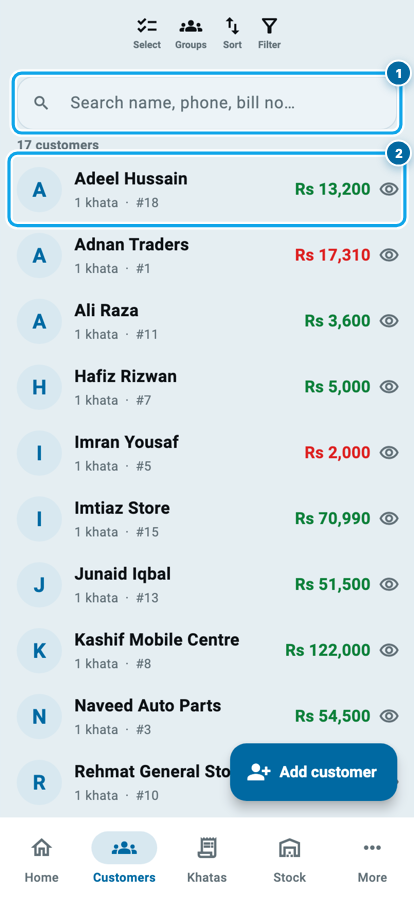
Two of the five footer tabs carry one. On Customers it sits at the very top, above the list, and says Search name, phone, bill no…. On Khatas the same box sits above the board. Every picker has it built in, so you never scroll a list to pick a man.
The Customers tab shows a count above the list: 17 customers on the shop below. It moves as you type, which is the fastest way to know whether your spelling matched anything.
On a computer or on the web there is one more door. Press Ctrl+K (⌘K on a Mac) anywhere and a search box opens in the middle of the screen. Arrow keys move down the results, Enter opens one.
Type a phone number, not a name
Names are where searching goes wrong. You saved him as Adeel Hussain, you remember him as the painter, and the two never meet. A number has no such problem.
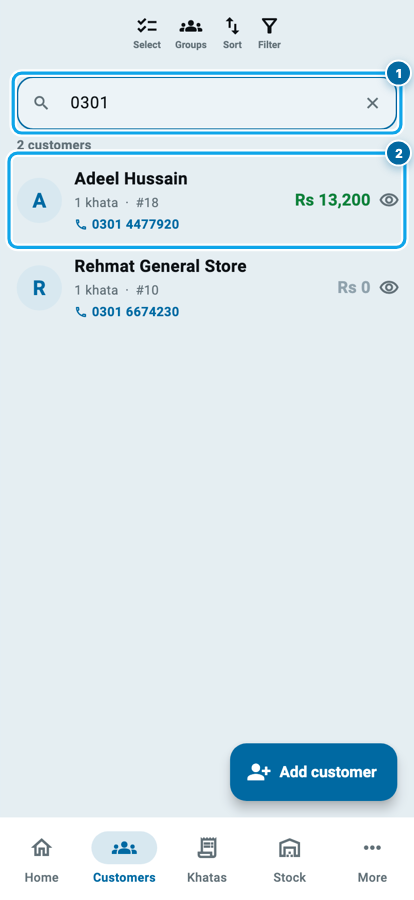
Type 0301 and the list drops to the people with those digits in a saved number, and the matching number prints in blue under the name. Four more digits and one row is left.
It searches every number on the man, not only the first, which is the whole reason Class 1 asked you to save more than one.
The box also matches an email, a CNIC number, an address, and the trade you wrote in his profile. Search Painter and you get every painter in your shop.
What Class 5 covers, in order
- 1Type three digitsThe Customers tab search finds a man by name or by any phone number saved on him.
- 2Search from the Khatas tab tooThe same box there finds a khata number, an item you sold, even the guarantor's name.
- 3Open the profileThe person: his phones, WhatsApp, CNIC and address, and every khata he has with you.
- 4Read the four numbersRemaining is what he owes. Sale, Paid and Late explain how it got there.
- 5Move between the twoHis name at the top of a khata page opens the profile; a khata row opens the khata.
The Khatas tab finds what a name cannot
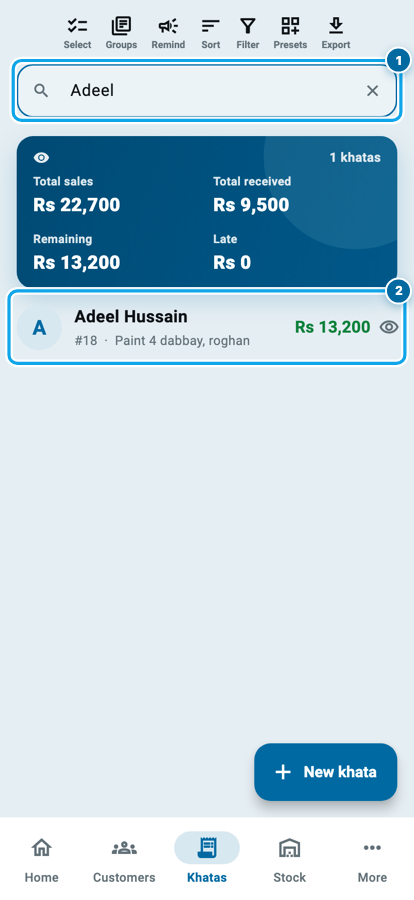
The box on the Khatas tab searches khatas, and it knows things the customer list does not.
Type a khata number and it goes straight there, and a part of one works: 73 finds khata 7305. Type the item you sold him (paint, pankha, bora) and every khata carrying that line comes up, which is how you find a man whose name you never knew but whose fan you remember selling. Type a guarantor's name and you get the khatas he stood behind.
The card above the results adds up whatever is showing: total sales, total received, remaining, late. Narrow the board to one name and it becomes that man's totals.
The profile page holds the person
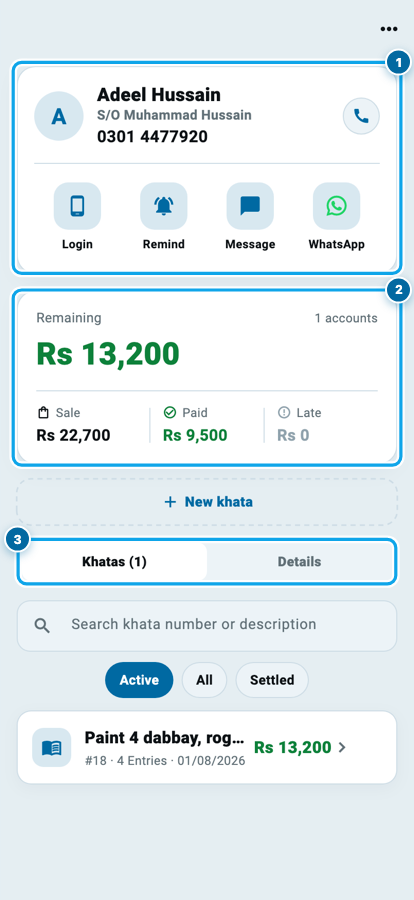
Tap the row and his profile opens. This page is about the man, not the money, and knowing the difference saves you hunting on the wrong screen.
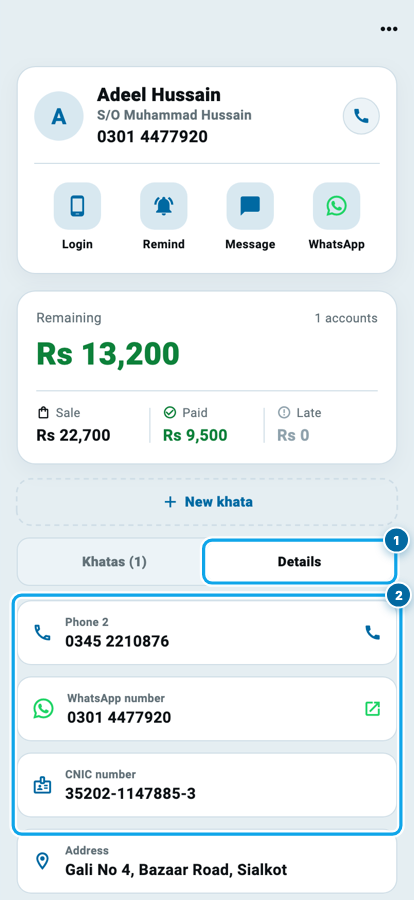
At the top is his card: photo or initials, full name, father's name under it, his first number in bold, and a round call button. Under that sit four buttons: Login, Remind, Message, WhatsApp. Login is where you give him an account in the customer app, and a green dot there means he already has one.
Below it is the balance block: Remaining in big green figures, Sale, Paid and Late in a row beneath, and 1 accounts on the right telling you how many khatas that total came from.
Then the segmented strip: Khatas (1) and Details. If he has stood guarantor for anybody, a third tab appears between them.
Details: the second phone, the CNIC, the address
Press Details and the page stops being about money.
Phone 2 and any number after it, each with its own call button. WhatsApp number, with a green arrow that opens the chat. CNIC number, and if you photographed the card, a Photos link showing front and back. Address. Any extra field you built in Class 1 shows here too.
Further down are his groups, his alert switches if he has a login, and your private rating and note: the one place you can write pays late, always pays and keep it to yourself.
Start your digital khata today
Free to start. Works offline. English, Roman Urdu & Hinglish. Your customers get their app free, forever.
The khata page holds the money
Back on Khatas (1), tap the khata row. Everything on this page is one account's money.
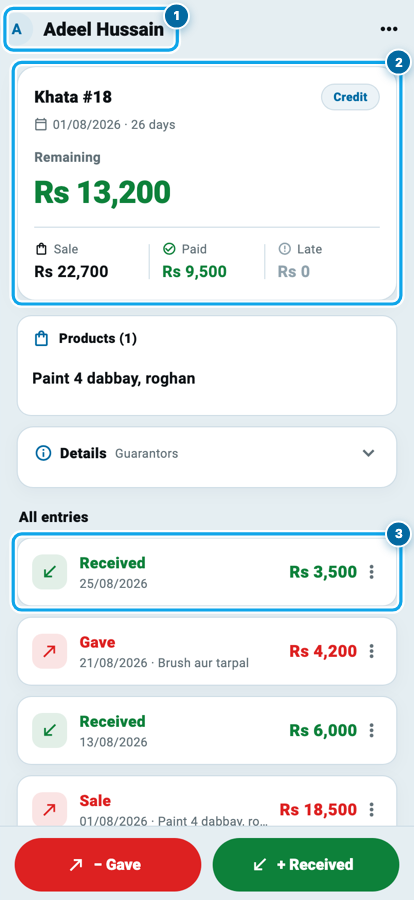
The top card says Khata #18 with a Credit chip beside it, the type you chose in Class 3, then the date it opened and how old it is. Under that, Remaining Rs 13,200 in green, and three smaller figures: Sale Rs 22,700, Paid Rs 9,500, Late Rs 0.
Green means the money is coming to you. Red on that big number means the opposite: he has paid more than he took, and you hold his advance.
What the four numbers on a khata page mean
Sale minus Paid is Remaining, every time. If the big number surprises you, the smaller two tell you which half moved.
Below the card, Products lists what went out on this khata. All entries is the full history, newest first, each line green for money received and red for goods given. Tap a line and it opens on its own page with the amount, who wrote it and when it was edited, which settles an argument about a payment.
Guarantors, and the way back
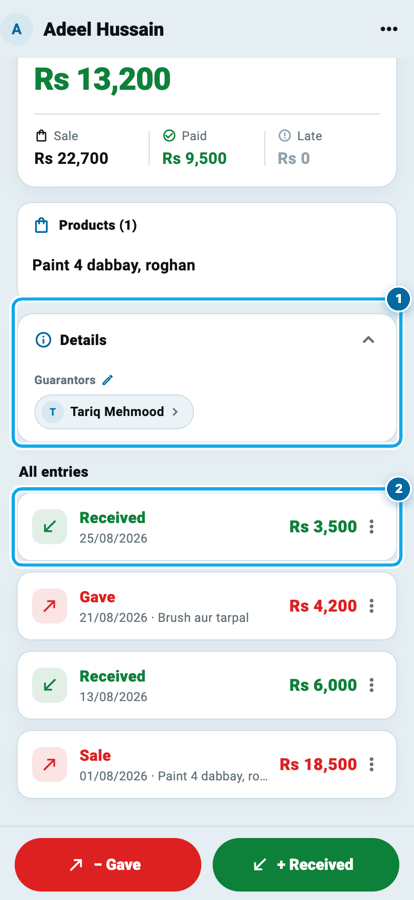
Between the products and the entries sits a Details card, folded shut with a one-line summary, Guarantors. It opens on a tap.
Inside is the khata's description, any extra fields, the private note only your team can read, and the guarantors, each a chip with his name. Tap the chip and that man's profile opens, so you can call him without going back to a list. A guarantor belongs to the khata, not to the customer: one man can guarantee one khata of his brother's and not another.
The way back is the top of the screen. The avatar and name in the app bar are a button: tap them and you are on his profile again, on the tab you left. Tap a khata row there and you are back on the khata. Two taps either direction, no list in between.
Common questions
I have four hundred customers. Does the search stay fast?
Yes. It runs on the copy of your khata that lives on your own phone, so it never waits for the internet, and the columns it reads are indexed. It answers while you type, and in flight mode.
Why can I not find a customer I know I saved?
Three usual reasons. His khata is inside a group you set to hidden, and hidden groups stay out of search on purpose. Or he is in your other shop, if you run more than one. Or he was deleted, so look in Trash, where he waits 30 days.
What is the difference between the khata page and the profile page?
The khata page is one account: its entries, its balance, its products, its guarantors. The profile page is the man: his numbers, his address, his documents, and all his khatas added together.
Can I search by the thing I sold instead of the name?
On the Khatas tab, yes. Type the item and every khata carrying that line comes up. It works on the Customers tab too, because that box reaches into each person's khatas.
My employee cannot see a customer's phone number. Why?
Contact details are a separate permission. A seat without it sees the name and the khata but not the number, the CNIC or the address. That is useful when a helper writes entries but must not copy your customer list.
Does searching tell the customer anything?
No. Opening a profile, reading a khata or searching a number does nothing on his side. He hears from you only when you press Remind, or open WhatsApp yourself and send the message.
Wasoolo is 100% FREE to download on Android and iPhone. Class 4 built an installment plan. This class was about finding it again, on a busy evening, with one hand.