
updateWhat's new
What's new in Wasoolo 3.4.0: a statement for any dates, one name on papers, and a wider khatas list on your computer
Wasoolo 3.4.0 makes a statement for any dates you pick, prints one name for a bill of many products, and keeps plan changes off the customer's papers.
Wasoolo 3.4.0 in four lines
- 1Statement by datesPick a month or any two days.
- 2One name on papersMany products print as one line.
- 3Cleaner papersPlan changes stay off the customer's copy.
- 4A wider list on computersDrag the line, or show the list alone.
Wasoolo 3.4.0 brings a statement for any dates you pick, one name on papers for a bill of many products, and cleaner papers when an installment plan changes. On a computer you can now drag the khatas list wider, or let it fill the whole screen.
A statement for just the dates you want
A full statement lists every entry since the khata was opened. That is right for some customers, but many only want to see one month. An office customer who settles once a month asks for October, not for the whole year. Now you can give him exactly that.
- Open the khata and tap ⋮ at the top. For all of a customer's khatas together, open the customer and tap ••• instead.
- Choose Statement by dates.
- Tap a ready choice, This month, Last month, Last 30 days, Last 3 months or This year, or tap First date and Last date to pick your own days (1). Both open the same calendar you use for any entry.
- Tap Send as PDF or Send as image (2).
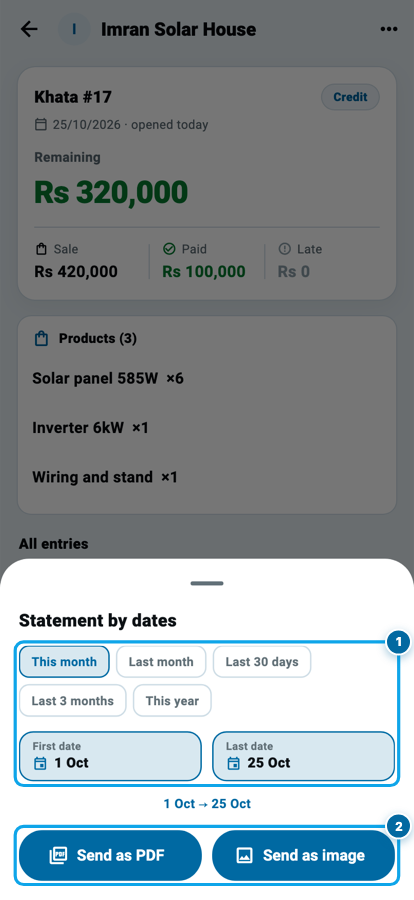
You can also start from More, then Generate documents: the tiles Khata statement by dates and Customer statement by dates open the same choice after you pick the khata or the customer.
What the dated statement shows
The paper does not start from zero. Everything before your first date is added up into one row, Previous balance, so the customer sees where he stood when the month began. After it come only the entries inside your dates, and the closing balance at the bottom.
Say a customer's khata stood at Rs 18,000 at the end of September. In October you gave him goods worth Rs 6,000 and he paid Rs 9,000. His October statement shows a Previous balance of Rs 18,000, the two October entries, and Rs 15,000 remaining. Rs 18,000 plus Rs 6,000, minus Rs 9,000, is Rs 15,000, the same figure his khata shows today if nothing happened after October.
For an installment khata the paper also carries the installment schedule as it stands today, so the customer sees what is still to come.
If you send one bill a month to a regular buyer, the dated statement is that bill. The office customer who wants one bill a month shows how to run that habit, and Class 6 covers the look of every paper Wasoolo makes.
One name on papers for a bill of many products
Some sales are many items that the customer thinks of as one thing. A solar system is six panels, an inverter and the wiring. A wedding order is ten pieces of furniture. On the invoice the customer would rather read one line, "Solar system 6kW", than ten.
One name on papers does that. You give the sale one name, and the customer's papers print that name as a single line, with the same total. Your own khata keeps every item, every quantity and your stock exactly as before. The name changes only what the paper shows, never the money.
Turn it on, then name the bill
The option is switched off until you want it, so shops that never sell this way see nothing new.
- Open the new khata page and tap the Customize this page icon at the top.
- Turn on One name on papers (1).
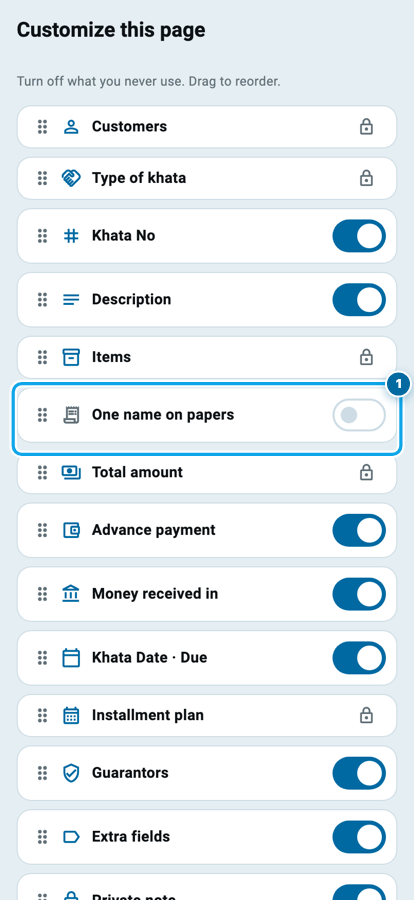
A counter sale has its own switches page, Counter sale form, with the same switch.
Now, whenever a sale has two or more products, a small One name on papers line appears under them, on a new khata and on Edit khata alike. Tap it and type the name (1), up to 60 letters, then save. A sale of one product never shows the line, because one product already is one line.
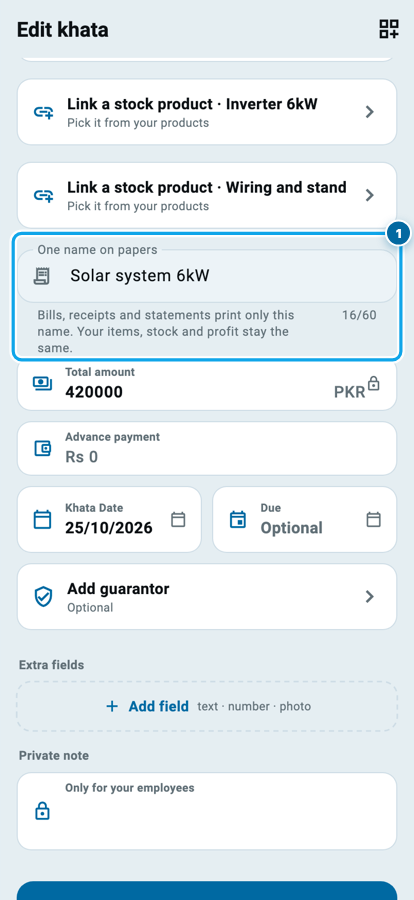
This works on a khata that already has payments or an installment plan too. Those khatas keep their products locked, because changing them would change money that has already moved, but a name moves no money, so you can still give one.
See and change the name on the khata page
Once a sale has a name, the khata page shows it at the top of the Products card, above the items (1). Tap it to change the name, or tap Remove name to print every item again. A khata without a name looks exactly as it did before.
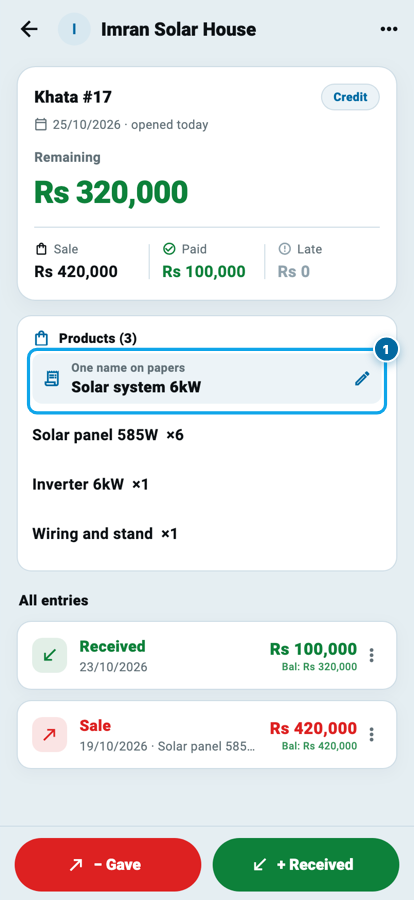
Plan changes stay off the customer's papers
When you change an installment plan, Wasoolo writes the change into the khata so the numbers stay right. Until now that change also printed on the customer's statement, invoice and receipt, and a line the customer never agreed to on paper only raises questions.
From 3.4.0 the customer's papers show the sale and the plan he is on, without the change in between. Your own khata page still shows every change, so your record is complete. If you are deciding whether a plan should change at all, read when a qist plan has to change halfway through.
On a computer: drag the list wider, or let it fill the screen
On the Windows, Mac and web app, the Khatas tab shows the list on the left and the open khata on the right. Long customer names were cut on a laptop screen. Now the line between the two sides moves with your mouse.
- Drag the line between the list and the khata (1). The list takes the room you give it, and the khata side always keeps enough room to work.
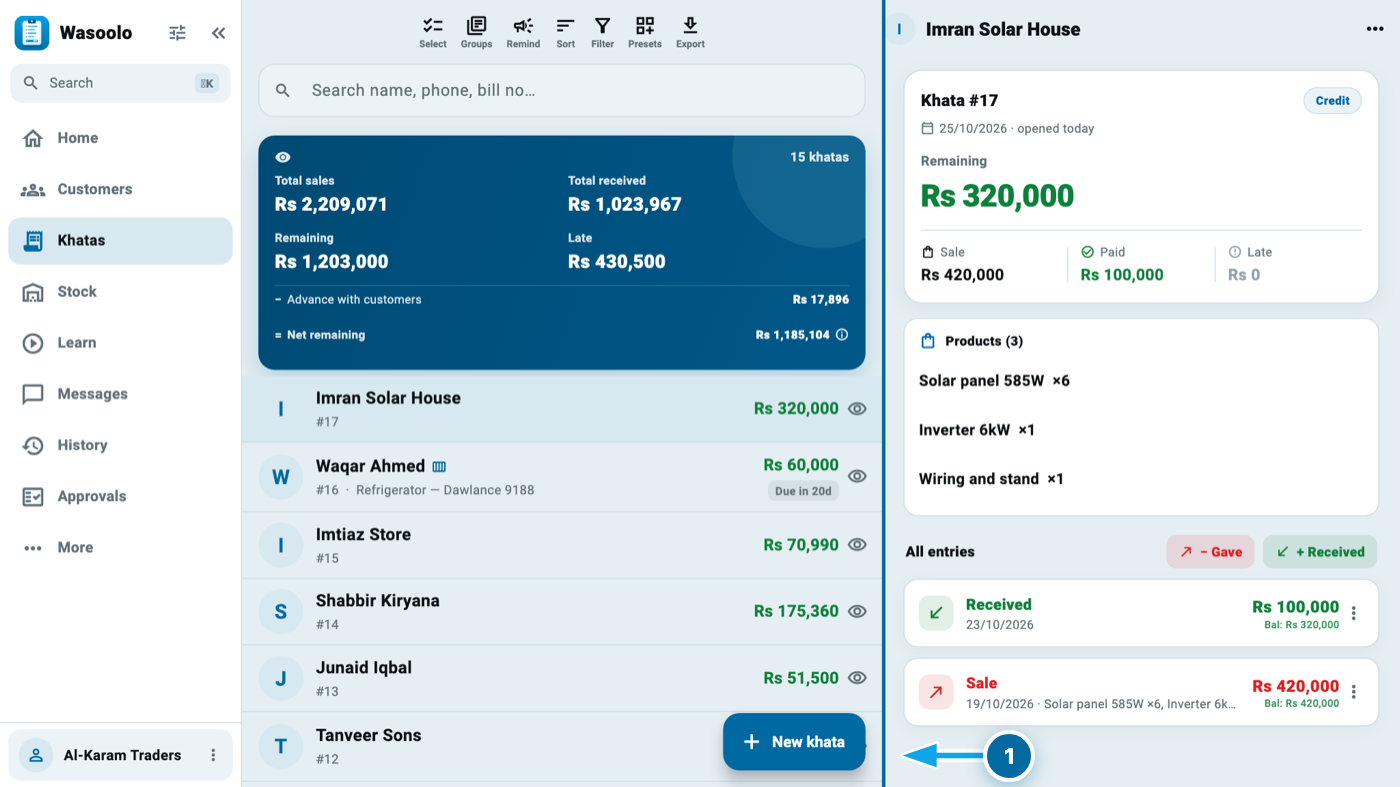
- Drag it all the way to the right and the list shows alone, full width, like the Suppliers page. Clicking a khata then opens it on its own page. To bring the khata side back, click the thin grip at the right edge (1), or drag it to the left. A double click on the line puts it back to the usual width.
- For even more room, click Minimize sidebar (2) to fold the menu on the left into small icons. Show sidebar brings it back.
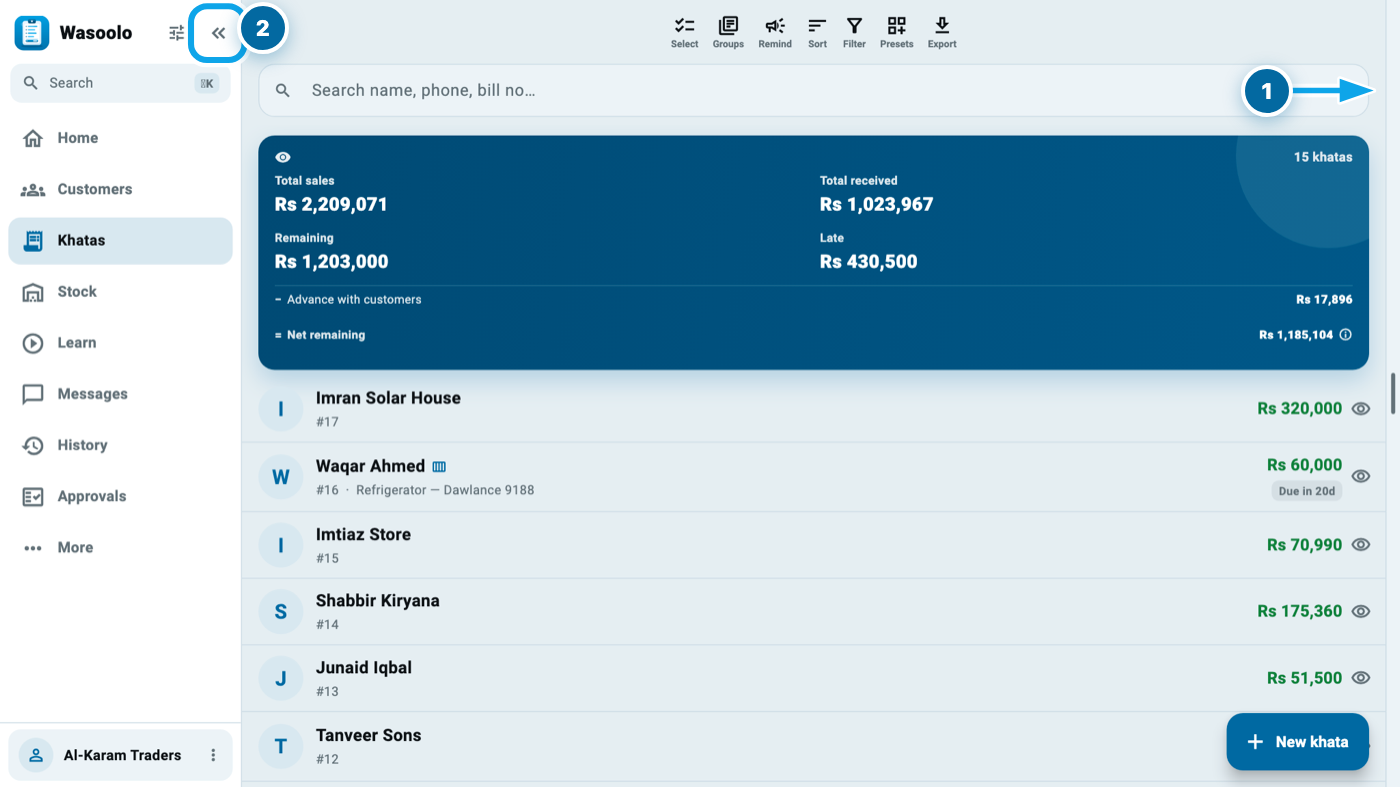
Wasoolo remembers your width and your sidebar on that computer. Two fixes ride along: on a laptop-size window, sending a khata as a PDF or an image from its ⋮ menu now always reaches the Download and Print choice, and clicking a product inside an open khata opens that product's own page.
Common questions
Does a dated statement change the customer's balance?
No. It only chooses which entries the paper lists. Everything before your first date is added into the Previous balance row, so the total is the same as in the khata.
Can I make a statement for dates that are not a whole month?
Yes. Tap First date and Last date and pick any two days. The ready choices are only shortcuts.
Why don't I see One name on papers on my sale?
Turn it on first in Customize this page, then add at least two products. A sale of one product never shows it.
Does one name on papers change my stock or my profit?
No. Every item, quantity and buy rate stays in your khata exactly as you entered it. Only the customer's papers print the one name.
Will the customer still see the installment plan he is on?
Yes. His statement shows the sale and the schedule he is paying. Only the change entries between plans are left off his papers.
Do I need to set anything up after updating?
Only One name on papers, which you switch on when you want it. Everything else works as soon as the app is updated.