
updateWhat's new
What's new in Wasoolo 2.3.1: my reminders, and a phone that finally rings
Wasoolo 2.3.1 brings My reminders: write yourself a note, pick a day and a time, and your phone rings. Plus a one-screen time picker and a filter.
Everything 2.3.1 brings, in one list
- 1My remindersWrite yourself a note, pick a day and a time, and your phone rings.
- 2Reminders that actually ringEvery reminder the app sends now reaches your phone, old ones too.
- 3Zakat2.5% of what the business is worth, with a history and Ramadan reminders.
- 4Total business worthWhat the shop is worth on any day you ask, broken into its parts.
- 5Stock asks before it leavesTake out, damage and transfer can each need your approval first.
- 6Each account its own switchDecide per account whose balance your team may see.
Wasoolo 2.3.1 is a big one. My reminders arrives, so you can write yourself anything you must not forget and have your phone ring on time. Zakat and Total business worth each get a screen of their own. Stock can ask before it leaves. And every reminder the app sends finally reaches your phone.
Everything 2.3.1 brings, in one list
- 1My remindersWrite yourself a note, pick a day and a time, and your phone rings.
- 2Reminders that actually ringEvery reminder the app sends now reaches your phone, old ones too.
- 3Zakat2.5% of what the business is worth, with a history and Ramadan reminders.
- 4Total business worthWhat the shop is worth on any day you ask, broken into its parts.
- 5Stock asks before it leavesTake out, damage and transfer can each need your approval first.
- 6Each account its own switchDecide per account whose balance your team may see.
My reminders: write it once, and forget it safely
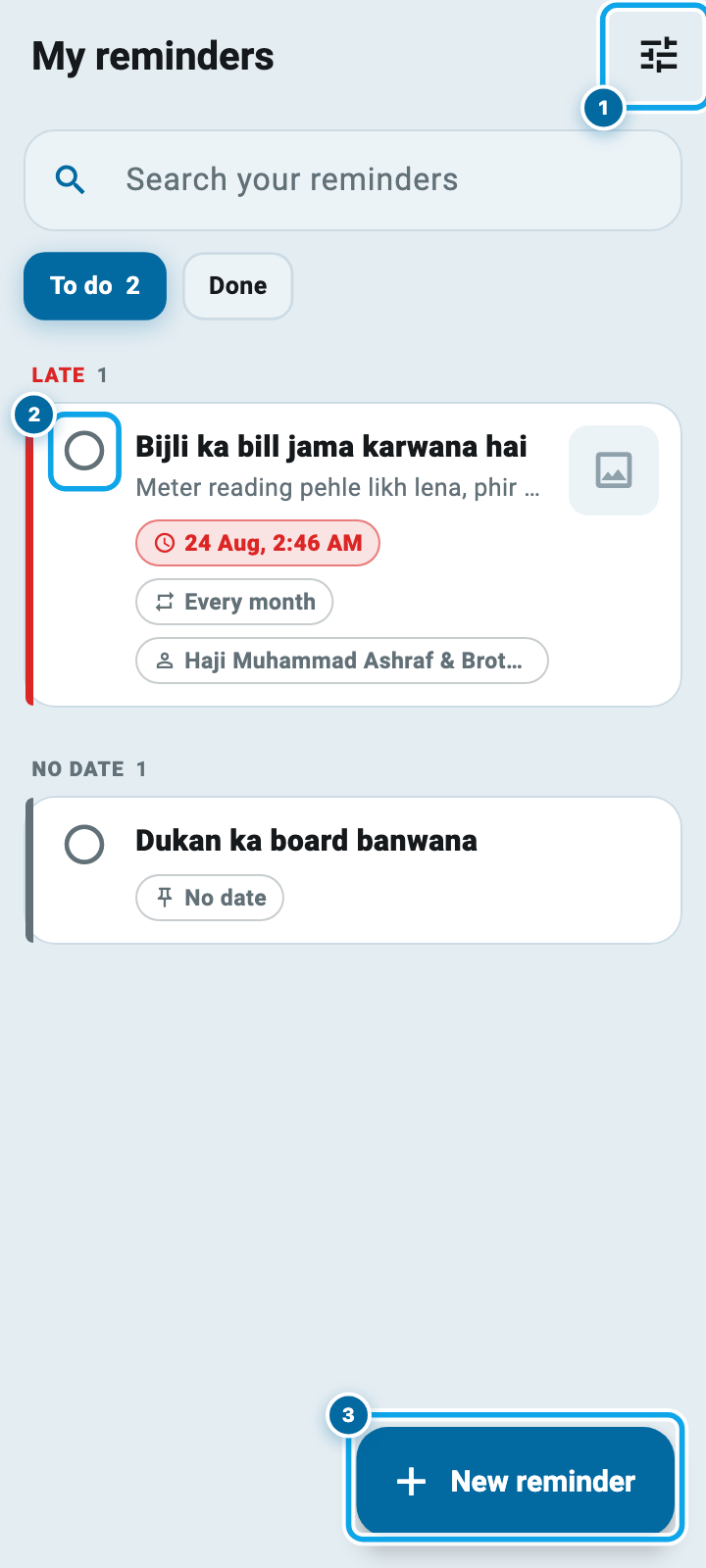
Open More and tap My reminders. Its icon also sits on your Home screen from this version.
The screen is two lists. To do holds everything still waiting, with the ones whose time has gone at the top, then today, tomorrow, this week, later, and last the ones you gave no date at all. Done is what you have ticked off. The search box matches the topic, the details, and the name of the person a reminder is about.
Writing one takes a topic and, if you want, details, up to six photos, and a customer or supplier the note is about. Only you see this list. A helper on your shop never does.
Pick a day and a time on one screen
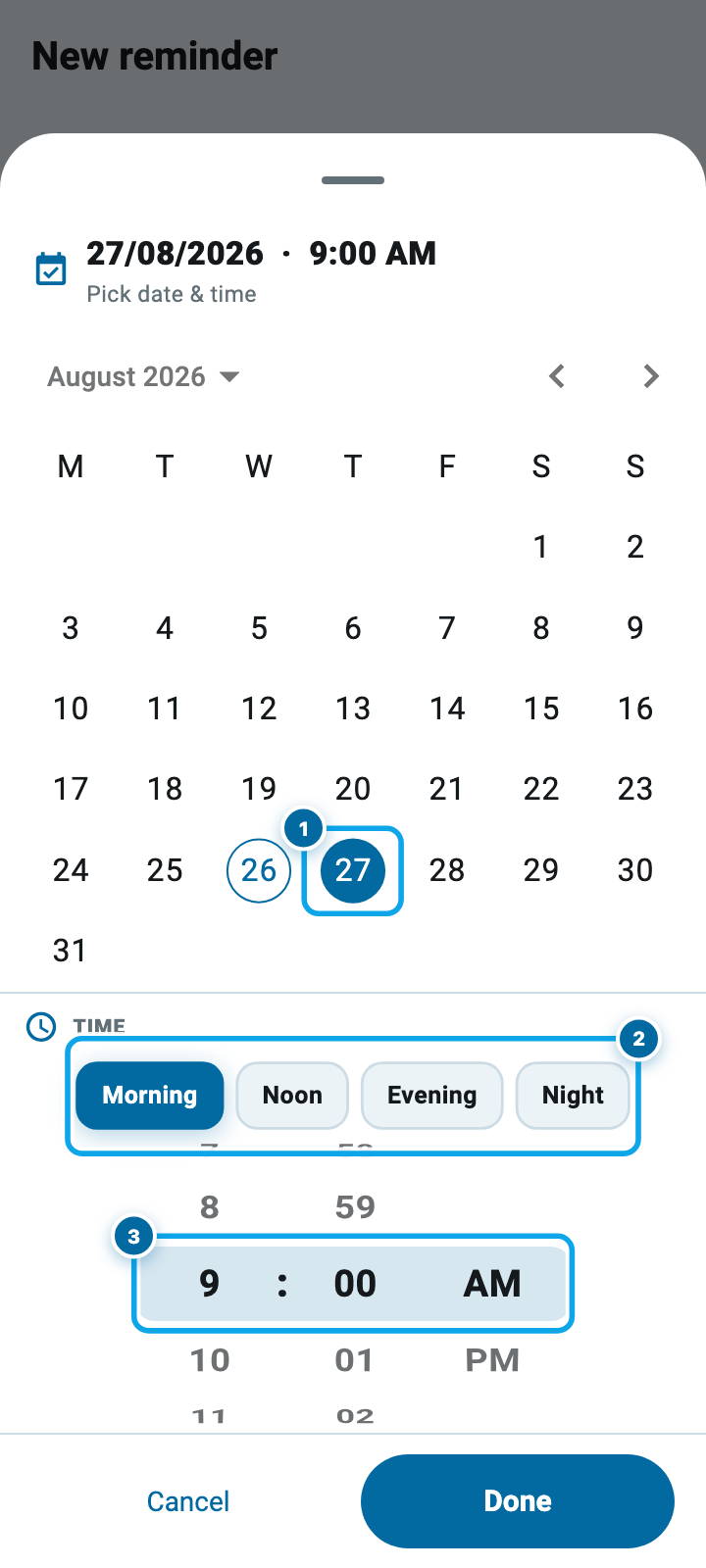
This is the part that changed most. Before, the app asked twice: a calendar popup, then a round dial you dragged once for the hour and again for the minute.
Now Change opens a single screen. The calendar sits on top. Under it a rolling wheel for the hour, the minutes and AM or PM, and above that four buttons for the times things actually happen: Morning, Noon, Evening, Night. The line at the top always shows the full answer, and Done is the only thing that writes it. Back out and nothing moves.
The clock follows your own phone. Set your phone to 24-hour time and the wheel, and every time in the app, show 24-hour.
Choosing a time: before 2.3.1, and now
No date, repeats, and a filter that answers questions
Four quick buttons sit above the calendar: This evening, Tomorrow, Next week, and No date. A reminder with no date never rings and never goes late; it waits on your list until you tick it.
Repeat brings one back every day, week, month or year. Tick a repeating reminder and it moves itself to the next date instead of disappearing. One set on the 31st keeps landing on the 31st.
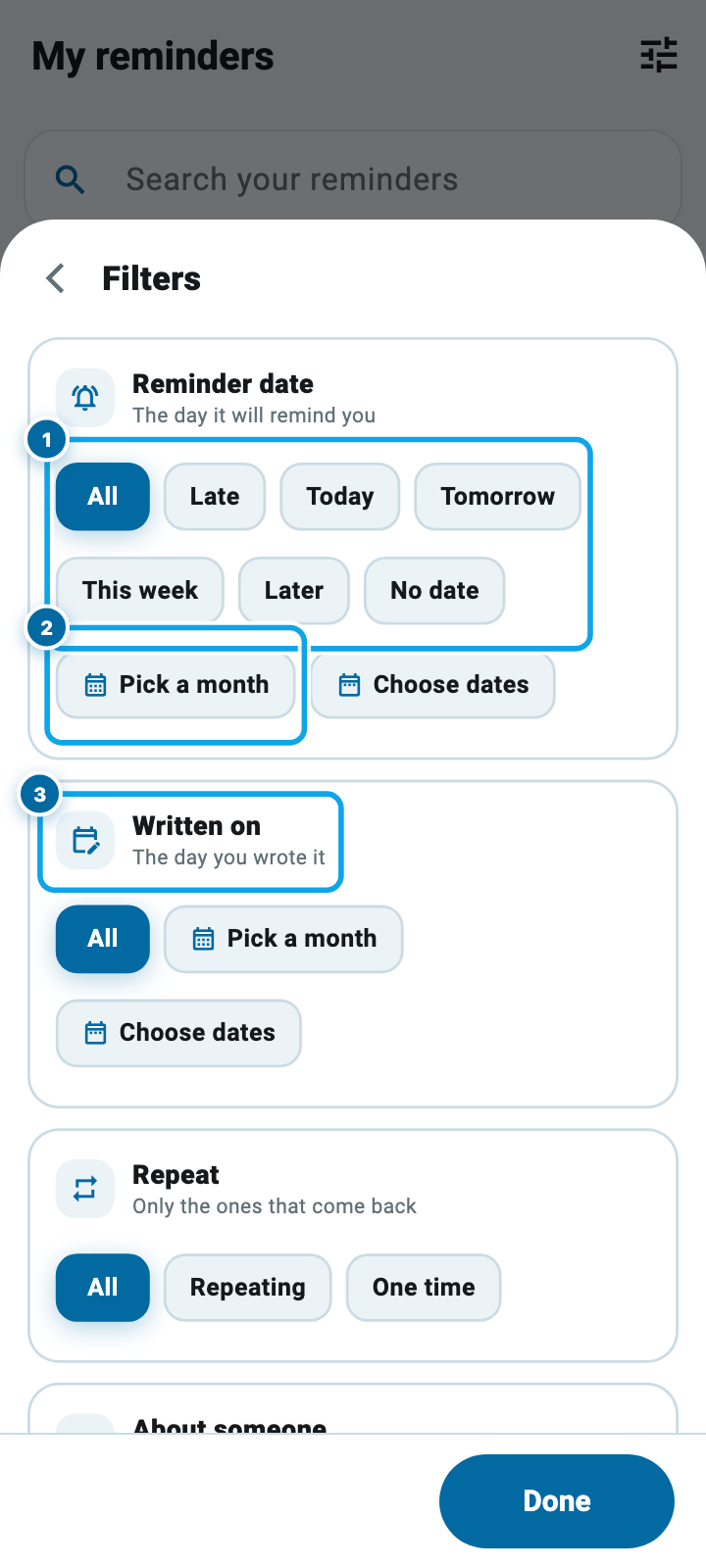
The button at the top right of the list filters by the day it will ring, the day you wrote it, whether it repeats, the person it is about, and whether it carries a photo. Choose a whole month, say May 2027, and a line tells you how many are waiting and how many of that month you have already finished.
Your reminders finally ring
This one matters even if you never write a reminder yourself.
Wasoolo has sent reminders for a long time: the promise a customer made to pay, the monthly note about a bill. They arrived in your alerts list inside the app and never reached your phone. Now they come through as a real notification, with a bell and the reminder's own words on it, and tapping it opens that exact reminder. The switch is in Settings, then Notifications, then Reminders & promises.
Start your digital khata today
Free to start. Works offline. English, Roman Urdu & Hinglish. Your customers get their app free, forever.
Zakat, worked out for you
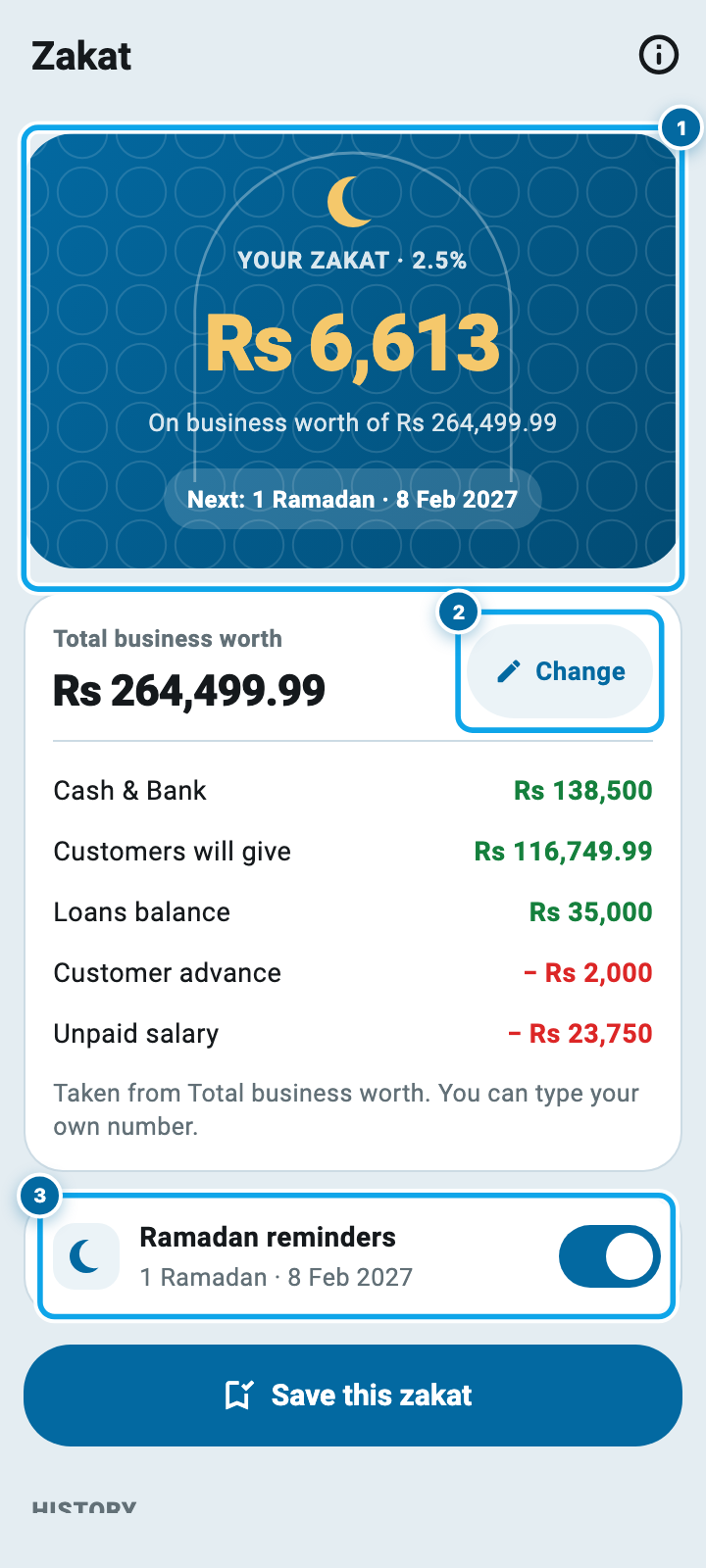
Business Tools now carries Zakat, and its icon is on your Home screen. It takes what your business is worth today and shows you 2.5% of it.
The worth is yours to change: tap Change and type your own number if you do not agree with the app's. Every zakat you save is kept in a history, with the worth it came from, and you can tick the ones you have already given. Three reminders arrive each Ramadan, on the 1st, the 11th and the 21st, and you can turn them off from the same page.
What your business is worth, on any day
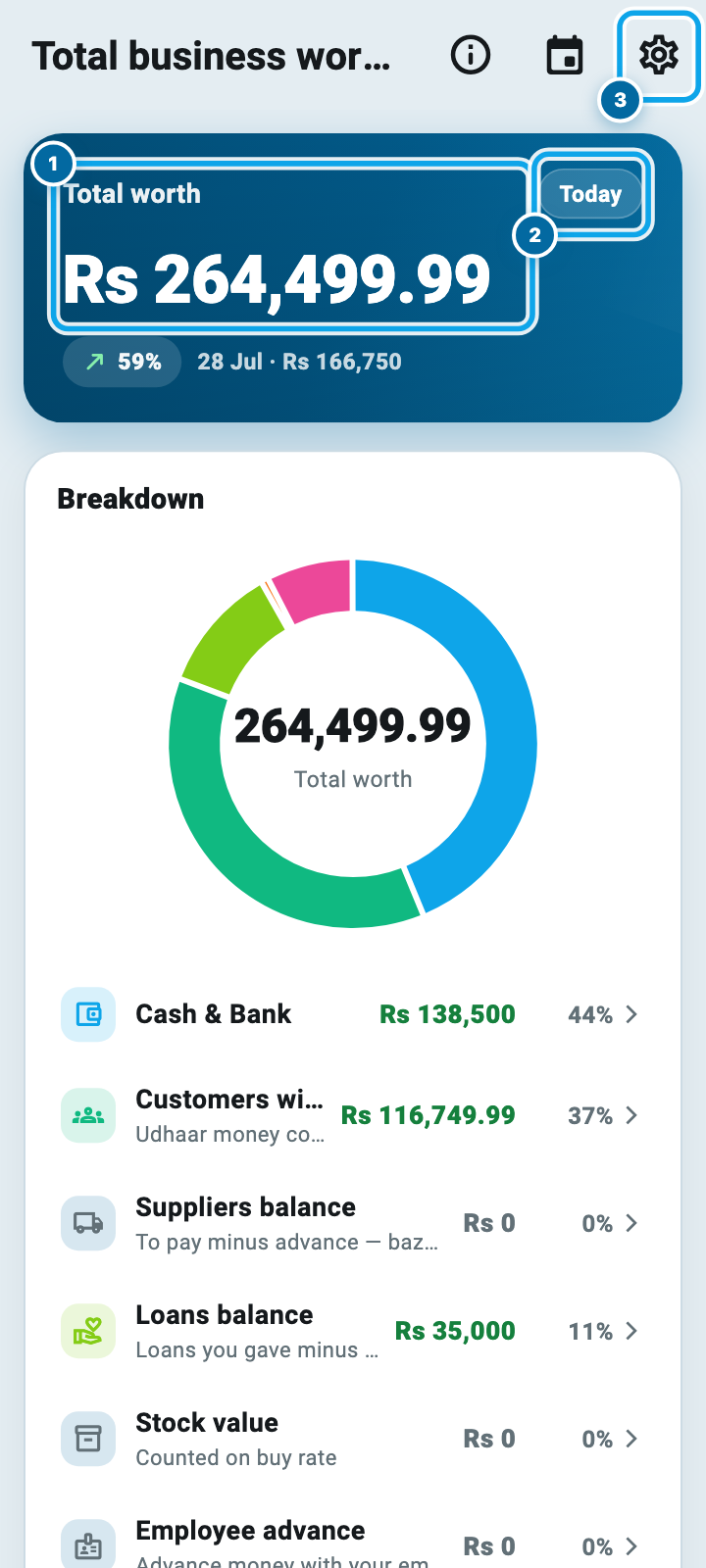
Insights opens with Total business worth. It adds your cash and bank, what customers owe you, and your stock, then takes off what you owe suppliers and your team, and shows the answer as one number with a breakdown underneath.
Every line has its own switch, so you decide what counts. A growth chart covers seven days, a month, six months or a year, and you can tap any point on it. Pick a single date and the whole page answers for that day instead of today.
Stock, permissions, and the smaller things
Stock asks before it leaves. Taking stock out, marking damage and transferring between shops can each need your approval first, with their own switches on the Stock card and a Stock chip on your approvals inbox.
Each account gets its own switch, so you decide per account whose balance your team can see, instead of one setting for all of them.
An alert now knows where it leads. Tapping one in your alerts list opens the screen it is about, not a message box.
What's New moved into More, above Settings, and every version's notes now carry a button to the full article, like the one you are reading. On Android the app asks Google Play itself whether an update is waiting, and an older build gets a polite nudge instead of a wall.
Common questions
Can my helper see my reminders?
No. My reminders is for the shop owner only. A helper never sees the door and cannot open the screen even from an old link. What you write there is yours.
Does a reminder work when the app is closed?
Yes. The reminder is held on our side, not on your phone, so it rings whether the app is open, closed, or the phone was switched off for an hour. It also survives a new phone.
I set a time and nothing came. What should I check first?
Open Settings, then Notifications, and check that "Reminders & promises" is on. If it is off, nothing is sent at all. After that, check your phone's own silent switch and its Focus setting.
Where does the Zakat number come from?
From Total business worth on the day you open it: cash and bank, what customers owe, and stock, less what you owe suppliers and your team. If you disagree, tap Change and type your own figure.
Do I have to turn stock approvals on?
No. Every one of them is off until you switch it on. Turn one on only where you want a second pair of eyes before stock moves.
Will any of this change my old records?
No. Nothing in this update rewrites a khata, a payment or a balance. The new screens read what is already there, and old reminders keep the day and time you gave them.
Wasoolo is 100% FREE to download on Android and iPhone. If you are new here, Class 3 opens your first khata, and Class 2 gives the money somewhere to land. Keeping the record itself safe is a separate job.